


AIMP is a lightweight and feature-rich music player for Windows designed for users who want high-quality audio playback, extensive format support, and detailed control over their music library.
The player supports a wide range of audio formats and includes an 18-band equalizer, built-in sound effects, playlist management, tag editing, audio conversion, internet radio, and plugin support. Its customizable interface also allows users to adjust skins, layouts, shortcuts, and playback settings.
What's New
Recent AIMP updates focus on compatibility, playback stability, interface improvements, and refinements to its built-in tools.
-
Improved compatibility with modern Windows versions.
-
Updates to supported audio formats and playback components.
-
Improvements to the audio engine and playback stability.
-
Refinements to the playlist and music library features.
-
Improvements to the tag editor and audio converter.
-
Updated plugin support and internal components.
-
General performance and usability improvements.
Key Features
Wide Format Support – Plays numerous audio formats, including MP3, AAC, FLAC, OGG, WAV, WMA, APE, M4A, OPUS, TTA, WV, and others.
High-Quality Audio Processing – Supports 32-bit and 64-bit audio processing with multiple output methods, including DirectSound, ASIO, and WASAPI.
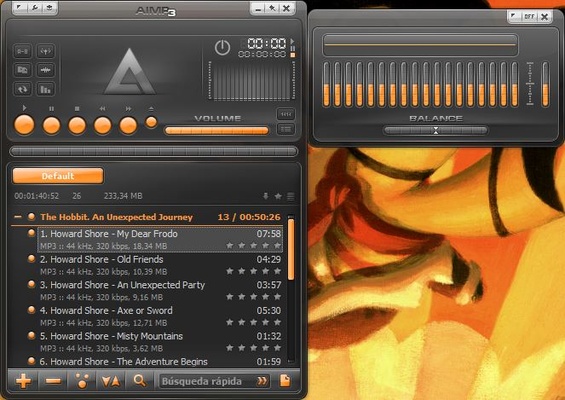
18-Band Equalizer – Provides detailed control over audio frequencies and includes effects such as Reverb, Flanger, Chorus, Echo, Pitch, Tempo, Bass, and Enhancer.
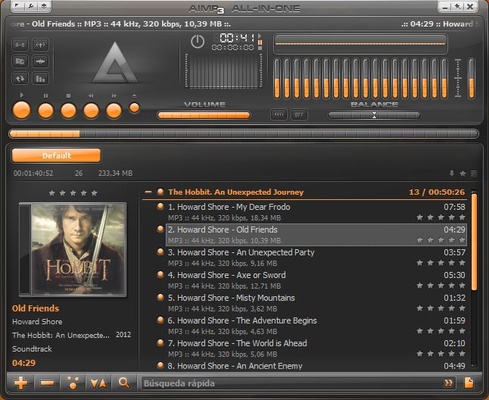
Playlist Management – Create and manage multiple playlists, playback queues, bookmarks, and CUE-based audio collections.
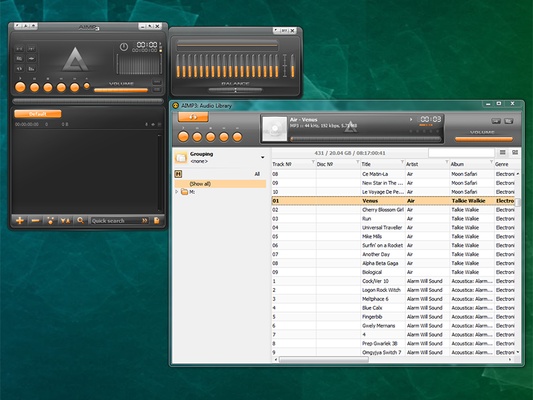
Music Library – Organize local music collections and search for tracks across available playlists and libraries.
Tag Editor – Edit metadata, rename multiple files, and apply tags to groups of audio files.
Audio Converter – Convert supported audio files between different formats using the built-in conversion tools.
Internet Radio – Listen to online radio stations and record supported streams in compatible audio formats.
Plugin Support – Extend the player's functionality through supported plugins and additional components.
Customizable Hotkeys – Configure local and global keyboard shortcuts for frequently used operations.
Skins and Interface Customization – Change the appearance and layout of the player using different skins and interface settings.
Last.fm Scrobbling – Supports sending listening information to Last.fm through the appropriate plugin or integration.
Alarm Clock and Auto Shutdown – Schedule playback and automatically shut down the computer after playback finishes or at a specified time.
User Interface
AIMP uses a compact and customizable interface centered around the playlist and playback controls.
Users can customize the appearance with skins and adjust different interface elements according to their preferences. The player also provides dedicated tools for the equalizer, music library, tag editor, playlists, and other functions.
The interface supports multiple languages and provides keyboard shortcuts for users who prefer controlling playback without using the mouse.
Installation and Setup
-
Download the appropriate AIMP installer for Windows.
-
Run the installer and follow the on-screen instructions.
-
Launch AIMP after installation.
-
Add music folders to the Music Library or open individual audio files.
-
Configure the output device and playback settings if necessary.
-
Customize the interface, equalizer, hotkeys, and other options from the settings menu.
-
Install additional supported plugins if required.
How to Use
Add Music – Open the Music Library and add folders or individual audio files.
Create Playlists – Create new playlists and add tracks from your music collection.
Customize Audio – Open the equalizer and adjust frequency bands or built-in sound effects.
Edit Tags – Use the tag editor to modify metadata and organize groups of audio files.
Convert Audio – Open the audio converter, select the source files, choose an output format, and start the conversion.
Listen to Internet Radio – Browse available stations and stream supported radio content directly through the player.
Customize the Interface – Change skins, layouts, visualization options, and keyboard shortcuts from the settings.
Schedule Playback – Use the alarm clock or auto-shutdown functions when you want playback to start or stop automatically.
FAQ
Is AIMP free?
Yes. AIMP is available as free software for personal and non-commercial use, subject to its current license terms.
What audio formats does AIMP support?
AIMP supports a large selection of audio formats, including MP3, FLAC, AAC, OGG, WAV, WMA, APE, M4A, OPUS, TTA, and many others.
Can AIMP convert audio files?
Yes. AIMP includes a built-in audio converter that can convert supported audio files into different formats.
Does AIMP support gapless playback?
Yes. AIMP supports gapless playback for compatible audio content, allowing consecutive tracks to play without unnecessary pauses.
Can AIMP play internet radio?
Yes. AIMP can play supported internet radio streams and provides tools for working with online radio.
Does AIMP support plugins?
Yes. Plugins can be used to extend the player's functionality and add support for additional features.
Can I use AIMP on macOS or Linux?
AIMP is primarily developed for Windows and does not provide official native desktop versions for macOS or Linux.
Can AIMP be controlled remotely?
Remote-control functionality is available through compatible third-party or companion solutions, depending on the current AIMP ecosystem and platform support.
Alternatives
Winamp – A classic customizable music player with extensive plugin support and library management features.
foobar2000 – A lightweight and highly configurable audio player aimed at users who want detailed control over playback and customization.
MusicBee – A comprehensive music player and library manager with advanced organization, tagging, and playback features.
VLC Media Player – A versatile media player capable of handling a wide range of audio and video formats.
MediaMonkey – Combines music playback with advanced library organization, tagging, and media management tools.
Pricing
AIMP is available free of charge for personal and non-commercial use. There is no standard subscription required for its core music playback features.
System Requirements
-
Operating System: Windows 7 or later
-
Processor: Modern x86 or x64 processor
-
RAM: 256MB minimum
-
Storage: Approximately 20MB for the basic installation
-
Sound Card: A compatible Windows audio device
Additional storage and memory may be required for large music libraries, plugins, and other optional components.
Pros
-
Lightweight and resource-efficient
-
Supports a wide range of audio formats
-
18-band equalizer and multiple audio effects
-
Extensive playlist and music library tools
-
Built-in audio converter
-
Internet radio support
-
Highly customizable interface
-
Plugin support
-
Tag editing and batch file management
Cons
-
Primarily focused on Windows
-
Large feature set can take time to learn
-
Some advanced functionality requires additional configuration
-
Not designed as a full cross-device music synchronization platform
Conclusion
AIMP is a versatile Windows music player that combines low resource usage with a broad range of audio and library management features. Its format compatibility, 18-band equalizer, audio effects, playlist tools, tag editor, converter, and customization options make it suitable for both everyday listening and more advanced music management.
Users looking for a simple player may find its large feature set unnecessary, but those who want detailed control over playback and their local music collection will find AIMP to be a strong and flexible choice.