

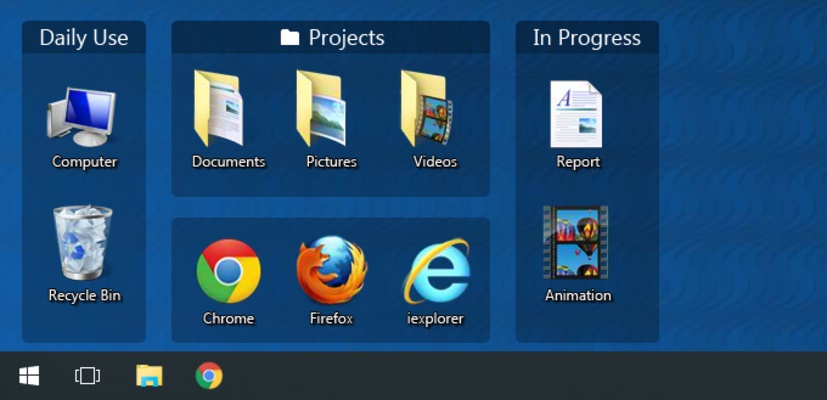
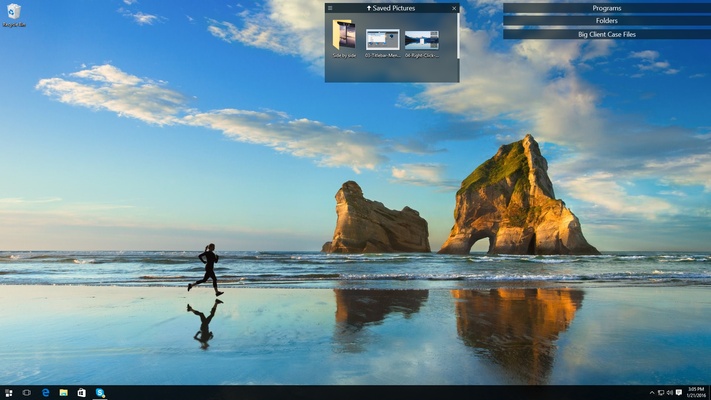
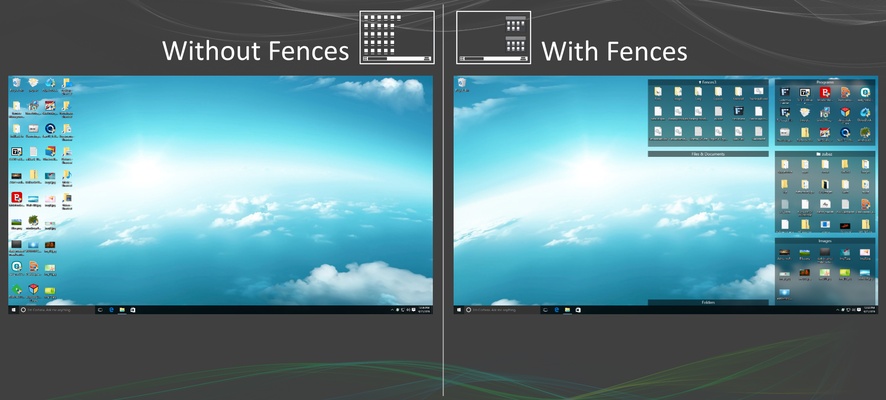
Fences is a Windows desktop organization tool that helps users keep their desktop clean by grouping shortcuts, files, and folders into customizable areas called Fences.
Each Fence can be resized, moved, renamed, and customized with different colors and transparency settings. The software also supports automatic icon organization, Folder Portals, multiple desktop pages, and quick desktop cleanup.
Fences is a useful choice for users who frequently have a large number of icons and files on their Windows desktop.
Key Features
- Desktop Organization – Group shortcuts, files, and folders into customizable Fences.
- Automatic Organization – Automatically sort new desktop icons according to user-defined rules.
- Quick-Hide – Double-click the desktop to hide or show desktop icons and Fences.
- Folder Portals – Display the contents of selected folders directly inside a Fence.
- Multiple Desktop Pages – Create separate pages for different groups of applications and files.
- Customizable Appearance – Adjust Fence colors, transparency, labels, and backgrounds.
- Resizable Areas – Move and resize Fences to fit different desktop layouts.
- Multiple Monitor Support – Organize desktop items across multiple displays.
User Interface
Fences adds organized areas directly to the Windows desktop without replacing the standard desktop environment.
Users can drag and drop icons into different Fences, resize the areas, and customize their appearance. The interface is straightforward, although users with heavily customized desktops may need some time to configure the available organization options.
How to Use
Create a Fence: Create a new Fence on the desktop and give it a descriptive name.
Organize Icons: Drag applications, files, and shortcuts into the appropriate Fence.
Resize and Move: Adjust the size and position of each Fence to create a layout that fits your desktop.
Hide Desktop Items: Double-click an empty area of the desktop to quickly hide or restore desktop icons.
Create Folder Portals: Add frequently used folders to the desktop for quick access to their contents.
Set Organization Rules: Configure automatic rules to sort newly added desktop items into specific Fences.
FAQ
What is Fences used for?
Fences helps organize Windows desktop icons, shortcuts, files, and folders into customizable groups.
Can Fences automatically organize new icons?
Yes. You can create rules that automatically place new desktop items into selected Fences.
Can I hide all desktop icons quickly?
Yes. The Quick-Hide feature lets you hide or restore desktop items with a double-click.
Does Fences support multiple monitors?
Yes. It can be used with multi-monitor desktop setups.
Can I customize the appearance of Fences?
Yes. You can adjust colors, transparency, labels, sizes, and other visual settings.
Is Fences free?
Fences is commercial software, but a free trial is available.
Pricing
Fences is available as a subscription with plans for individual users and multiple devices. A free trial is also available.
System Requirements
- Operating System: Windows 10 or Windows 11
- Processor: 1 GHz or faster
- Memory: 2 GB RAM or more recommended
- Storage: Sufficient free space for installation
PROS
- Keeps desktop icons organized
- Easy drag-and-drop organization
- Automatic sorting rules
- Quick-hide desktop feature
- Folder Portal support
- Multiple monitor support
- Extensive appearance customization
CONS
- Requires a paid license after the trial period
- May be unnecessary for users with simple desktops
- Large numbers of Fences can make the desktop feel crowded
- Some advanced features require additional configuration
Conclusion
Fences is a practical desktop organization tool for Windows users who want better control over a cluttered desktop. Its customizable Fences, automatic sorting, Folder Portals, and Quick-Hide feature make it easy to organize frequently used applications, files, and folders.
It may offer more functionality than casual users need, but for users who regularly work with a large number of desktop items, Fences provides a convenient and flexible way to keep the Windows desktop organized.