


Password Depot is a comprehensive password manager for Windows that helps you securely store and organize passwords, credit card details, software licenses, identities, and other confidential information in a single encrypted database.
Designed for both home users and businesses, it combines strong AES-256 encryption, extensive security protections, browser integration, cloud synchronization, and advanced management tools while remaining accessible to beginners through its flexible user interface.
Whether you need a simple password vault or a feature-rich credential management solution, Password Depot offers one of the most complete desktop password management platforms available.
Key Features
- Securely store passwords, credit cards, software licenses, identities, and notes
- AES-256 (Rijndael) encryption with double-layer protection
- Optional key file authentication alongside the master password
- Built-in password generator and password strength analyzer
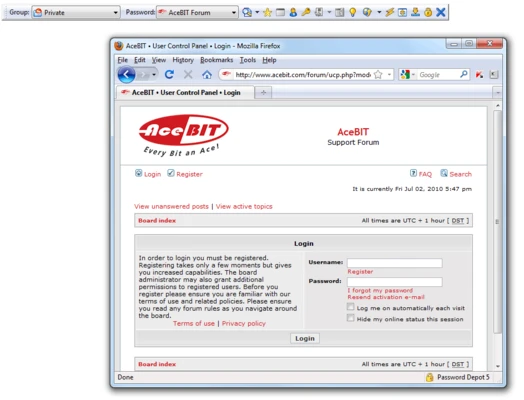
- Browser autofill with automatic website recognition
- Clipboard protection and anti-keylogging technology
- Virtual keyboard for secure password entry
- Automatic encrypted backups with cloud and FTP/SFTP support
- Import and export data from other password managers
- Cloud synchronization via OneDrive, Google Drive, Dropbox, Box, and more
- Portable mode for USB drives
- Enterprise multi-user server support
Security Features
AES-256 Encryption
Password Depot encrypts your entire password database using AES-256, one of the world's most trusted encryption standards used by governments and enterprises.
Dual Authentication
In addition to a master password, users can secure their database with an optional key file, adding another authentication layer.
Brute Force Protection
Repeated incorrect password attempts trigger a temporary lockout, making brute-force attacks significantly more difficult.
Anti-Keylogging Protection
Sensitive password fields are protected against software keyloggers, helping prevent credential theft.
Virtual Keyboard
A built-in virtual keyboard allows secure password entry without relying on physical keystrokes, reducing exposure to keylogging attacks.
Clipboard Protection
Passwords copied to the clipboard are automatically cleared after use, reducing the risk of credential leakage.
Secure Memory Handling
Sensitive information is removed from memory whenever possible to minimize exposure through memory dumps.
Automatic Backup
Encrypted backup copies can be created automatically and stored locally or remotely through FTP, SFTP, or supported cloud services.
Password Management
Password Depot manages much more than passwords, including:
- Website accounts
- Credit cards
- Bank information
- Software licenses
- Personal identities
- Secure notes
- File attachments
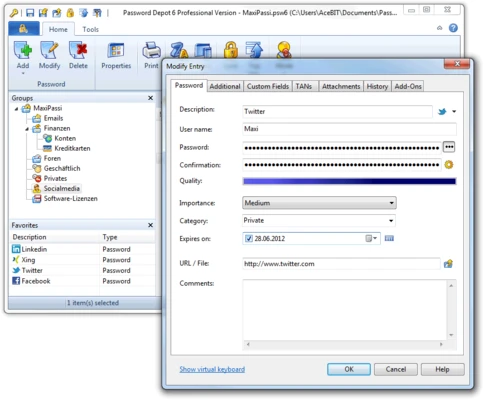
Folders, categories, and search tools make large collections easy to organize.
Browser Integration
The browser extensions provide:
- Automatic login
- Autofill for usernames and passwords
- Website recognition
- One-click credential selection
- Support for multiple browsers
Password Generator
The integrated password generator creates highly secure passwords using customizable rules, including:
- Uppercase and lowercase letters
- Numbers
- Symbols
- Custom length
- Excluded characters
- Pronounceable passwords (optional)
The built-in password quality checker also identifies weak or reused passwords.
Cloud & Synchronization
Password Depot supports synchronization with popular cloud storage providers, including:
- Microsoft OneDrive
- Google Drive
- Dropbox
- Box
- FTP/SFTP servers
- Local network storage
This allows secure access to password databases across multiple Windows devices.
Enterprise Features
For organizations, Password Depot offers:
- Multi-user password databases
- Enterprise server
- Permission management
- Shared password vaults
- Simultaneous access
- Centralized administration
User Interface
The interface resembles Windows Explorer, making navigation familiar and straightforward.
Highlights include:
- Folder-based organization
- Search and filtering
- Multiple viewing modes
- Beginner, Expert, and Custom modes
- Extensive customization options
Although feature-rich, new users can start with the simplified Beginner mode and gradually unlock advanced capabilities.
How to Use
- Install Password Depot.
- Create a new encrypted password database.
- Set a strong master password.
- Optionally enable key-file authentication.
- Add password entries manually or import from another password manager.
- Install the browser extension for autofill.
- Enable cloud synchronization or automatic backups if desired.
- Use the password generator to create strong credentials.
Alternatives
- Bitwarden – Open-source password manager with excellent cross-platform support.
- 1Password – Premium password manager with polished usability and advanced sharing features.
- KeePass – Free, local-first password manager with a large plugin ecosystem.
- NordPass – Modern interface with zero-knowledge architecture.
- Proton Pass – Privacy-focused password manager from Proton.
- Dashlane – Includes dark web monitoring and security dashboard.
- Keeper – Enterprise-focused password management solution.
- LastPass – Cloud-based password manager with browser integration.
- RoboForm – Strong autofill and form-filling capabilities.
System Requirements
- Operating System: Windows 7, 8, 10, or 11 (32-bit & 64-bit)
- Processor: Intel or compatible CPU
- Memory: 1 GB RAM minimum
- Storage: 100 MB available disk space
- Display: 1024×768 resolution or higher
- Internet: Required for cloud synchronization and updates
Pros
- Strong AES-256 encryption
- Optional dual authentication with key files
- Excellent browser autofill support
- Powerful password generator
- Secure clipboard and anti-keylogging protection
- Cloud synchronization support
- Portable USB version available
- Enterprise multi-user capabilities
- Extensive customization options
Cons
- Interface can feel complex for new users
- Some advanced features require the paid edition
- Mobile apps require separate licensing
- Large number of configuration options may overwhelm beginners
Conclusion
Password Depot is one of the most feature-complete password managers available for Windows, offering enterprise-grade encryption alongside a rich set of security and productivity features. Beyond password storage, it securely manages sensitive personal information, provides browser autofill, automatic backups, cloud synchronization, and advanced authentication options.
While the extensive functionality may present a learning curve for first-time users, it rewards those seeking a highly customizable and security-focused password management solution. It is well suited for individuals, professionals, and organizations that prioritize strong local security without sacrificing flexibility.
Note: A fully functional 30-day trial is available. After the trial expires, the software continues to operate in free DEMO mode with feature limitations.