


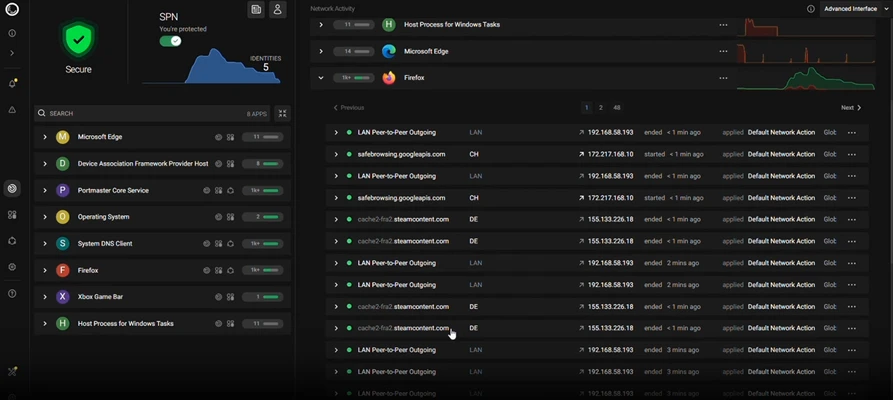
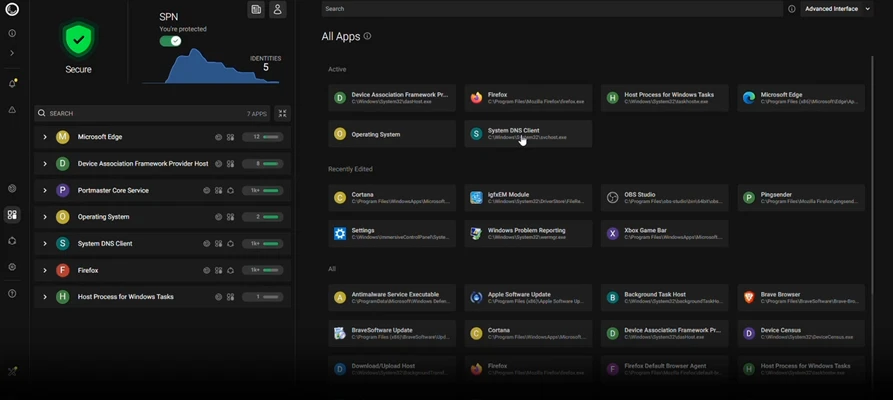
Portmaster is an advanced network monitoring and firewall utility that gives users detailed insight into the network activity of Windows applications and services. It can monitor connections in real time, block trackers, manage DNS services, and control network access on a per-application basis.
Developed by Safing.io as an open-source project, Portmaster is designed for users who want greater visibility and control over the network traffic generated by their computers.
The software provides detailed information about applications communicating with external servers, helping users identify unwanted connections, trackers, and potentially suspicious network activity.
Key Features
Real-Time Network Monitoring – View active network connections and see which applications and services are communicating with external destinations.
System-Wide Tracker Blocking – Automatically block known trackers and unwanted domains across applications and services.
Application-Level Firewall – Create individual network rules for specific applications, including blocking incoming or outgoing connections.
DNS Management – Configure secure DNS services and apply privacy filtering to network requests.
Privacy Filtering – Monitor and block connections to domains associated with tracking, advertising, or other unwanted activity.
Traffic History – Review recent network activity, including accessed domains and connection metadata.
Three Interface Modes – Choose between Simple, Advanced, and Developer modes depending on the level of network information required.
LAN Access Control – Control whether individual applications can communicate with devices on the local network.
Global and Per-App Settings – Apply network policies globally or configure different rules for individual applications.
Open Source – The core application is developed as open-source software, allowing its functionality and code to be examined by the community.
User Interface
Portmaster features a detailed interface designed to make network activity easier to understand.
The main dashboard displays applications and their current network connections, while additional information can show accessed domains, connection details, and related network activity.
Users can switch between Simple, Advanced, and Developer modes. Simple mode provides an easier overview, while the more advanced modes expose additional technical information for experienced users.
Individual applications can also be selected to configure their network permissions, DNS behavior, tracker blocking, and connection rules.
Installation and Setup
Download and install Portmaster for Windows.
Run the installer and follow the on-screen instructions.
Launch Portmaster after installation.
Allow the application to initialize its network filtering components.
Review the detected applications and network connections.
Configure global privacy and network settings according to your requirements.
Create additional rules for individual applications when necessary.
How to Use
Monitor Network Activity: Open Portmaster to view applications and services currently communicating over the network.
Inspect Connections: Select an application to see the domains and network destinations it has contacted.
Block Connections: Create rules to block unwanted incoming or outgoing network communication.
Block Trackers: Enable privacy filtering to automatically block known tracking domains.
Configure DNS: Select and configure an appropriate DNS service from the network settings.
Control LAN Access: Prevent selected applications from communicating with devices on your local network.
Adjust Per-App Rules: Create specific network policies for applications that require different permissions.
Review Traffic History: Use the recent connection history to investigate network activity and identify unexpected connections.
What's New
Recent versions of Portmaster have added configuration import and export capabilities, making it easier to transfer settings when reinstalling Windows or moving a Portmaster configuration to another system.
FAQ
What is Portmaster used for?
Portmaster is used to monitor, filter, and control network traffic generated by applications and services on a computer.
Is Portmaster free?
Yes. Portmaster offers a free version with privacy filtering, secure DNS, and network monitoring features. Additional features are available through paid plans.
Can Portmaster block trackers?
Yes. Its privacy filtering can block known tracking and advertising domains across applications.
Does Portmaster work as a firewall?
Yes. It provides application-level network controls that allow users to control outgoing and incoming network communication.
Can I configure different rules for individual applications?
Yes. Portmaster supports per-application network settings, allowing different programs to have different network permissions.
Does Portmaster replace a VPN?
No. Portmaster primarily provides local network monitoring, filtering, and firewall functionality. Its SPN service provides additional privacy features, but it should not be treated as identical to a traditional VPN in every use case.
Can Portmaster monitor all Windows applications?
It is designed to monitor network activity from applications and background services, although the exact visibility and behavior can depend on the application and Windows networking environment.
Pricing
Free / Forever
- Privacy filtering
- Secure DNS
- Network monitoring
Plus – €4 / Month
- Privacy features
- Investigative features
- Safing support
Pro – €9.90 / Month
- Advanced features
- Privacy features
- Investigative features
- Safing support
- SPN
System Requirements
Operating System: Windows and supported Linux distributions
Processor: Modern x86-compatible processor
Memory: 2 GB RAM or more recommended
Storage: Additional disk space required for application data and traffic history
Internet Connection: Required for network services, DNS features, and online filtering updates
PROS
- Real-time network monitoring
- System-wide tracker blocking
- Application-level firewall controls
- Secure DNS and privacy filtering
- Detailed network activity information
- Global and per-app configuration
- Open-source project
- Free version available
CONS
- Can be complicated for beginners
- Advanced network controls require some technical knowledge
- Detailed monitoring can generate a large amount of information
- Some advanced privacy features require a paid plan
- Incorrect firewall rules can interfere with application connectivity
Conclusion
Portmaster is a powerful network monitoring and firewall solution for users who want greater control over how applications communicate with the Internet. Its combination of network monitoring, tracker blocking, DNS management, and per-application firewall rules makes it considerably more capable than a basic firewall.
The free version provides a useful set of privacy and monitoring features, while paid plans add additional functionality such as SPN and advanced investigative tools. Although its extensive configuration options may be overwhelming for beginners, Portmaster is a strong choice for technically minded Windows users who want detailed visibility and control over their network traffic.