Go to Windows platform Display platforms icon
Go to Windows platform Go to Mac platform Go to Android platform
Ultimate Vocal Remover icon

Ultimate Vocal Remover

5.6.0
Anjok07
0
1.58 GB size

Separate the vocals in any song

Ultimate Vocal Remover is a software that will allow you to remove all vocals from any song. Or, if you prefer, you can also remove all the instrumental music and leave only the vocals. UVR will basically allow you to isolate the vocals or instrumental music in any audio file, thanks to the technology of its MDX-Net model, which uses a hybrid spectrogram network to separate directly at the source.

UVR is easy to install and easy to use

The first plus side to Ultimate Vocal Remover is how easy it is to use. Installation is very simple: you just have to choose the directory where you want to store the program, and that's it. Please note, however, that the software takes up a little more than 5 GB of hard drive space. Once you have installed it, you don't have to do anything else to start working with it. Simply double-click on the executable to start working with your audio files in a matter of seconds.

Separate vocals and music in a few seconds

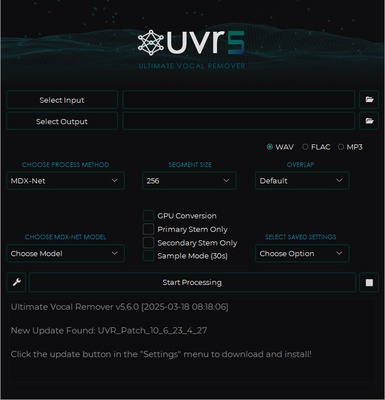
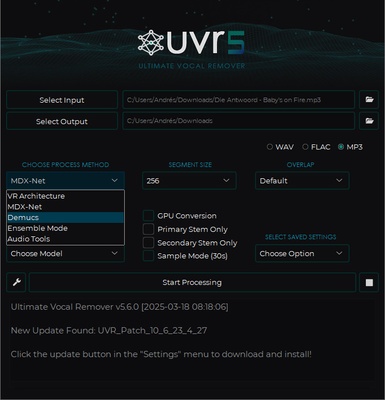
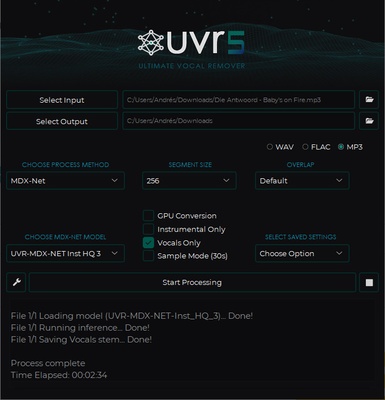
Using UVR is very easy. Just select the audio file you want to work with and choose the folder where you'll save the new audio file you create. After this, you'll need to choose whether you want to save the new audio file as WAV, FLAC or MP3. The next step is to choose the AI model you want to use to carry out the conversion. You can choose from a fair few, but the most recommended is MDX-Net, which offers extraordinary results in just a few seconds. Finally, you only have to indicate what you want to do: isolate only the voices or just the music.

Adjust the audio quality from the Settings

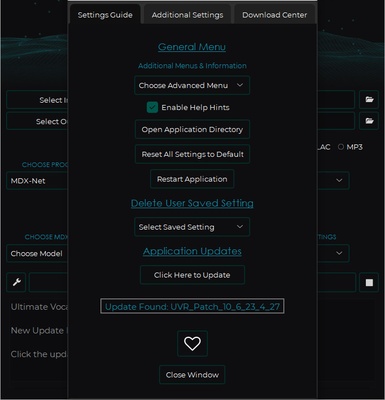
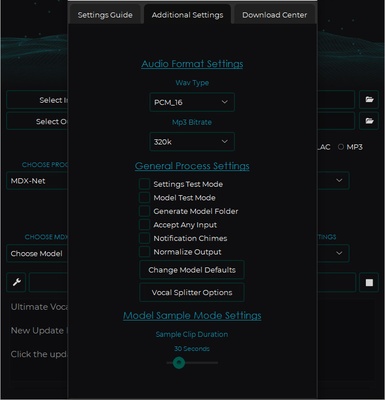
Within the Ultimate Vocal Remover Settings menu, you'll find several settings for customizing your experience using the program. One of the most useful options will allow you to modify the bitrate of outgoing MP3 files. If you're going to save the new audio files in WAV format, you can also choose between different WAV file types.

A great program for karaoke

Although it has many interesting uses, Ultimate Vocal Remover is particularly useful for turning any song you want into a karaoke song. In less than a minute, you can transform an ordinary song into an instrumental version, perfect for you and your friends to sing along to with a mic in hand. Unlike other online tools, here, the result is practically perfect.

The best tool for separating music and vocals in songs

Download Ultimate Vocal Remover if you're looking for a tool to turn your favorite song into an instrumental track. Thanks to this simple program, you can not only do this, but you can also isolate the vocals of any song to see how it sounds without its instrumental music. Best of all, the app is very easy to use and delivers absolutely spectacular results in mere seconds.

Information about Ultimate Vocal Remover

License Free
Op. System Windows
Category Audio
Language English 47 more
Author Anjok07
permission icon Permissions Not applicable
Date 2026-06-02
Size 1.58 GB
File type EXE

Apps recommended for you

UltraStar WorldParty icon
Free karaoke game for up to six players
4K YouTube to MP3 icon
4K YouTube to MP3 for Windows allows users to download and convert YouTube videos into high-quality MP3 audio files.
eSound icon
Listen to your favorite music with this streaming platform
VUPlayer icon
VUPlayer for Windows is a lightweight media player that supports a wide range of audio and video formats for smooth playback.
OfflineDJ icon
OfflineDJ for Windows is a music player and DJ software that allows users to play and mix music tracks offline, creating custom playlists and transitions.
Nuclear Music Player icon
Play music from various online sources
PCDJ DEX icon
Create your own mixes, no matter if you are a novice
Syncplay icon
Watch videos at the same time with your friends
Ocenaudio icon
Ocenaudio is a user-friendly audio editing software that offers powerful features for recording, editing, and analyzing audio files with ease.
TIDAL Desktop icon
Listen to high-fidelity music and manage your playlists with TIDAL Desktop for Windows, the premium streaming service offering lossless audio and exclusive content.
MP4 Player icon
MP4 Player is a simple media player that allows users to play MP4 video files with ease and high-quality playback.
ProgDVB icon
ProgDVB for Windows is a versatile software that allows users to watch and record satellite, cable, and IPTV broadcasts on their PC.
ASIO4ALL icon
ASIO4ALL for Windows is a universal audio driver that improves sound quality and reduces latency for audio applications on systems without native ASIO support.
Pianoteq icon
Create realistic piano sounds and virtual instruments with Pianoteq for Windows, the advanced physically modeled piano software for musicians and producers.
Balabolka Portable icon
Convert text to speech effortlessly with Balabolka Portable for Windows, the lightweight text-to-speech software with support for multiple voice engines and audio formats.
Deezer Desktop icon
Deezer Desktop for Windows is a music streaming app that lets users listen to millions of tracks, create playlists, and enjoy personalized music recommendations.
spotDL icon
spotDL for Windows is a tool that allows users to download music from Spotify as high-quality MP3 files quickly and easily.
Syncplay icon
Watch videos at the same time with your friends
KMPlayer 64X icon
KMPlayer 64X for Windows is a high-performance media player that supports 64-bit architecture for smoother playback of HD and 4K videos.
AIMP Portable icon
The portable version of this powerful audio player
OfflineDJ icon
OfflineDJ for Windows is a music player and DJ software that allows users to play and mix music tracks offline, creating custom playlists and transitions.
Xmedia Recode icon
Convert your video files to different formats
Turbo Play icon
All in one Image/Audio/Video editor and Sequence with AI features
AnyMusic – Download Any Music icon
Download any song or music video online