


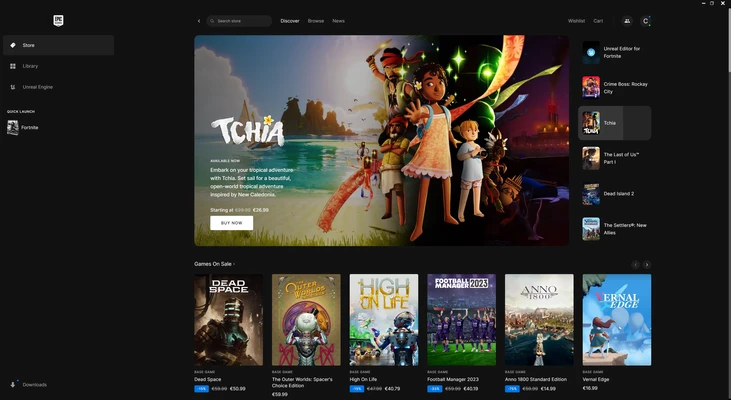
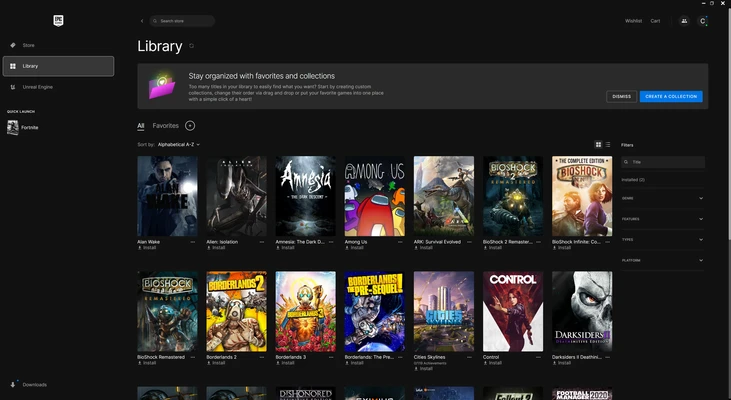

Epic Games Launcher for Mac is a free digital game distribution platform and game library manager developed by Epic Games. It serves as the official gateway to the Epic Games Store, allowing users to discover, purchase, download, update, and manage games from both Epic Games and third-party developers.
Beyond game distribution, the launcher also provides access to the Unreal Engine ecosystem, making it a valuable tool for both gamers and game developers. With regular free game giveaways, cloud saves, social features, and automatic updates, Epic Games Launcher has become one of the leading alternatives to Steam on macOS.
Key Features
- Access to the Epic Games Store marketplace
- Weekly free game giveaways
- Centralized game library management
- Automatic game downloads and updates
- Cloud save synchronization across devices
- Friends list, party system, and chat features
- Support for selected game mods and add-ons
- Integrated Unreal Engine downloads and project management
- Fast game installation and patching system
- Search, filter, and organize owned games
- Secure account management and authentication
Why Choose Epic Games Launcher?
Epic Games Launcher offers a streamlined experience for managing and playing games while providing exclusive titles and frequent free game promotions. The platform is particularly attractive for users looking to expand their game libraries without additional cost.
Its integration with Unreal Engine also makes it a practical choice for developers who need quick access to development tools, assets, and project management features from a single application.
Best For
- PC and Mac gamers
- Fortnite players
- Unreal Engine developers
- Users looking for free game promotions
- Players managing large digital game libraries
- Gamers seeking an alternative to Steam
Pros
- Completely free to download and use
- Weekly free game giveaways
- Clean and easy-to-use interface
- Automatic game updates
- Cloud save support
- Strong Unreal Engine integration
- Supports social and multiplayer features
- Exclusive game releases available
Cons
- Smaller game catalog than Steam
- Fewer community features
- Limited mod support compared to competitors
- Some advanced library management features are missing
- Can occasionally consume significant bandwidth during updates
System Requirements
- macOS 11 Big Sur or later
- Intel or Apple Silicon processor
- Minimum 4 GB RAM
- Broadband internet connection
- Sufficient storage space for game installations
Conclusion
Epic Games Launcher for Mac is a powerful game distribution and library management platform that combines a growing game marketplace, regular free game promotions, cloud synchronization, and Unreal Engine integration into a single application. While its ecosystem is still smaller than some competitors, its exclusive content, free games, and developer-focused tools make it an excellent choice for both gamers and creators on macOS.