


Adlice Diag is a Windows diagnostic and malware analysis tool designed to help users identify suspicious files, processes, startup entries, browser extensions, services, and other potentially unwanted or malicious components.
The software combines system diagnostics with malware scanning technology from Adlice's security tools, including heuristic and signature-based detection. It can perform targeted scans of specific system areas as well as broader scans for malware, rootkits, and potentially unwanted programs.
Adlice Diag is available as both an installable application and a portable version. The portable edition can be run without a traditional installation, making it useful for troubleshooting or analyzing systems when a lightweight diagnostic tool is preferred.
What's New
Adlice Diag is updated alongside Adlice's security technology and may receive improvements to its detection engine, scanning capabilities, system analysis, and compatibility.
Because features and detection databases can change between releases, users should refer to the current version information when installing or updating the software.
Key Features
Malware Detection
Scans Windows systems for various types of malicious or potentially unwanted software, including trojans, worms, adware, spyware, and other suspicious components.
Rootkit Detection
Includes specialized detection capabilities for rootkits and other threats that can hide within deeper areas of the operating system.
System Analysis
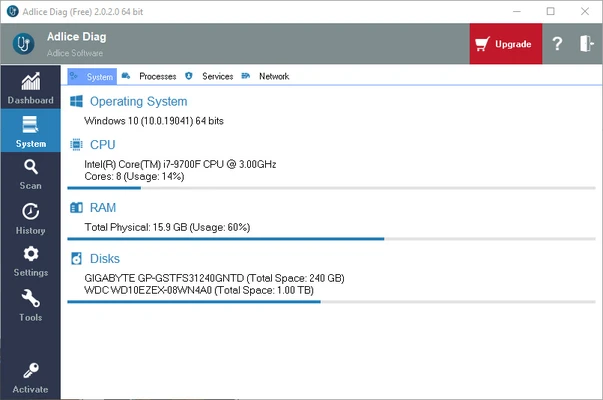
Examines running processes, startup entries, services, scheduled tasks, and other system components to help identify suspicious activity.
Browser Extension Analysis
Checks installed browser extensions for potentially unwanted or suspicious components that may affect browser behavior or privacy.
File and Registry Analysis
Analyzes selected files and Windows Registry locations for suspicious entries and provides options for handling detected items.
Custom Scanning
Allows users to select specific areas or components to analyze instead of always performing a complete system scan.
Detailed Scan Results
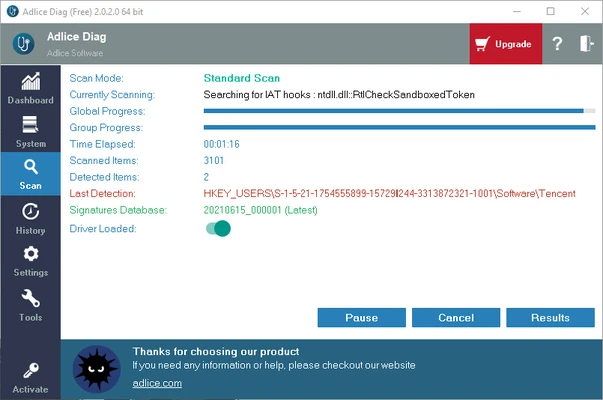
Scan results provide information about detected and suspicious items, helping users review findings before taking corrective action.
Portable Version
The portable edition can be launched without a conventional installation, which is useful for system troubleshooting and on-demand diagnostics.
User Interface
Adlice Diag uses a diagnostic-oriented interface that organizes scan options, system information, and detected items in a structured format.
Scan results are presented in a way that helps users distinguish between different types of findings. More advanced users can use the detailed system information and analysis results to investigate suspicious behavior, while less experienced users can focus on the recommended actions.
Installation and Setup
The software can be used in either installable or portable form.
For the installed version:
-
Download the installer.
-
Run the setup file.
-
Follow the installation wizard.
-
Launch Adlice Diag after installation.
-
Start a scan or select specific diagnostic options.
The portable version does not require a traditional installation. Extract or copy the program to a suitable location and launch the executable.
How to Use
Run a Scan
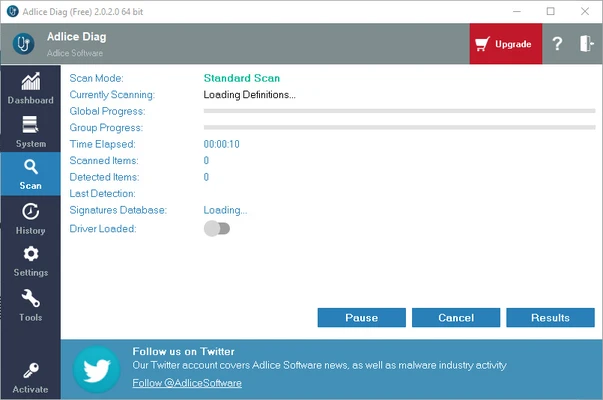
Launch Adlice Diag and select the available scanning option. A broader scan can be used when investigating a potentially infected system, while targeted scans are useful for specific problems.
Review the Results
Examine detected and suspicious items before removing or modifying anything. System diagnostic tools may identify legitimate components that require additional investigation.
Remove or Quarantine Threats
Follow the available remediation options for confirmed malicious or unwanted items. Avoid deleting unfamiliar system components unless you are confident that they are unnecessary or malicious.
Analyze System Components
Use the diagnostic information to examine processes, startup entries, services, scheduled tasks, browser extensions, and other areas that may contribute to suspicious system behavior.
FAQ
What is Adlice Diag?
Adlice Diag is a Windows diagnostic and malware analysis tool that helps users scan for malicious or suspicious components while investigating system problems.
Can Adlice Diag remove malware?
Yes. Depending on the detected item and current version, the software can provide options to remove or otherwise remediate detected malware and unwanted components.
Does Adlice Diag detect rootkits?
Yes. It includes rootkit detection capabilities designed to identify threats that may be difficult to detect with conventional system scans.
Is Adlice Diag an antivirus program?
Adlice Diag is better described as a diagnostic and on-demand malware analysis tool rather than a conventional full-time antivirus replacement. Users who require continuous real-time protection should use a dedicated antivirus solution alongside appropriate security practices.
Does Adlice Diag require installation?
No. Adlice provides both an installable version and a portable version. The portable edition can be run without a traditional installation.
Is Adlice Diag free?
Adlice Diag has been offered in free and Premium editions, with features and licensing depending on the current release. Check the current license information before purchase.
Is Adlice Diag safe to use?
When obtained from a legitimate source, it is a security diagnostic tool intended to analyze Windows systems. Because malware-removal tools can make changes to system files and settings, users should review scan results carefully before removing items.
Alternatives
Malwarebytes is a popular malware detection and removal tool suitable for users who want a more general-purpose security solution.
Spybot Search & Destroy focuses on detecting spyware, adware, and other unwanted software and also provides additional system-management features.
Avast Free Antivirus is a conventional antivirus solution that provides broader protection features, including real-time threat monitoring.
Pricing
Adlice Diag has been offered in free and Premium editions. The available features, licensing terms, and pricing may change between releases, so current pricing should be checked before purchase.
The Premium edition may provide additional capabilities and commercial-use options compared with the free version.
System Requirements
-
Operating System: Windows
-
Processor: Compatible x86 or x64 processor
-
RAM: 1 GB or higher recommended
-
Disk Space: Sufficient free space for the application and scan data
-
Internet Connection: Recommended for updates and online security resources
Exact requirements may vary depending on the current version.
PROS
-
Combines malware scanning with Windows system diagnostics.
-
Includes rootkit detection capabilities.
-
Supports targeted and broader system analysis.
-
Provides detailed information about suspicious system components.
-
Available in a portable version.
-
Useful for troubleshooting potentially infected Windows systems.
CONS
-
Better suited to on-demand diagnosis than continuous antivirus protection.
-
Some features may require a Premium license.
-
Detailed scan results can be difficult for inexperienced users to interpret.
-
Removing system components without proper verification can cause problems.
Conclusion
Adlice Diag is a useful Windows diagnostic and malware analysis tool for users who need more detailed information than a conventional quick malware scan provides. Its combination of malware detection, rootkit analysis, system-component inspection, and portable operation makes it particularly useful for troubleshooting suspicious system behavior.
It should not necessarily be viewed as a replacement for a full antivirus solution with continuous real-time protection. Instead, it works best as an additional diagnostic and malware-removal utility for investigating and cleaning potentially compromised Windows systems.