Go to Windows platform Display platforms icon
Go to Windows platform Go to Mac platform Go to Android platform
Daemon Tools Lite icon

Daemon Tools Lite

12.2.0.2273
DAEMON Tools
4.8
65.98 MB size

The lite version of Daemon Tools

Daemon Tools Lite is a lite version of Daemon Tools that offers all the same features while taking up hardly any space on your computer. This program allows you to create ISO images, mount VHDs, or even edit disk images to make custom disks and drives.

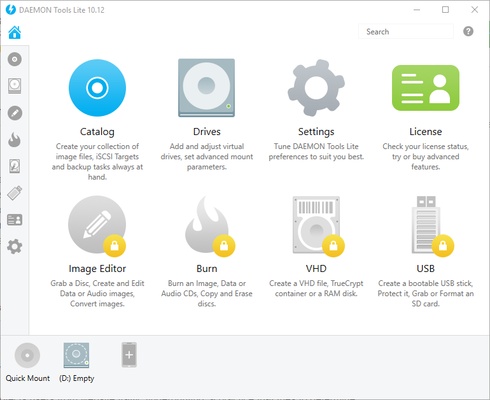
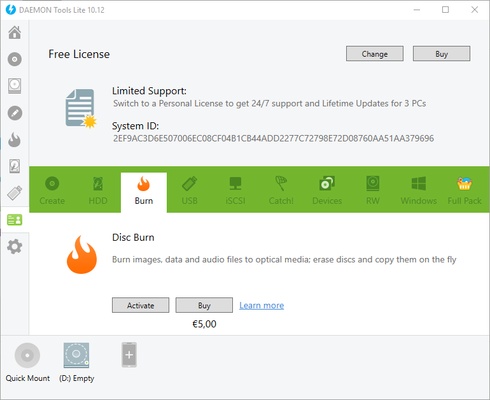
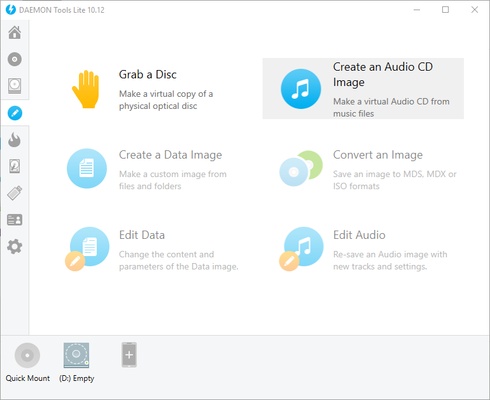
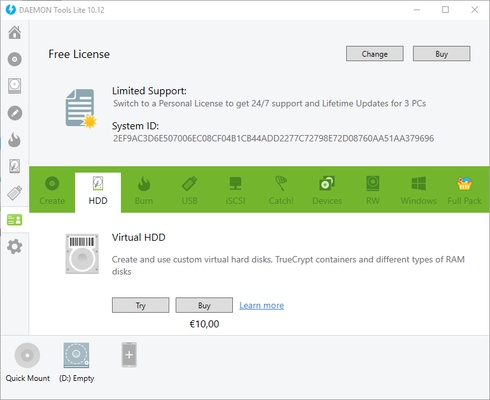
This version has an easy-to-use interface and displays all its features on one panel, so you can easily find whatever task you're looking for in just a few clicks. All of the tools offered by Daemon Tools Lite are organized into sections: catalog, drives, settings, image editor, burn, VHD, and USB.

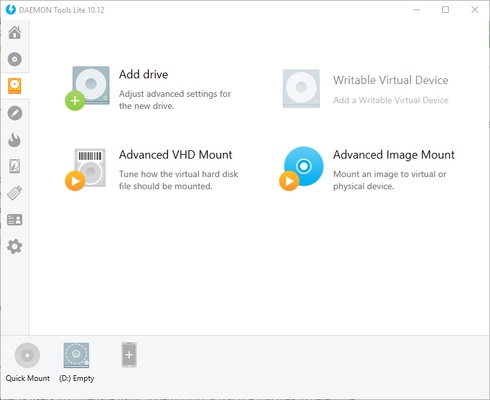
The catalog section contains all the features you'll need to create your own collection of disk images. From this section, you can mount as many ISO images as you want by clicking the button on the right side of the screen. This tool makes managing your catalog and organizing or deleting your disk images easy. For more advanced features, open the drives section, where you can adjust the mount parameters of VHDs and add virtual drives.

Daemon Tools Lite has all the same features as the original version, which means you can adjust mount parameters, update software, manage integration, and modify folders for each type of disk image. On top of all that, you can also change your local network setting and share files with mobile devices.

With this program's image editor, you can copy the audio files of CDs, which you can then convert to other file types, edit, and save as new tracks.

Undoubtedly, Daemon Tools Lite has loads of features that make it much easier to work with ISO images. Check it out and discover all its features while only taking up 1MB of space.

Frequent questions

What is the difference between Daemon Tools Lite and the Pro and Ultra versions?

Daemon Tools Lite is the free version of the popular program for managing ISO images in Windows. The Lite version can be used unlimitedly in exchange for watching ads, but you can pay to remove them. The Pro and Ultra versions add more features and have limited 14-day trial versions.

Is it still necessary to install Daemon Tools Lite?

Daemon Tools Lite is very useful for creating and copying game or operating system images. Since Windows 8, it is possible to create ISO images directly in the operating system, so there is no need to use Daemon Tools Lite for that. However, Daemon Tools Lite still offers a multitude of additional features.

What file formats does Daemon Tools Lite support?

Daemon Tools Lite supports ISO, MDX, MDS, APE, CCD, VDMK, WAV, CUE, ISZ, CDI, B5T, B6T, BWT, NRG, VHD, ISCSI, ZIP, RAR, 7Z, TC, HC, DAA, WIM, BIN, WV, TOAST and UIF formats.

Information about Daemon Tools Lite

License Free
Op. System Windows
Category Utilities
Language English 10 more
Author DAEMON Tools
permission icon Permissions Not applicable
Date 2026-06-02
Size 65.98 MB
File type EXE

Apps recommended for you

Alternate TextBrowser icon
Alternate TextBrowser is a lightweight text-based web browsing tool designed to view and navigate web content in a simplified, distraction-free format.
FreeDOS icon
An operating system that can run retro games and programs
Atlantis Word Processor icon
Atlantis Word Processor is a lightweight and efficient word processing tool designed for writing, editing, and formatting documents with a focus on simplicity and performance.
BreeZip icon
Free alternative to WinRAR
Print.Test.Page.OK icon
Nenad Hrg
Glary Utilities icon
Optimize and maintain your Windows PC with Glary Utilities, the all-in-one system cleaner and performance enhancement software.
Argente StartUp Manager icon
Argente StartUp Manager for Windows is a tool that helps users manage and optimize startup programs to improve system boot time and performance.
FinePrint icon
Save ink and paper when printing
ASUS GPU Tweak III 2.1.3.3 icon
Enjoy maximum performance of your ASUS video card!
MiniTool ShadowMaker 4.8.1 icon
Free Backup Software and Professional Backup Solution!
Autoruns 14.3 icon
Shows you what programs are configured to run during system bootup or login
O&O ShutUp10++ 3.1.1104 icon
Disable telemetry, localization detection, Cortana, app access. Free antispy tool!
SignalRGB 2.5.70 icon
Control and sync your favorite RGB devices from any brand!
Universal USB Installer icon
Create bootable USB drives easily with Universal USB Installer for Windows, the powerful tool for installing Linux distributions, Windows systems, and recovery utilities from USB.
SignalRGB icon
Synchronize and control RGB lighting across all your devices with SignalRGB for Windows, the versatile software for gaming and PC customization.
HWMonitor icon
Monitor your PC’s hardware temperatures, voltages, and fan speeds in real time with HWMonitor for Windows, the reliable system health monitoring tool.
QuickLook icon
Take a look at any file's content instantly
Text Editor Pro icon
Text Editor Pro is a powerful and feature-rich text editing tool that supports syntax highlighting, advanced search, and multiple file formats for efficient editing and coding.
Sandboxie Plus icon
Sandboxie Plus for Windows is a security tool that runs applications in isolated environments to prevent system changes and protect against malware.
GPU-Z icon
Monitors your graphic card's key features
Xperia Companion 26.6.1 icon
A new software for your PC to help manage your Sony Xperia device
EMCO Ping Monitor icon
Monitor network availability and performance with EMCO Ping Monitor for Windows, the professional tool for pinging and tracking multiple devices.
Microsoft 365 (Office) (UWP) icon
Keep all your Office programs from Microsoft 365 in one place
EF Commander icon
Manage all the files on your hard drive