


DBeaver is an open-source database management and development tool for Windows. It is designed for developers, database administrators, data analysts, and other users who need to work with databases through a graphical interface.
DBeaver supports a wide range of database systems, including MySQL, PostgreSQL, SQLite, Oracle, SQL Server, and many other relational and non-relational databases. It provides tools for writing SQL queries, browsing and editing data, managing database objects, importing and exporting data, and analyzing database structures.
DBeaver is available in a free Community Edition and several paid PRO and Enterprise editions. The Community Edition provides the core database management and SQL features, while paid editions add broader database support, cloud integrations, advanced security, and enterprise-oriented features.
What's New
-
Improved database connectivity and driver support
-
Updates to the SQL editor and code completion
-
Improvements to data editing and export/import tools
-
Enhanced database navigation and schema management
-
Performance, stability, and usability improvements
-
Updated support for newer database versions and platforms
Key Features
Multi-Database Support
Connect to a large variety of relational, NoSQL, and cloud database systems depending on the DBeaver edition and installed drivers.
SQL Editor
Write and execute SQL queries with syntax highlighting, code completion, formatting, search, and other editing features.
Data Editor
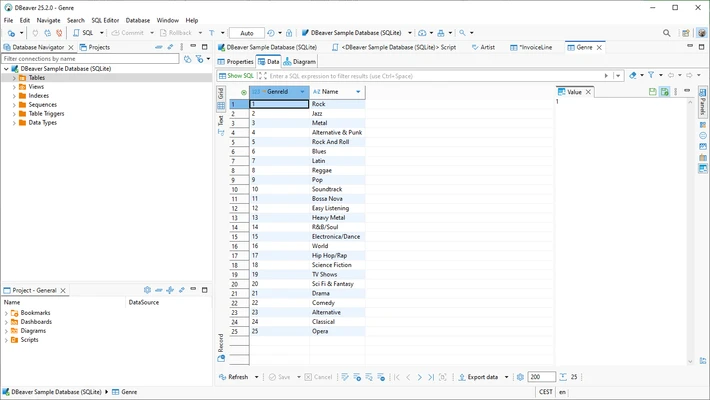
View, edit, sort, filter, and manage records directly through a spreadsheet-style data grid.
Database Navigator
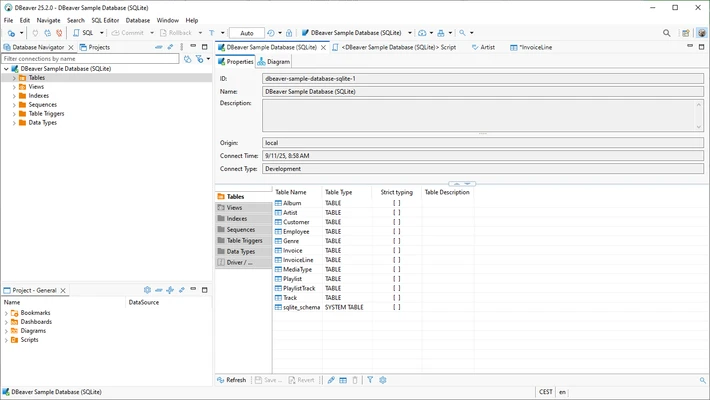
Browse databases and manage tables, views, indexes, procedures, functions, schemas, and other database objects from a centralized interface.
ER Diagrams
Visualize relationships between tables and database objects using entity-relationship diagrams.
Data Import and Export
Transfer database information using formats such as CSV, JSON, XML, SQL, and other supported formats.
Database Comparison
Compare database schemas and, depending on the edition, compare data between different database sources.
Secure Connections
Support for secure database connections using technologies such as SSL/TLS and SSH tunneling where supported by the database and driver.
Cloud Database Support
Paid editions provide additional integrations for cloud database platforms and services.
Extensions and Plugins
DBeaver can be extended with additional drivers and plugins to support different databases and development workflows.
User Interface
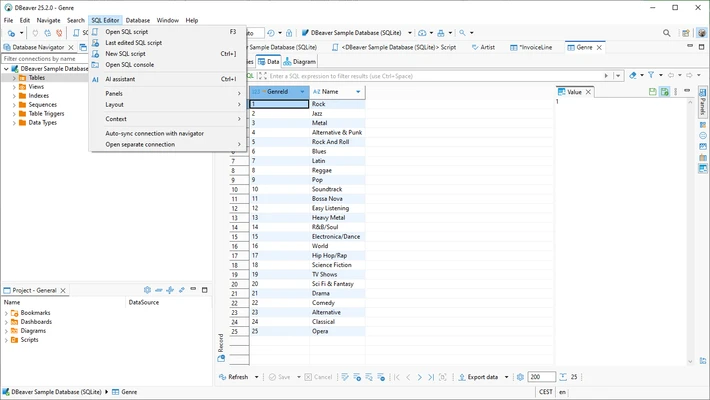
DBeaver uses a multi-panel interface designed around database exploration and SQL development.
-
Database Navigator: Displays connections, databases, schemas, tables, and other objects.
-
SQL Editor: Provides a dedicated environment for writing and executing SQL queries.
-
Results Grid: Displays query results and allows users to sort, filter, and edit data where supported.
-
Properties and Metadata: Shows information about tables, columns, indexes, keys, and relationships.
-
ER Diagram: Provides a visual representation of database structures.
The interface is highly customizable, allowing users to adjust panels, editors, themes, and other workspace elements.
Installation and Setup
Download and install the appropriate DBeaver edition for your Windows system.
During installation, follow the on-screen instructions and select the required components. Modern DBeaver distributions may include the required Java runtime, so a separate Java installation may not always be necessary.
After installation:
-
Launch DBeaver.
-
Select New Database Connection.
-
Choose your database type.
-
Install or configure the required database driver if prompted.
-
Enter the hostname, port, database name, username, and password.
-
Test the connection.
-
Save the connection and begin managing the database.
How to Use
Create a Database Connection
Open DBeaver and select New Database Connection. Choose the database engine and enter the required connection information. Test the connection before saving it.
Run SQL Queries
Open an SQL Editor associated with your database connection, enter the SQL statement, and execute it. Query results are displayed in the results panel.
Manage Database Objects
Use the Database Navigator to browse tables, views, indexes, procedures, functions, and other objects. Depending on the database and user permissions, you can create, modify, or delete database objects.
Edit Data
Open a table and use the data editor to view or modify records. Changes can be reviewed and committed to the database when appropriate.
Import and Export Data
Use DBeaver's data transfer tools to move data between databases or export information to supported file formats such as CSV, JSON, XML, and SQL.
Create ER Diagrams
Select the relevant tables or database objects and open the ER Diagram view to examine relationships and database structure visually.
FAQ
Is DBeaver free?
Yes. DBeaver Community Edition is free and open-source. Paid PRO and Enterprise editions provide additional features and database integrations.
What databases does DBeaver support?
DBeaver supports a large number of database systems, including MySQL, PostgreSQL, SQLite, Oracle, SQL Server, and many others. Available database support varies by edition and driver.
Does DBeaver support NoSQL databases?
Yes. NoSQL support is available for selected database systems in the paid editions.
Does DBeaver require Java?
DBeaver is built on Java technology, but current distributions may bundle the required Java runtime. Therefore, users may not need to install Java separately.
Can DBeaver migrate databases?
Yes. Its data transfer tools can be used to copy or migrate data between compatible database sources, subject to the capabilities of the selected database and drivers.
Can DBeaver connect to remote databases?
Yes. DBeaver can connect to remote database servers using supported network and security configurations, including SSH tunneling for compatible connections.
Alternatives
MySQL Workbench – A database development and administration tool focused primarily on MySQL.
pgAdmin – A graphical administration and development platform designed for PostgreSQL.
HeidiSQL – A lightweight database management application supporting several popular database systems.
Navicat – A commercial database management suite with a polished interface and extensive database administration features.
Pricing
DBeaver Community Edition: Free and open-source.
DBeaver PRO: Paid subscription with additional database, cloud, security, and development features. Pricing depends on the selected plan and billing period.
DBeaver Enterprise: Designed for organizations that require advanced authentication, security, database integrations, automation, and enterprise support.
Pricing and available features may change over time.
Community Edition Features
-
Support for many popular relational databases
-
SQL Editor
-
Data Editor
-
Database Navigator
-
Schema and database object management
-
Basic ER diagrams
-
Data import and export
-
Database maintenance tools
-
Task management
-
Basic data visualization and charts
PRO and Enterprise Features
Depending on the selected paid edition, DBeaver provides additional capabilities such as:
-
Expanded NoSQL database support
-
Additional cloud database integrations
-
Advanced authentication and security
-
SSO, SAML, Kerberos, and other enterprise authentication options
-
Schema and data comparison
-
Advanced ER diagram editing
-
Mock data generation
-
Query execution analysis
-
Task automation and scheduling
-
Cloud storage and S3-related tools
-
AI-assisted SQL development
-
Enterprise deployment and support features
System Requirements
-
Operating System: Windows 10 or later
-
Architecture: 64-bit recommended
-
Processor: Modern Intel or AMD processor
-
RAM: 2 GB minimum; 4 GB or more recommended
-
Storage: At least 200 MB of free disk space, with additional space required for drivers, databases, and workspace data
-
Java: The required Java runtime may be included with the DBeaver distribution
Actual requirements can vary depending on the DBeaver edition, database drivers, and size of the databases being managed.
Pros
-
Supports a wide range of database systems
-
Free and open-source Community Edition
-
Powerful SQL editor
-
Convenient data browsing and editing
-
Database schema and ER diagram tools
-
Extensive import and export capabilities
-
Support for secure remote connections
-
Highly customizable interface
-
Paid editions add cloud, NoSQL, security, and enterprise features
Cons
-
Large feature set can be overwhelming for beginners
-
Some advanced database integrations require a paid edition
-
Can consume significant memory when working with large databases
-
Performance depends partly on the connected database and installed drivers
Conclusion
DBeaver is a versatile database management and SQL development tool for Windows, combining database browsing, SQL editing, data management, schema visualization, and data transfer capabilities in a single application.
The free Community Edition is particularly useful for users who primarily work with popular relational databases and need a capable graphical database client. PRO and Enterprise editions extend the platform with additional NoSQL, cloud, security, automation, and enterprise features.
For developers, database administrators, and analysts who regularly work with multiple database systems, DBeaver is a strong all-purpose database management solution.