

DesktopOK is a lightweight and free desktop utility for Windows that allows users to save and restore the positions of desktop icons.
It is particularly useful for users who frequently change screen resolutions, work with multiple monitors, or find that Windows rearranges desktop icons after restarting or changing display settings.
What's New
Recent versions include improvements to Windows compatibility, icon layout management, multi-monitor support, and overall stability.
Key Features
Save and Restore Icon Layouts: Save your current desktop icon arrangement and restore it whenever needed.
Multiple Layouts: Create and save multiple desktop layouts for different resolutions, monitors, or working environments.
Automatic Saving: Automatically save icon positions at scheduled intervals or during system startup and shutdown.
Multi-Monitor Support: Preserve icon arrangements when working with different monitor configurations and screen resolutions.
Portable Version: The portable edition can run without a traditional installation, making it convenient to use from removable storage.
System Tray Support: Run the program quietly in the background and access its main functions from the Windows system tray.
Hotkeys: Configure shortcuts for quickly saving or restoring desktop icon layouts.
Import and Export: Export saved layouts for backup or transfer them to another computer.
User Interface
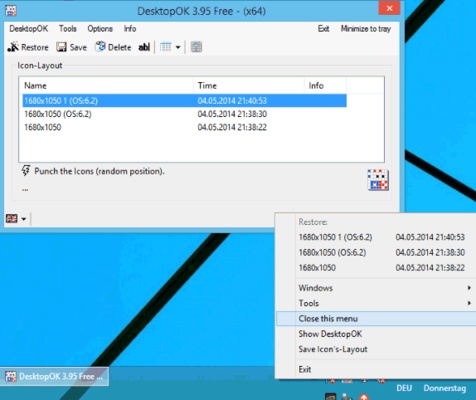
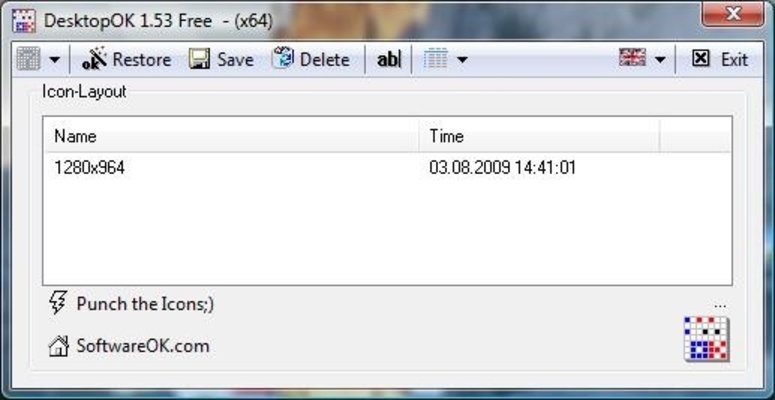
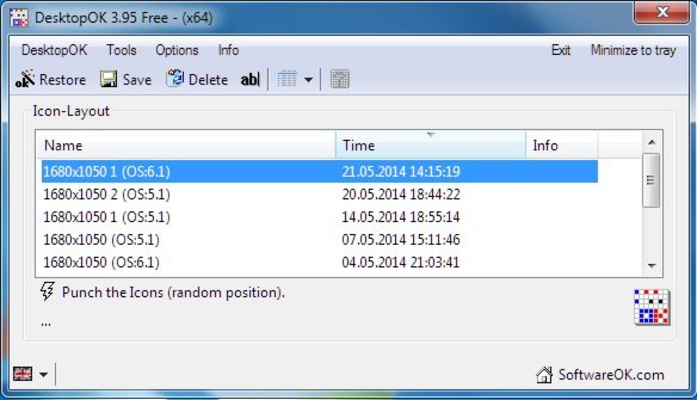
DesktopOK features a simple and compact interface focused on desktop icon management. Saved layouts are displayed in the main window, allowing users to quickly save, restore, rename, or manage different configurations.
The interface is functional rather than modern, but its straightforward design makes the program easy to understand.
Installation and Setup
- Download DesktopOK for Windows.
- Run the installer or launch the portable version.
- Start the application.
- Configure the available options if needed.
- Save your current desktop icon layout.
How to Use
- Launch DesktopOK.
- Arrange your desktop icons as desired.
- Click the option to save the current icon positions.
- Give the layout a recognizable name if needed.
- Create additional layouts for different monitor or resolution configurations.
- Restore a saved layout whenever Windows rearranges your icons.
- Enable automatic saving if you want regular backups of your desktop layout.
FAQ
Is DesktopOK free?
Yes. DesktopOK is available as a free Windows utility.
What does DesktopOK do?
It saves the positions of desktop icons and allows you to restore them later.
Does DesktopOK support multiple monitors?
Yes. It can save and restore icon layouts for different monitor configurations and resolutions.
Is DesktopOK portable?
Yes. A portable version is available and can run without a traditional installation.
Does DesktopOK work with Windows 11?
Yes. DesktopOK supports modern Windows versions, including Windows 11.
Can I save multiple desktop layouts?
Yes. You can create and manage multiple saved icon layouts.
Alternatives
ReIcon: A lightweight utility for saving and restoring Windows desktop icon layouts.
Iconoid: A small Windows utility that provides additional control over desktop icons and their positions.
Fences: A more advanced desktop organization tool that groups icons into customizable areas.
Nimi Places: Organizes desktop files and shortcuts into customizable containers.
Pricing
DesktopOK is available free of charge. No subscription or registration is required for the basic application.
System Requirements
- Operating System: Windows 11, 10, 8, 7
- Architecture: 32-bit and 64-bit
- Processor: 1 GHz or faster
- RAM: 512 MB or more
- Storage: Approximately 10 MB of free space
Pros
- Free to use
- Lightweight and fast
- Saves and restores icon positions
- Supports multiple layouts
- Multi-monitor support
- Portable version available
- Automatic saving options
Cons
- Basic and outdated interface
- Limited desktop customization features
- No built-in cloud synchronization
- Some display configurations may require manual adjustment
Conclusion
DesktopOK is a simple and useful utility for Windows users who want to keep their desktop icons organized. Its ability to save and restore multiple icon layouts makes it particularly useful when changing screen resolutions or using multiple monitors.
With its low resource usage, portable version, and straightforward operation, DesktopOK is a practical choice for anyone who regularly experiences rearranged desktop icons.