

StartAllBack is a Windows 11 customization tool designed to restore the classic appearance and functionality of the Start menu, taskbar, File Explorer, and context menus.
It is aimed at users who prefer the familiar Windows 7 or Windows 10 interface while continuing to use Windows 11. StartAllBack integrates directly with Windows and provides extensive options for customizing the desktop environment without replacing the operating system.
What's New
Recent versions of StartAllBack focus on improved Windows 11 compatibility, better taskbar customization, refined File Explorer integration, updated context menus, and improved stability following Windows updates.
Key Features
-
Classic Start Menu – Restore a Windows 7 or Windows 10-style Start menu with customizable layouts and navigation.
-
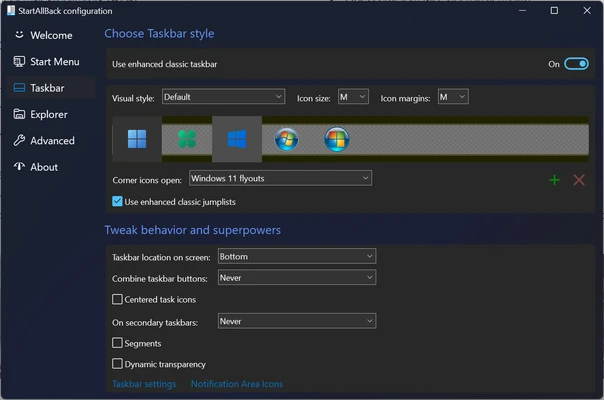
Advanced Taskbar – Move the taskbar to different screen edges, adjust icon sizes and spacing, enable labels, and customize icon grouping.
-
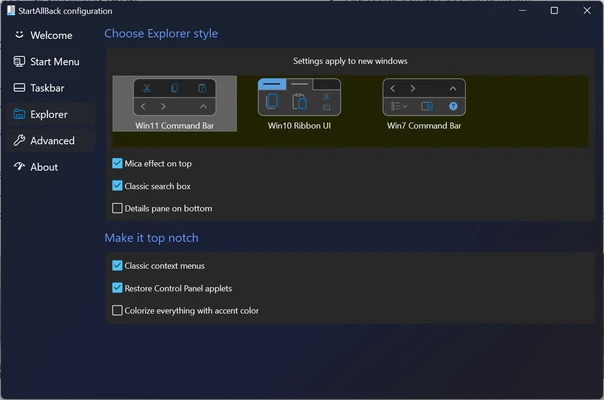
Classic File Explorer – Restore familiar Explorer elements such as the traditional command bar, ribbon interface, and details pane.
-
Classic Context Menus – Bring back traditional context menus while retaining compatibility with Windows 11.
-
Drag and Drop Support – Restore convenient drag-and-drop functionality to the Windows 11 taskbar.
-
UI Customization – Customize the appearance of taskbars, Start menus, Explorer windows, and other Windows interface elements.
-
Multiple Styles – Choose between Windows 7, Windows 10, and customized interface styles.
-
Lightweight Integration – Runs directly within Windows without requiring a separate desktop environment or shell replacement.
User Interface
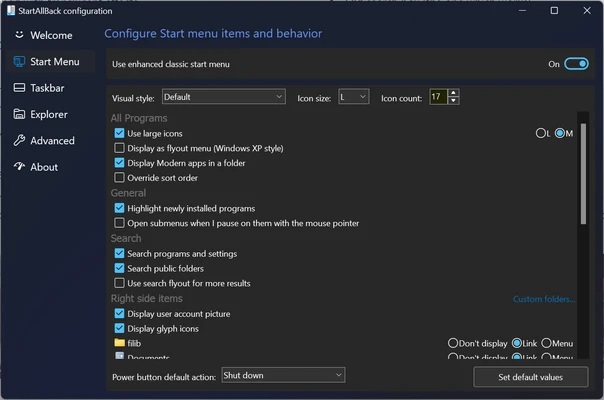
StartAllBack integrates into the Windows 11 interface rather than operating as a standalone application. Its settings panel provides separate options for the Start menu, taskbar, Explorer, and other interface elements.
Users can select a preferred visual style and then fine-tune individual settings such as icon size, taskbar position, menu behavior, transparency, and Explorer layout.
Installation and Setup
-
Download the StartAllBack installer.
-
Run the setup file and follow the installation instructions.
-
Select your preferred Windows interface style.
-
Open the StartAllBack settings panel after installation.
-
Customize the Start menu, taskbar, and File Explorer.
-
Apply the changes and restart Windows Explorer if required.
How to Use
Customize the Start Menu – Open StartAllBack settings and select a Windows 7 or Windows 10-style Start menu. Adjust its layout, appearance, and behavior.
Customize the Taskbar – Change the taskbar position, icon size, grouping, labels, and other appearance settings.
Customize File Explorer – Use the Explorer settings to restore classic interface elements and adjust the overall Explorer appearance.
Customize Context Menus – Enable traditional context menus and adjust related interface options.
Switch Styles – Return to the settings panel whenever you want to change the overall Windows interface style or modify individual options.
FAQ
Is StartAllBack free?
StartAllBack is commercial software with a free trial. A license is required after the trial period.
Does StartAllBack work with Windows 10?
No. StartAllBack is primarily designed for Windows 11. Users looking for similar functionality on older Windows versions should use software designed specifically for those systems.
Can I uninstall StartAllBack?
Yes. It can be uninstalled through Windows Settings or Control Panel. After removal, Windows returns to its standard interface.
Does StartAllBack replace Windows Explorer?
No. It modifies and enhances the Windows interface while continuing to use the built-in Windows components.
Does StartAllBack use many system resources?
StartAllBack is designed to have a relatively low system overhead, although resource usage can vary depending on Windows configuration and enabled features.
Is StartAllBack safe?
When obtained from a legitimate source, StartAllBack is designed to integrate with Windows without replacing the operating system or installing unrelated software.
Alternatives
Start11 – A commercial Windows customization tool offering Start menu and taskbar customization.
Open-Shell – A free and open-source Start menu replacement with extensive customization options.
StartIsBack – A Windows customization utility focused on restoring classic Start menu functionality on supported Windows versions.
Pricing
StartAllBack is commercial software and includes a trial period. A personal license uses a one-time purchase model rather than a recurring subscription.
System Requirements
-
Operating System: Windows 11
-
Processor: Modern x86/x64 processor
-
RAM: 2 GB or more recommended
-
Storage: A small amount of free disk space for installation
-
Additional Requirements: Administrator permissions may be required during installation
PROS
-
Restores classic Windows interface elements
-
Extensive Start menu customization
-
Advanced taskbar options
-
Classic File Explorer and context menus
-
Lightweight and easy to configure
-
Integrates directly with Windows 11
CONS
-
Designed primarily for Windows 11
-
Requires a paid license after the trial
-
Major Windows updates may occasionally affect compatibility
-
Extensive customization can require some configuration
Conclusion
StartAllBack is a useful Windows 11 customization tool for users who prefer the familiar interface of earlier Windows versions. It restores and enhances the Start menu, taskbar, File Explorer, and context menus while allowing users to retain the underlying Windows 11 operating system.
Its extensive customization options and lightweight integration make it a practical choice for users who dislike some of the interface changes introduced with Windows 11. However, it is commercial software and compatibility should be checked after major Windows updates.