

DiskDigger is a lightweight file recovery software for Windows that helps users recover deleted or lost files from hard drives, USB drives, memory cards, and other storage devices.
It can recover a variety of file types, including photos, videos, documents, music, and archives. DiskDigger is useful for recovering files that were accidentally deleted or lost after formatting or other common data-loss situations.
Key Features
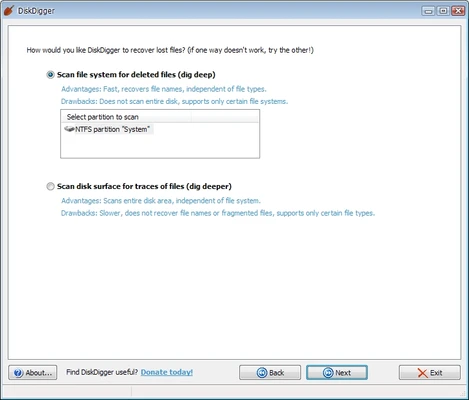
Two Recovery Modes
Choose between a standard scan and a deeper scan to search for deleted files.
Multiple File Types
Supports the recovery of photos, videos, documents, audio files, archives, and other common file formats.
Wide Device Support
Works with internal and external hard drives, USB flash drives, memory cards, and other supported storage devices.
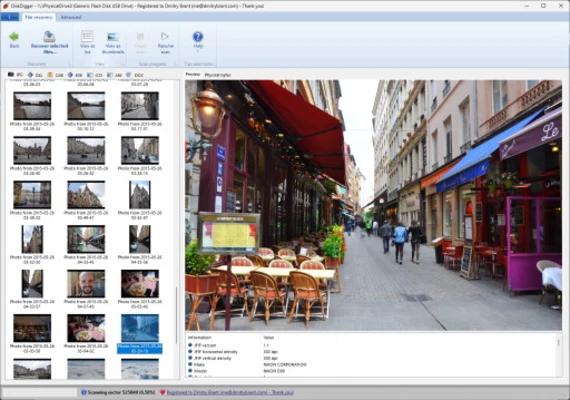
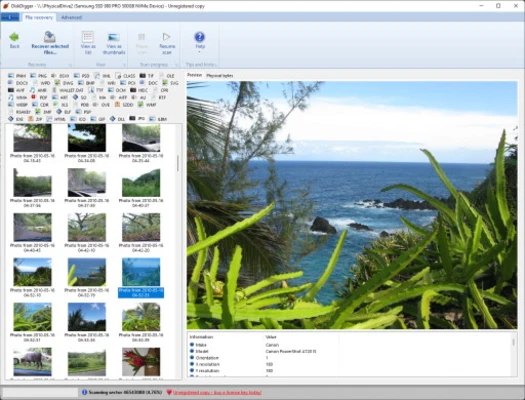
File Preview
Preview recoverable files before selecting them for recovery.
Search and Filtering
Filter recovery results by file type, name, size, and other available criteria.
Portable Version
A portable version can run without a traditional installation, which can be useful when recovering files from a system drive.
Simple Recovery Process
The step-by-step interface makes it easy to select a drive, scan for deleted files, and recover selected items.
User Interface
DiskDigger uses a simple and straightforward interface focused on the recovery process rather than visual design. Users can select a storage device, choose a scanning method, review the results, and recover files from the main interface.
The interface is easy to understand, even for users who have limited experience with data recovery software.
Installation and Setup
- Download DiskDigger for Windows.
- Run the installer or use the portable version.
- Launch the application with the required permissions.
- Select the drive or storage device you want to scan.
- Choose the appropriate recovery mode.
- Start scanning for deleted files.
Important: Avoid saving new files to the drive where the deleted data was located. New data can overwrite deleted files and reduce the chances of successful recovery.
How to Use DiskDigger
- Open DiskDigger and select the target drive.
- Choose the standard or deep recovery mode.
- Start the scan and wait for it to complete.
- Browse the files found during the scan.
- Preview available files when supported.
- Select the files you want to recover.
- Save the recovered files to a different drive or storage device.
FAQ
Can DiskDigger recover permanently deleted files?
It can recover some deleted files if their data has not been overwritten. Recovery is not guaranteed, especially after extensive disk usage.
Is DiskDigger free?
DiskDigger offers a free version with limitations. The Pro version provides additional recovery features.
Can DiskDigger recover files from USB drives and memory cards?
Yes. It can scan supported USB flash drives, memory cards, and other storage devices.
Can DiskDigger recover files from an SSD?
It can scan SSDs, but recovery results may be limited by features such as TRIM, which can make deleted data difficult or impossible to recover.
Should I install DiskDigger on the drive where I deleted files?
No. If possible, use the portable version or install the software on another drive. Installing or writing data to the affected drive may overwrite recoverable files.
Where should I save recovered files?
Save recovered files to another drive or storage device rather than the original source drive.
Alternatives
Recuva – A simple Windows file recovery tool with standard and deep scanning options.
Wondershare Recoverit – A comprehensive data recovery application supporting many storage devices and file types.
EaseUS Data Recovery Wizard – A feature-rich recovery solution with support for various data-loss scenarios.
Stellar Data Recovery – A professional recovery tool designed for recovering files from hard drives, SSDs, memory cards, and other devices.
MiniTool Power Data Recovery – A Windows recovery utility with scanning and file recovery features.
Pricing
Free Version – Provides basic file recovery capabilities with certain limitations.
DiskDigger Pro – A paid version that provides additional recovery functionality.
Pricing may vary, so check the latest license information before purchasing.
System Requirements
- Operating System: Windows 7, 8, 10, or 11
- Architecture: 32-bit or 64-bit
- Processor: Intel or AMD processor
- RAM: 1 GB or more recommended
- Storage: Small amount of space for the application
- Additional: Administrator privileges may be required for some recovery operations
PROS
- Lightweight and easy to use
- Simple recovery workflow
- Supports many file types
- Works with multiple storage devices
- Deep scanning option
- Portable version available
- File preview before recovery
CONS
- Interface looks dated
- Free version has limitations
- Deep scans can take considerable time
- Recovery success depends heavily on the condition of the storage device
- SSD recovery can be limited by TRIM and other storage technologies
Conclusion
DiskDigger is a straightforward file recovery tool for Windows users who need to recover accidentally deleted or lost files. Its simple interface, multiple scanning modes, portable version, and support for common storage devices make it suitable for basic data recovery tasks.
For the best chance of recovering deleted files, stop using the affected drive as soon as possible and save recovered data to a different storage device. DiskDigger is a good choice for straightforward recovery jobs, while users dealing with severe data loss may prefer more advanced professional recovery software.