Go to Windows platform Display platforms icon
Go to Windows platform Go to Mac platform Go to Android platform
Eraser 6.2.0.2998 icon

Eraser 6.2.0.2998

6.2.0.2998
Eraser Team
5.0
8.49 MB size

Completely remove sensitive data from your hard drive by overwriting it

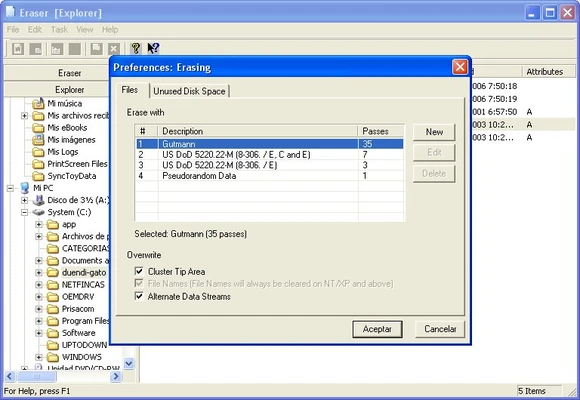
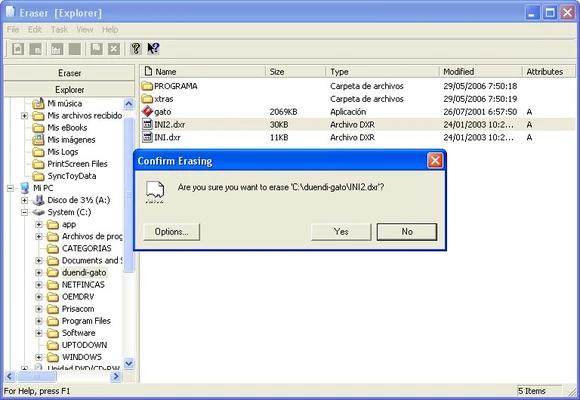
Eraser is a free and open-source security tool for Windows that securely deletes sensitive files and folders. It permanently removes data by overwriting the selected disk space using configurable data erasure methods.

Unlike normal file deletion, which can leave recoverable data behind, Eraser is designed to make deleted information much harder to recover with standard data recovery software.

Key Features

  • Securely erase files and folders

  • Multiple data erasure methods

  • Support for custom erasure patterns

  • Schedule automatic erasure tasks

  • Securely erase previously deleted data

  • Windows Explorer context menu integration

  • Support for local and removable drives

  • Detailed task management

  • Free and open-source

How to Use

  • Install and launch Eraser.

  • Select the files or folders you want to remove.

  • Choose an available erasure method.

  • Start the erasure task.

  • Wait for the process to complete.

  • Use the scheduler to automate recurring erasure tasks if needed.

FAQ

What is Eraser used for?

Eraser is used to securely delete sensitive files and folders so they are much harder to recover using standard data recovery tools.

Can Eraser permanently delete files?

It overwrites the selected data according to the chosen erasure method, making recovery significantly more difficult than with normal file deletion.

Does Eraser support scheduled deletion?

Yes. You can create scheduled tasks to automatically erase selected files, folders, or unused disk space.

Does Eraser work with SSDs?

Eraser can be used with SSDs, but traditional overwrite-based erasure is not the most reliable way to securely sanitize SSDs because of wear leveling and internal storage management. For complete SSD sanitization, the drive manufacturer's secure erase or sanitize function is generally preferable.

Is Eraser free?

Yes. Eraser is free and open-source software.

System Requirements

  • Operating System: Windows 7, 8, 10, or 11

  • Processor: 1 GHz or faster

  • RAM: 512 MB or more

  • Storage: At least 20 MB of free disk space

PROS

  • Free and open-source

  • Multiple erasure methods

  • Customizable erasure tasks

  • Task scheduling

  • Windows Explorer integration

  • Simple interface

CONS

  • Windows-only

  • Secure overwriting can be time-consuming

  • Traditional overwrite methods are not ideal for SSD sanitization

  • Advanced options may be confusing for beginners

Conclusion

Eraser is a practical solution for Windows users who need to securely remove sensitive files beyond standard deletion. Its multiple erasure methods, scheduling options, Explorer integration, and open-source licensing make it a useful privacy tool for securely deleting files and folders.

Note: Be careful when selecting files, folders, or drives for erasure because securely deleted data cannot normally be recovered.

Information about Eraser 6.2.0.2998

License Freeware
Op. System Windows
Category Utilities
Language English + more
Author Eraser Team
permission icon Permissions Not applicable
Date 2026-08-24
Size 8.49 MB
File type Official Website

Apps recommended for you

Duet Display 4.0.366 icon
Ex-Apple Engineers turn your iPad into an extra display!
BreeZip icon
Free alternative to WinRAR
App Installer icon
Install apps from the Microsoft Store manually
MailConverterTools MBOX Converter icon
Install MBOX Converter to convert MBOX files to multiple file formats
Fort Firewall icon
An alternative to the Windows Firewall
PeaZip Portable icon
Mobile version of this excellent file compressor
AdBlock for Chrome icon
AdBlock for Chrome is a browser extension that blocks ads, pop-ups, and trackers to provide a faster and cleaner browsing experience.
Xperia Companion 26.6.1 icon
A new software for your PC to help manage your Sony Xperia device
Duet Display 4.0.443 icon
Ex-Apple Engineers turn your iPad into an extra display!
AMD Driver Autodetect 2026 26.8.1 icon
Auto-Detect and Install Radeon Graphics Drivers for Windows PC
GoodSync 12.11.6 icon
GoodSync is a backup and file synchronization program for Windows
NTLite 2026.08.11723 (64-bit) icon
Integrate updates, drivers, automate Windows and application setup
Bandizip 7.46 icon
It extract the most popular compression formats, including Zip, ZipX, 7z, RAR
CPU-Z 3.01 icon
Utility that gathers information of the main devices of your system
Wise Disk Cleaner 11.3.9 icon
Clean junks of Browsers, remove junk and useless files of Windows
DiskDigger 2.3.59.4493 icon
Undelete and recover photos, documents, music, videos, and more
SteelSeries GG 117.0.0 icon
GameSense & Customization Software for the Best Gaming Experience
Argente Disk Cleaner icon
Safely eliminate files and folders
Atlantis Word Processor Lite icon
Type fast in this compact word processor
Grub2Win icon
Easily boot Windows or Linux on the same PC
EMCO Ping Monitor icon
Monitor network availability and performance with EMCO Ping Monitor for Windows, the professional tool for pinging and tracking multiple devices.
EaseUS Partition Master Free icon
Manage disk partitions with EaseUS Partition Master Free for Windows, the free partition manager to resize, clone, format, migrate, and optimize HDDs and SSDs.
Notepad Light icon
Notepad Light is a simple and lightweight text editor designed for quick note-taking and basic text editing with a clean and minimal interface.
7-Zip icon
7-Zip for Windows is a free and open-source file archiver that supports various compression formats and provides high compression ratios.