balenaEtcher is a free, open-source utility for flashing operating system images to USB drives and SD cards. Developed by Balena, it provides a simple way to create bootable installation and recovery media from supported image files.
Key Features
-
OS Image Flashing – Write supported operating system images to USB drives and SD cards.
-
Multiple Image Formats – Supports common formats such as ISO, IMG, and compressed image files.
-
Validated Flashing – Verifies written data to help detect flashing errors.
-
Removable Drive Detection – Focuses on removable storage devices to reduce the risk of selecting internal system drives.
-
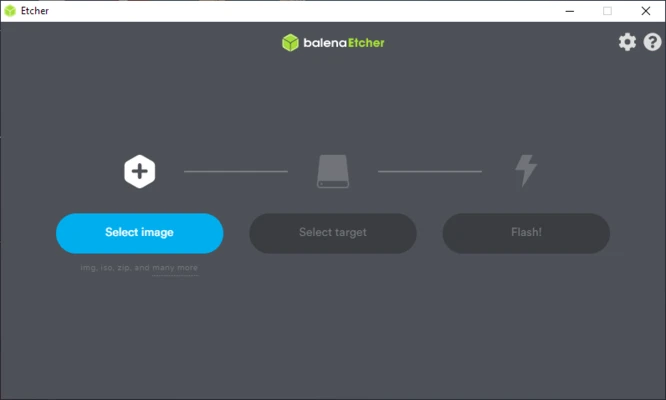
Simple Interface – Uses a straightforward workflow for selecting an image, target drive, and starting the flash process.
-
Automatic Drive Handling – Manages mounted volumes during the flashing process.
-
Cross-Platform – Available for Windows, macOS, and Linux.
-
Open Source – Developed as an open-source project.
User Interface
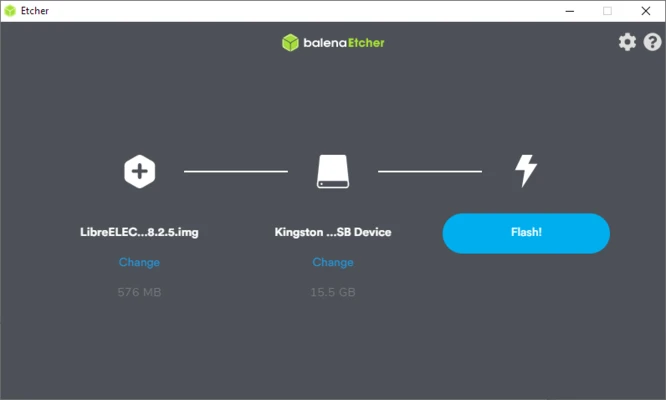
balenaEtcher uses a minimal three-step workflow. Users select an image file, choose the target USB drive or SD card, and start the flashing process. A progress indicator and validation status provide feedback while the operation is running.
Installation and Setup
-
Download and install balenaEtcher on your computer.
-
Launch the application.
-
Connect the USB drive or SD card you want to use.
-
Make sure any important data on the target device has been backed up, as flashing will overwrite its contents.
How to Use
Select an Image – Choose the operating system or disk image you want to write.
Select a Target – Choose the connected USB drive or SD card as the destination.
Start Flashing – Start the flashing process and wait for it to finish.
Verify the Result – Allow Etcher to complete its validation process before safely removing the storage device.
Use the Bootable Media – Insert the completed USB drive or SD card into the target computer and boot from it when required.
Pros
-
Simple and easy to use
-
Free and open-source
-
Supports Windows, macOS, and Linux
-
Supports common image formats
-
Built-in flashing validation
-
Straightforward drive selection
Cons
-
Flashing erases existing data on the target drive
-
Does not provide advanced multiboot features
-
Designed primarily for removable media
-
Some specialized image types may require other tools
Conclusion
balenaEtcher provides a simple way to create bootable USB drives and SD cards from supported operating system images. Its clean interface, cross-platform support, and flashing validation make it suitable for users who want a straightforward tool for preparing installation, recovery, and other bootable media.