


SteelSeries GG is an all-in-one software suite for customizing and managing SteelSeries gaming peripherals. It provides tools for configuring keyboards, mice, headsets, and other compatible devices, while also offering audio enhancement, gameplay recording, and profile management features.
The software combines several functions in one application, including device customization, Sonar audio, Moments gameplay capture, and GameSense integration.
What's New
Recent SteelSeries GG updates focus on improved device compatibility, audio features, gameplay capture, performance, and overall stability.
Key Features
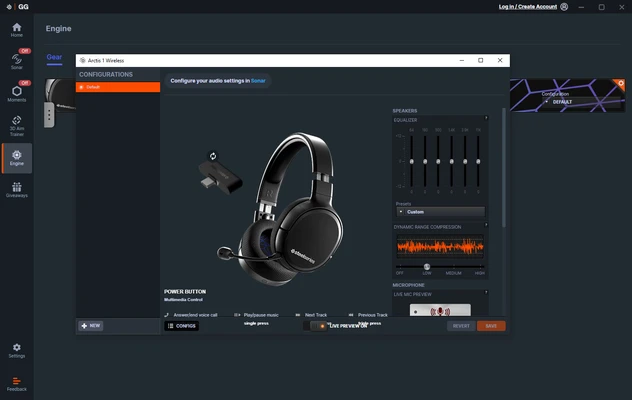
Device Customization: Configure compatible SteelSeries keyboards, mice, headsets, and other peripherals.
RGB Lighting: Customize lighting effects and create dynamic lighting profiles for supported devices.
Macros and Key Bindings: Assign custom commands, shortcuts, and macros to supported keyboards and mice.
Sonar Audio: Adjust equalizer settings, spatial audio, microphone settings, and other audio options.
AI Audio Features: Use supported noise cancellation and audio enhancement features to improve voice and game audio.
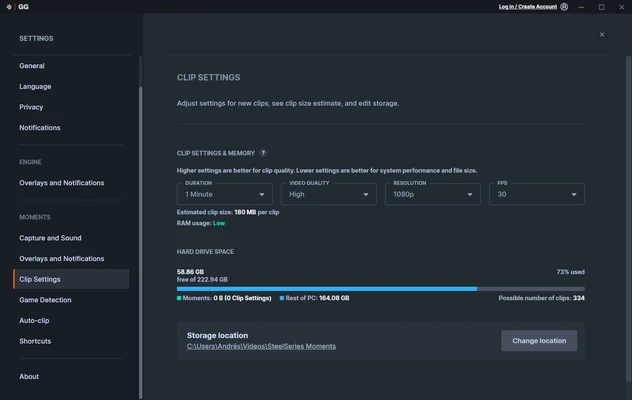
Moments: Automatically or manually capture gameplay clips, then trim and manage recordings within the application.
GameSense: Enable supported games to interact with compatible SteelSeries lighting and peripheral features.
Game Profiles: Create different configurations for individual games and applications and switch between them as needed.
User Interface
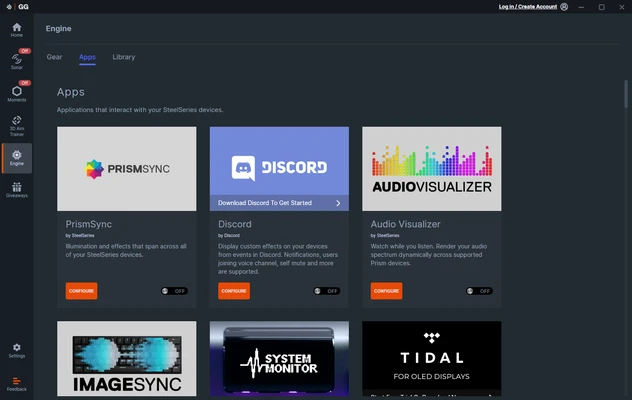
SteelSeries GG uses a modern interface with its main features organized into separate sections. Engine provides access to peripheral settings, Sonar handles audio configuration, and Moments is used for gameplay capture.
The layout is relatively easy to navigate, although the number of available settings can make the application feel somewhat complex for first-time users.
Installation and Setup
-
Download and install SteelSeries GG on your Windows PC.
-
Run the installer and follow the on-screen instructions.
-
Launch GG after installation.
-
Connect your compatible SteelSeries devices.
-
Allow the software to detect your peripherals.
-
Sign in or create a SteelSeries account if required for specific features.
-
Configure your devices and audio settings.
How to Use
Configure Peripherals: Open GG and select Engine to customize lighting, key bindings, macros, and other supported device settings.
Adjust Audio: Open Sonar to configure equalizers, spatial audio, microphone settings, and supported noise cancellation features.
Record Gameplay: Open Moments and configure recording or capture shortcuts for supported games.
Create Profiles: Set up different configurations for individual games and applications and switch between them when needed.
FAQ
What is SteelSeries GG used for?
SteelSeries GG is used to configure SteelSeries gaming peripherals, customize RGB lighting and controls, enhance audio, and capture gameplay clips.
Is SteelSeries GG free?
Yes. SteelSeries GG is free to download and use. Some features are designed specifically for compatible SteelSeries hardware.
Does SteelSeries GG work without SteelSeries hardware?
Some features, such as Moments and certain Sonar functions, can be used without SteelSeries peripherals, while device customization requires compatible hardware.
Can I disable Moments?
Yes. Moments can be disabled from the application's settings if you do not need gameplay recording.
Does Sonar work with other headsets?
Sonar can work with a range of audio devices, although some features and integrations are designed specifically for SteelSeries products.
Alternatives
Razer Synapse: Software for configuring and customizing Razer gaming peripherals.
Logitech G HUB: A peripheral management tool for Logitech G gaming devices.
Corsair iCUE: A comprehensive utility for managing Corsair peripherals, lighting, and other compatible hardware.
NZXT CAM: A hardware management application with device controls, monitoring, and customization features.
Pricing
SteelSeries GG is free to download and use. Compatible SteelSeries peripherals are sold separately.
System Requirements
-
Windows 10 or Windows 11
-
Intel or AMD processor
-
4 GB of RAM or more
-
At least 500 MB of available storage
-
Internet connection recommended for updates and online features
Pros
-
Free to use
-
Comprehensive SteelSeries device customization
-
Advanced audio controls with Sonar
-
Gameplay recording with Moments
-
RGB lighting and GameSense support
-
Custom profiles for games and applications
Cons
-
Mainly focused on SteelSeries hardware
-
Can use noticeable system resources
-
Some features require compatible devices
-
The interface may feel complex for new users
-
Occasional software issues may occur
Conclusion
SteelSeries GG is a useful companion application for gamers who use SteelSeries peripherals. It combines device customization, RGB lighting, audio enhancement, gameplay recording, and game integration into a single application.
For users already invested in the SteelSeries ecosystem, GG provides the tools needed to configure and get more functionality from their gaming hardware. Its broader features can also be useful for gamers who want centralized audio and gameplay recording tools.