Display Driver Uninstaller (DDU) is a free and portable Windows utility designed to completely remove graphics card drivers from a PC. It is commonly used when standard driver removal does not resolve problems or when a clean graphics driver installation is required.
DDU can remove display drivers and related files from major GPU manufacturers, including NVIDIA, AMD, and Intel. It is particularly useful for resolving driver conflicts, graphics problems, failed driver installations, or switching between different GPU brands.
Features
- Complete Driver Removal – Removes graphics drivers and related files, folders, and registry entries.
- NVIDIA, AMD, and Intel Support – Supports the major desktop GPU manufacturers.
- Safe Mode Support – Designed to work effectively in Windows Safe Mode for cleaner driver removal.
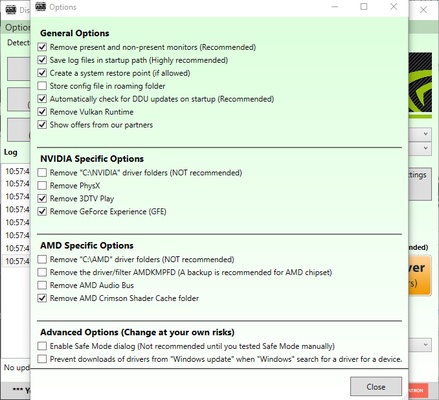
- Windows Update Control – Provides options to prevent Windows from automatically installing display drivers.
- Clean and Restart – Removes the selected driver and automatically restarts Windows.
- Portable – Runs without a traditional installation.
- Uninstallation Logs – Records the cleanup process for troubleshooting and verification.
- Command-Line Support – Provides additional options for advanced users.
- Multilingual Interface – Available in multiple languages.
User Interface
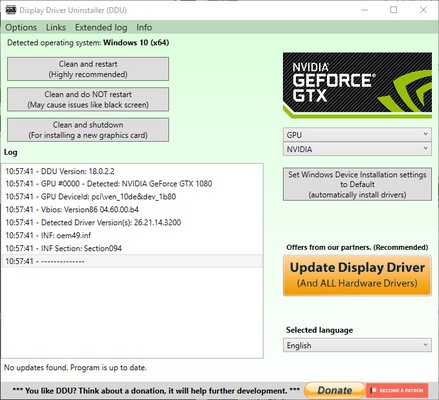
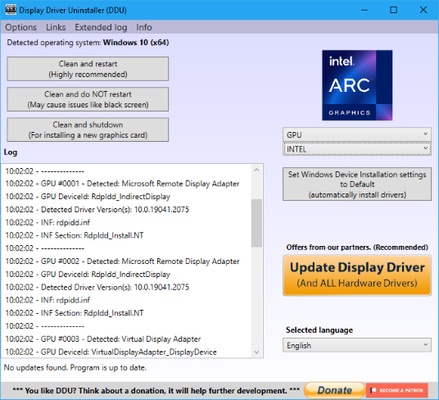
DDU uses a simple utility-focused interface rather than a modern graphical design. Users can select the graphics driver manufacturer and choose the desired cleanup operation.
The program also displays a log of the actions performed during the removal process, making it easier to check what was removed.
How It Works
DDU is commonly used when performing a clean installation of a graphics driver. After starting the utility, users select their GPU manufacturer and choose an appropriate cleanup option.
For the most thorough removal, using DDU in Windows Safe Mode is generally recommended. After the cleanup is completed, the computer can be restarted and a fresh graphics driver can be installed.
How to Use
- Extract the DDU archive to a folder.
- Restart Windows in Safe Mode.
- Launch DDU with administrator privileges.
- Select NVIDIA, AMD, or Intel as the device manufacturer.
- Choose Clean and Restart.
- Wait for the cleanup process to finish and Windows to restart.
- Install the desired graphics driver after restarting.
FAQ
Is DDU safe to use?
DDU is widely used for removing graphics drivers, but because it performs a deep cleanup, it should be used carefully and according to the recommended procedure.
Should I use DDU for every graphics driver update?
No. It is generally unnecessary for routine driver updates. DDU is more useful when dealing with driver problems, failed installations, conflicts, or changing GPU manufacturers.
Can I use DDU without Safe Mode?
Yes. DDU can run in normal Windows mode, but Safe Mode is generally recommended for a cleaner removal.
Does DDU remove audio or chipset drivers?
No. DDU is primarily designed to remove display/GPU drivers and related components.
Can DDU prevent Windows from reinstalling a graphics driver?
Yes. It provides options to prevent Windows Update from automatically installing a display driver during the cleanup process.
System Requirements
- Operating System: Windows 7, 8, 10, and 11
- Architecture: 32-bit and 64-bit
- RAM: 2 GB or more recommended
- Privileges: Administrator privileges required
- Storage: Minimal space required
- Internet: Not required for the cleanup process
PROS
- Thorough GPU driver removal
- Supports NVIDIA, AMD, and Intel
- Portable and lightweight
- Safe Mode support
- Useful for troubleshooting driver problems
- Provides detailed cleanup logs
CONS
- Basic user interface
- Intended specifically for graphics driver removal
- Advanced cleanup options may be confusing for beginners
- Usually unnecessary for routine driver updates
Conclusion
Display Driver Uninstaller (DDU) is a useful tool for completely removing graphics drivers from Windows PCs. It is especially valuable when dealing with driver conflicts, failed installations, graphics problems, or switching between NVIDIA, AMD, and Intel hardware.
For normal driver updates, DDU is usually not necessary. However, when a clean driver installation is needed, its portable design, Safe Mode support, and thorough cleanup capabilities make it a valuable utility for PC users and technicians.