DocuFreezer is a document conversion tool that converts Microsoft Office files into PDF, JPG, or TIFF formats. It supports common documents, spreadsheets, and presentations while preserving the original layout, images, and hyperlinks.
Key Features
-
Office Document Conversion – Convert Word, Excel, and PowerPoint files to PDF, JPG, or TIFF.
-
Batch Conversion – Process multiple files or entire folders at once.
-
Layout Preservation – Maintains the original document structure and formatting.
-
Image and PDF Output – Save documents as widely supported PDF or image files.
-
Drag-and-Drop Support – Easily add files and folders for conversion.
-
Custom Output Location – Choose where converted files are saved.
-
Simple Interface – Straightforward controls for selecting files, formats, and conversion options.
User Interface
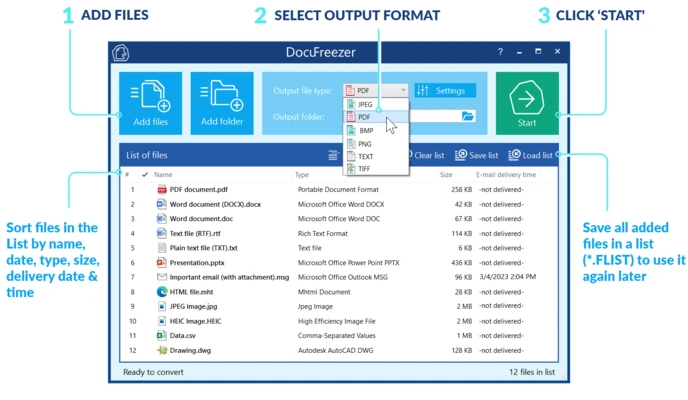
DocuFreezer features a clean and simple interface with file management options, output format settings, and a prominent conversion control, making the workflow easy to understand.
Installation and Setup
Install DocuFreezer on Windows and launch the application. Add the Office files or folders you want to convert, select the desired output format and destination, then start the conversion.
How to Use
-
Add the Office documents or folders you want to convert.
-
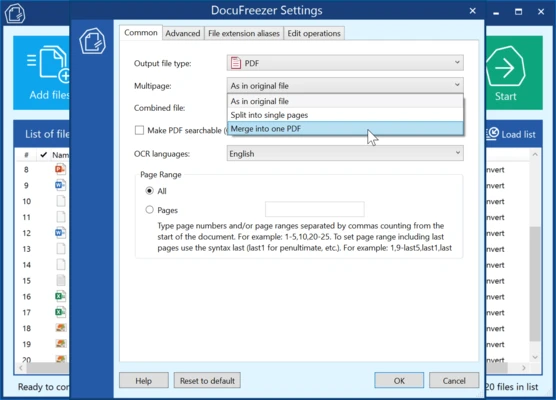
Select PDF, JPG, or TIFF as the output format.
-
Choose the destination folder.
-
Start the conversion and wait for the files to be processed.
Pros
-
Supports PDF, JPG, and TIFF output.
-
Preserves document layout and formatting.
-
Supports batch conversion.
-
Simple and easy to use.
Cons
-
Primarily focused on document conversion.
-
Requires Microsoft Office-compatible source documents for many conversion tasks.
Conclusion
DocuFreezer provides a simple way to convert Microsoft Office documents into PDF and image formats while preserving their original appearance. Its batch processing and straightforward interface make it suitable for everyday document conversion.