Go to Windows platform Display platforms icon
Go to Windows platform Go to Mac platform Go to Android platform
OCCT 17.1.3 icon

OCCT 17.1.3

17.1.3
OCBASE
5.0
205.3 MB size

Let you benchmark and overclock your PC system components

OCCT (OverClock Checking Tool) is a hardware stress testing and monitoring utility for Windows developed by OCBASE. It is designed to test the stability of CPUs, GPUs, memory, and power-related components while monitoring temperatures, voltages, fan speeds, and other system sensors.

OCCT can be used for troubleshooting hardware problems, checking system stability, and evaluating systems running at stock or overclocked settings.


Key Features

  • CPU Stress Testing – Apply intensive workloads to the processor to check stability and detect errors.

  • GPU Stress Testing – Test graphics cards under demanding workloads to evaluate stability and thermal behavior.

  • Memory Testing – Stress system memory to help identify memory-related errors and instability.

  • Power Testing – Apply combined CPU and GPU workloads to place a heavy load on the system's power delivery.

  • Combined Testing – Run multiple hardware tests together to evaluate overall system stability.

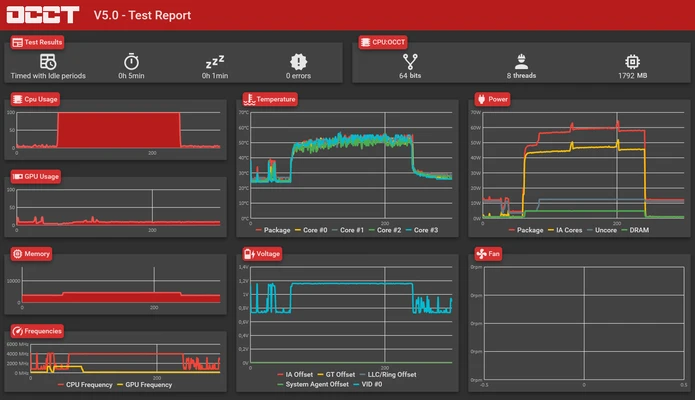
  • Real-Time Monitoring – Monitor temperatures, voltages, fan speeds, frequencies, and other available sensor data.

  • Customizable Tests – Configure test duration, workload intensity, and other testing parameters.

  • Error Detection – Detect calculation and stability errors during stress tests.

  • Monitoring Graphs – Display hardware sensor data in real-time graphs and test reports.

  • Test Reports – Review test results and detected errors after a test has finished.

  • Hardware Detection – Automatically identifies supported CPUs, GPUs, memory, and other system components.


User Interface

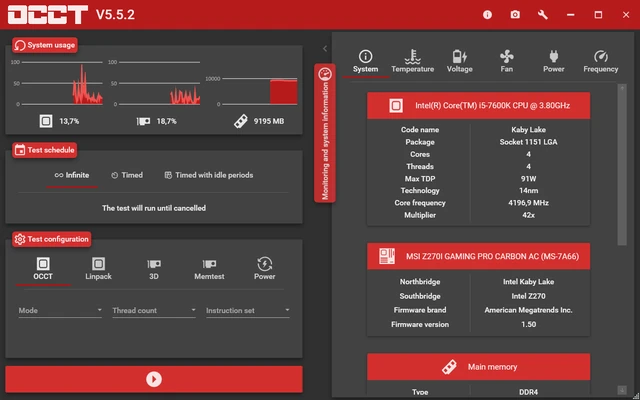
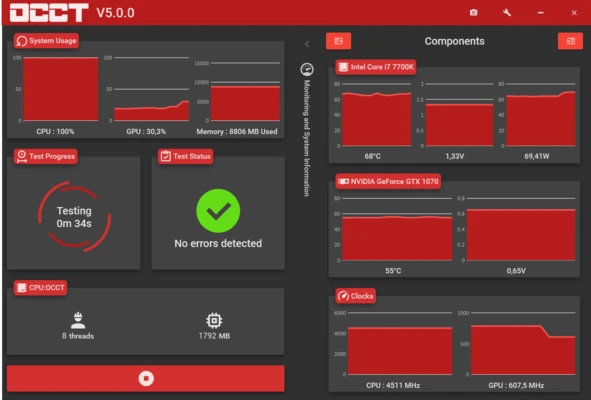
OCCT uses a dashboard-style interface with separate sections for different hardware tests and monitoring functions. Each test provides configuration options before starting, while sensor readings and graphs can be viewed during testing.

The interface provides both simple presets for quick testing and additional configuration options for users who need more control over workloads.


Installation and Setup

Download and install OCCT on a Windows PC, then launch the application. OCCT automatically detects available hardware and monitoring sensors. Select the component or test you want to evaluate and adjust the available parameters before starting the test.


How to Use

Open OCCT and select a CPU, GPU, memory, power, or combined test. Configure the desired test duration and workload settings, then start the test.

During testing, monitor temperatures, voltages, fan speeds, and other sensor readings. Stop the test if temperatures or other conditions become unsafe for your hardware. After completion, review the generated results and check for detected errors.

Because stress tests can place a heavy load on hardware, make sure the s

Information about OCCT 17.1.3

License Freeware
Op. System Windows
Category Utilities
Language English + more
Author OCBASE
permission icon Permissions Not applicable
Date 2026-09-18
Size 205.3 MB
File type Official Website

Apps recommended for you

Ultracopier icon
Substantial improvements for copying files
SyncBackSE icon
SyncBackSE for Windows is a backup and synchronization tool that helps users securely copy, sync, and restore files between devices and locations.
Nextcloud 34.0.4 icon
Makes it easy to sync, share and collaborate on your files!
Rclone 1.75.0 (64-bit) icon
The command-line app for transferring files and synchronizing directories
MiniTool ShadowMaker 4.8.1 icon
Free Backup Software and Professional Backup Solution!
Adlice Diag icon
Adlice Software
EaseUS Fixo icon
EaseUS Fixo for Windows is a system optimization tool that helps users clean up junk files, fix errors, and improve PC performance.
WSL Distro Manager icon
Manage WSL distributions
BurnAware Free 19.4 icon
Free burning software and various CD, DVD, Blu-ray tools
WizTree 4.33 icon
Finds files/folders using the most disk space on your hard drive
Driver Booster Free 14.0.0.444 icon
Quickly Find and Update 9,500,000+ Drivers for Your Windows PC
Nextcloud 34.0.4 icon
Makes it easy to sync, share and collaborate on your files!
BackBlaze 10.0.3.1075 icon
Finds your photos, music, documents and data and backs it up!
Display Driver Uninstaller (DDU) 18.1.6.0 icon
Program for quick uninstall NVIDIA, AMD or Intel display drivers
SIW 2026 16.15.0914 icon
Advanced System Information for Windows tool that analyzes your PC
BurnInTest Professional 11.1 Build 1003 icon
PC Reliability and Load Testing for your Desktop Windows PC
TGMacro icon
Automate repetitive tasks
pCloud 5.1.2 icon
Sign up and get 10 GB FREE cloud storage for your documents!
YUMI exfat icon
YUMI exFAT for Windows is a bootable USB creation tool that supports exFAT file systems, allowing users to create multi-boot USB drives.
PeaZip icon
PeaZip for Windows is a free and open-source file archiver that allows users to compress, extract, and manage archives in multiple formats.
AOMEI Partition Assistant Standard Edition 10.11.0 icon
Safely partition your hard drive without data loss
UltData iPhone Data Recovery icon
UltData iPhone Data Recovery for Windows is a tool that helps users recover lost or deleted data from iPhones quickly and safely.
Process Monitor 4.11 icon
Shows real-time file system, registry and thread activity for Windows PC