Go to Windows platform Display platforms icon
Go to Windows platform Go to Mac platform Go to Android platform
SignalRGB 2.5.70 icon

SignalRGB 2.5.70

2.5.70
Whirlwind FX
5.0
283 MB size

Control and sync your favorite RGB devices from any brand!

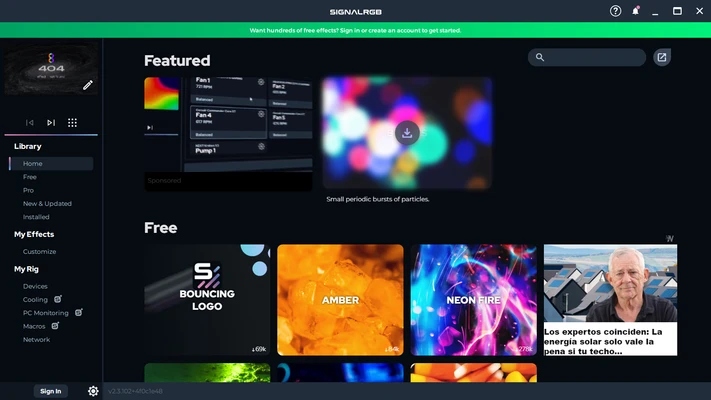
SignalRGB for Windows is a free RGB lighting control software that allows users to synchronize and manage all their RGB devices in a single application. It supports a wide range of hardware brands and enables dynamic lighting effects across keyboards, mice, headsets, fans, and other peripherals.

Designed for gamers and PC enthusiasts, SignalRGB delivers advanced lighting customization, game integration, and real-time visual effects with minimal setup.


Key Features

Unified RGB Control

Control all RGB devices from different manufacturers in one centralized application.

Wide Device Compatibility

Supports over 300+ devices from leading brands such as Razer, Corsair, Logitech, SteelSeries, ASUS, MSI, EVGA, and more.

Screen Ambience Sync

Synchronize lighting effects with on-screen content, including games, videos, and applications.

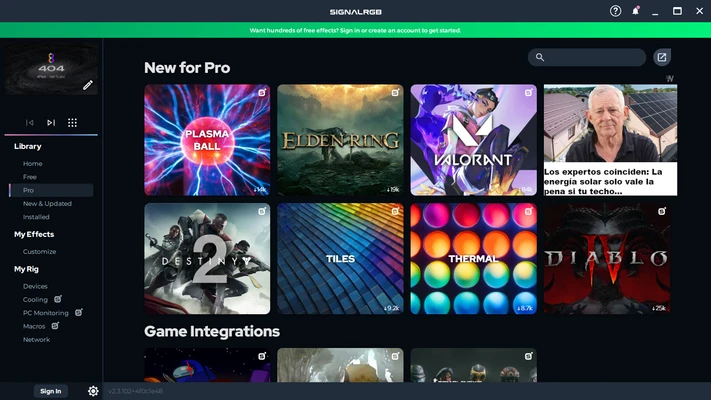
Game Integrations

Reactive lighting effects triggered by in-game events such as explosions, health changes, damage, and environment transitions.

Audio Visualizer

Turn your RGB setup into a dynamic light show that reacts to system audio in real time.

Real-Time Effects Engine

Detects on-screen activity and adjusts lighting instantly for immersive feedback.

Extensive Effects Library

Access thousands of customizable lighting effects designed by the community and developers.


Supported Devices

  • Keyboards
  • Mice
  • Headsets
  • PC fans & coolers
  • Motherboard RGB headers
  • GPU lighting systems
  • External RGB controllers

How to Use

  • Install SignalRGB on Windows
  • Launch the application and detect devices automatically
  • Connect supported RGB peripherals
  • Choose lighting effects or game profiles
  • Enable screen or audio synchronization
  • Customize effects in the dashboard

System Requirements

  • Windows 10 or Windows 11
  • Intel or AMD processor
  • Minimum 4 GB RAM
  • Internet connection required for device profiles and updates

Pros

  • Supports wide range of RGB devices
  • Unified control for multiple brands
  • Real-time game and screen synchronization
  • Powerful customization system
  • Free to use

Cons

  • Requires account login for full features
  • Some advanced integrations require internet connection
  • Occasional compatibility issues with new devices
  • Can be resource-heavy on older PCs

Conclusion

SignalRGB for Windows is a powerful RGB control solution that unifies lighting management across multiple device brands. With game-aware effects, screen syncing, and audio visualization, it is ideal for gamers and PC enthusiasts looking to build a fully synchronized lighting ecosystem.

Information about SignalRGB 2.5.70 2.5.70

License Freeware
Op. System Windows
Category Utilities
Language English
Author Whirlwind FX
permission icon Permissions Not applicable
Date 2026-06-17
Size 283 MB
File type Official Website

Apps recommended for you

1Password icon
One of the most comprehensive and safe password managers
Xplorer2 Professional icon
Nikos Bozinis
UniFi Network Server icon
UniFi Network Server is a centralized management software for configuring and monitoring UniFi network devices, ensuring seamless and efficient network performance.
Recover Keys icon
Recover Keys for Windows is a tool that helps users find and back up product keys for installed software quickly and securely.
Fernanda icon
Fernanda is a distraction-free plain text editor designed for fiction writers to focus on storytelling without worrying about formatting or styling.
Argente System Manager icon
Argente System Manager for Windows is a comprehensive system optimization tool that helps users manage and improve their PC’s performance, security, and stability.
Microsoft 365 (Office) (UWP) icon
Keep all your Office programs from Microsoft 365 in one place
Print.Test.Page.OK icon
Nenad Hrg
Universal USB Installer icon
Create bootable USB drives easily with Universal USB Installer for Windows, the powerful tool for installing Linux distributions, Windows systems, and recovery utilities from USB.
SignalRGB icon
Synchronize and control RGB lighting across all your devices with SignalRGB for Windows, the versatile software for gaming and PC customization.
HWMonitor icon
Monitor your PC’s hardware temperatures, voltages, and fan speeds in real time with HWMonitor for Windows, the reliable system health monitoring tool.
NewFileTime icon
Modify file and folder timestamps easily with NewFileTime for Windows, the lightweight utility for changing creation, modification, and access dates.
Easy System Utility icon
Easy System Utility for Windows is a system optimization tool that cleans, repairs, and speeds up your PC for better performance.
DriversCloud icon
Detect hardware, analyze drivers, and update your system efficiently with DriversCloud for Windows, the comprehensive PC diagnostics and driver update tool.
Syncovery 12.0.7 (64-bit) icon
Syncovery will copy your files the way you need it!
Ashampoo Backup Pro icon
Protect your data and recover files easily with Ashampoo Backup Pro for Windows, the reliable backup software for full system, partitions, and cloud storage.
Appflowy icon
AppFlowy is an open-source productivity and workspace tool designed for note-taking, task management, and collaboration as a self-hosted alternative to Notion.
Q-Dir Portable icon
Portable version of this efficient file manager
Intel® Driver & Support Assistant icon
The program you need to update Intel drivers
Sandboxie icon
Sandboxie for Windows is a tool that isolates programs in a secure environment, preventing unwanted changes and protecting your system from malware.
Grammarly icon
Grammarly is a powerful AI writing assistant for grammar checking, spell correction, and improving English writing.
Daemon Tools Lite icon
The lite version of Daemon Tools
BreeZip icon
Free alternative to WinRAR
Binderus icon
Binderus is a simple writing and note organization tool designed to help users collect, structure, and manage text content in a clean and distraction-free environment.