Go to Windows platform Display platforms icon
Go to Windows platform Go to Mac platform Go to Android platform
MobiKin Eraser for Android 5.1.10 icon

MobiKin Eraser for Android 5.1.10

5.1.10
MobiKin Studio
5.0
40.6 MB size

Erase All Files & Histories on Your Android Devices Permanently!

MobiKin Eraser for Android is a professional Android data wiping tool that helps users permanently delete personal information from Android phones and tablets.

When selling, donating, or replacing an Android device, simply deleting files or performing a factory reset may not completely protect personal data. MobiKin Eraser securely removes contacts, messages, photos, videos, apps, documents, and system settings to prevent data recovery.

The software supports Android devices from Android 4.0 and above, including many popular brands such as Samsung, Huawei, Xiaomi, OPPO, OnePlus, Motorola, Sony, and more.

Key Features

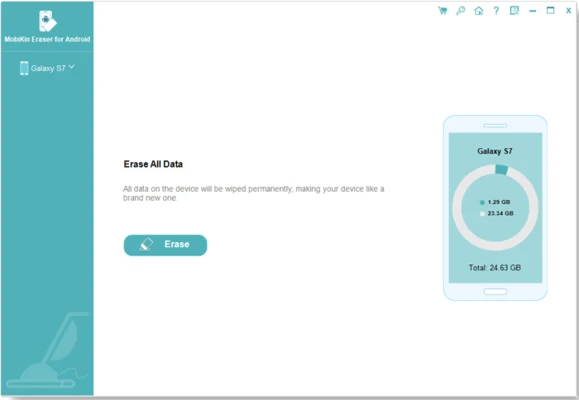
One-Click Data Erase

Erase all personal data and device settings with a simple process. It can permanently remove:

  • Contacts
  • Text messages
  • Call history
  • Photos and videos
  • Audio files
  • Documents
  • Applications
  • System settings

Multiple Security Levels

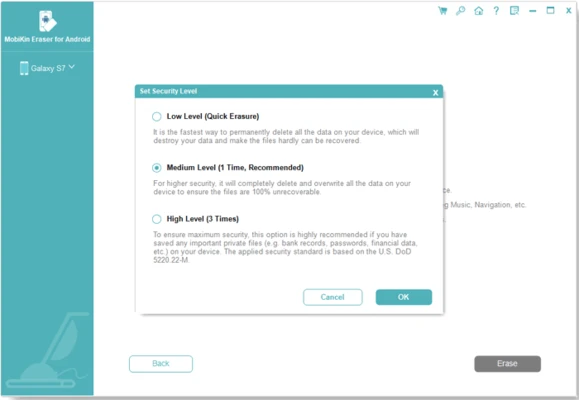
Provides three data erasure levels to meet different privacy requirements:

Low Level
Fast deletion suitable for basic cleanup.

Medium Level
Provides stronger protection and prevents common recovery methods.

High Level
Overwrites data multiple times for maximum security, suitable for removing sensitive information.

Simple Three-Step Process

The software makes Android data wiping easy:

  1. Connect the Android device to the computer.
  2. Select an erasing security level.
  3. Start the wiping process.

Wide Device Compatibility

Supports most Android smartphones and tablets, including:

  • Samsung
  • Huawei
  • Xiaomi
  • OPPO
  • OnePlus
  • Motorola
  • Sony
  • LG
  • HTC

Secure Data Protection

MobiKin Eraser only scans and removes data from the device. It does not upload or share personal information during the erasing process.

How to Use

  • Install MobiKin Eraser for Android on Windows.
  • Connect your Android device using a USB cable.
  • Enable USB debugging if required.
  • Choose the desired security level.
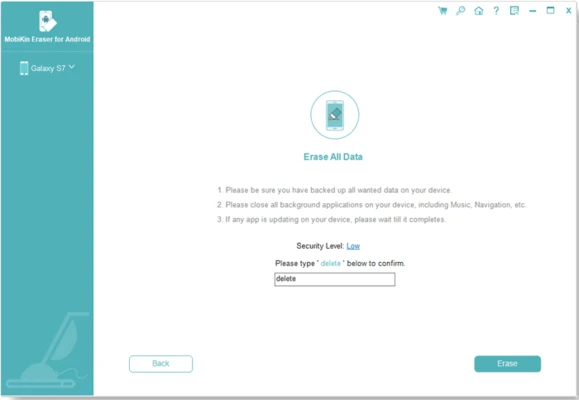
  • Confirm the erase operation.
  • Wait until the process finishes.

System Requirements

Windows

  • Operating System: Windows 7/8/10/11
  • Processor: 750MHz Intel or AMD processor
  • Memory: 512MB RAM or above
  • Storage: 1GB free disk space

Supported Android Versions

  • Android 4.0 and above
  • Android 16 supported

PROS

  • Permanently removes Android data
  • Multiple security erase levels
  • Supports many Android devices
  • Simple one-click operation
  • Protects personal privacy before device resale

CONS

  • Requires a Windows PC connection
  • Cannot recover erased data
  • Does not support iOS devices
  • Some device models may have compatibility issues

Conclusion

MobiKin Eraser for Android is a useful privacy protection tool for users who need to permanently remove personal data before selling or transferring an Android device.

With secure wiping options, broad device compatibility, and an easy-to-use interface, it provides a reliable way to prevent deleted files from being recovered.

Note: Limited functionality in the demo version.

Information about MobiKin Eraser for Android 5.1.10

License Trial / Demo
Op. System Windows
Category Utilities
Language English + more
Author MobiKin Studio
permission icon Permissions Not applicable
Date 2026-08-03
Size 40.6 MB
File type Official Website

Apps recommended for you

Ultracopier icon
Substantial improvements for copying files
Cisdem PDF Converter OCR icon
Convert and OCR PDFs to Office, images formats and more.
Steganos Privacy Suite icon
Protect the privacy and safety of your system
ONLYOFFICE icon
Create, edit, and sync documents with cloud storage services
Xperia Companion 26.6.1 icon
A new software for your PC to help manage your Sony Xperia device
UFS Explorer RAID Recovery icon
UFS Explorer RAID Recovery for Windows is a powerful data recovery tool designed to recover data from RAID arrays, including complex RAID configurations.
EmailProHelp PST Viewer Tool icon
Download the Updated PST File Viewer Tool to Open and Read PST Files
BackUp Maker icon
BackUp Maker is a backup utility that lets users easily create automated backups of files and folders to protect data.
Coolmuster Android Eraser 4.1.13 icon
Erase All File Types on Android with 1 Click!
OCCT 17.0.13 icon
Let you benchmark and overclock your PC system components
Wise JetSearch 5.0.1 icon
Quick search your local file, images, videos, music, removal and others
Rclone 1.75.0 (64-bit) icon
The command-line app for transferring files and synchronizing directories
HWMonitor 1.67 icon
A hardware monitoring tool that will read the system`s main health sensors
Duet Display 4.0.408 icon
Ex-Apple Engineers turn your iPad into an extra display!
DVDFab 13.0.6.5 (64-bit) icon
DVD and Blu-ray video processing application for Windows
CCleaner Free 7.10.1464 icon
Registry and junk-clearing utility for keeping your system clean and optimized
PDFelement icon
PDFelement for Windows is a versatile PDF editor that allows users to create, edit, convert, and manage PDF documents easily.
DVDFab Passkey icon
Unlock any DVD or Blu-ray protections
Atlantis Word Processor Lite icon
Type fast in this compact word processor
BleachBit 6.0.2 icon
BleachBit quickly frees disk space and tirelessly guards your privacy
ASUS GPU Tweak III 2.1.3.3 icon
Enjoy maximum performance of your ASUS video card!
7-Zip icon
7-Zip for Windows is a free and open-source file archiver that supports various compression formats and provides high compression ratios.
novelWriter icon
novelWriter is a free, open-source writing tool designed for authors to plan, organize, and write long-form fiction such as novels in a structured and distraction-free environment.
Display Driver Uninstaller (DDU) icon
Display Driver Uninstaller (DDU) for Windows is a utility that completely removes graphics drivers and related files for a clean reinstall.