

Wise Disk Cleaner is a free and lightweight Windows utility designed to remove junk files, temporary files, browser data, and other unnecessary items that take up disk space. It also includes disk defragmentation, scheduled cleaning, and system slimming tools.
Key Features
Junk File Cleaning
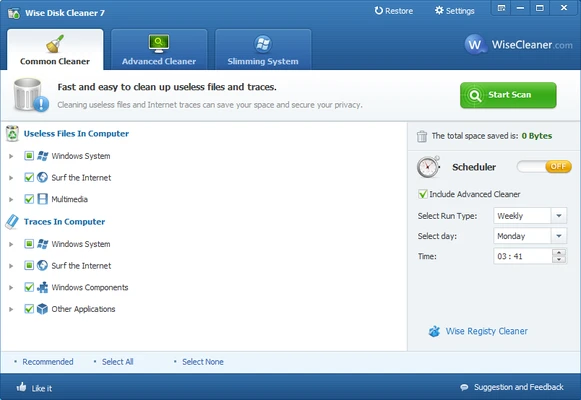
Scans for and removes temporary files, log files, Recycle Bin contents, recent documents, and other unnecessary system files.
Browser Cleaning
Clears browsing history, cache, cookies, and other temporary browser data from supported browsers.
Advanced Cleaner
Provides additional scanning options for users who want to find more unnecessary files beyond the standard cleanup.
System Slimming
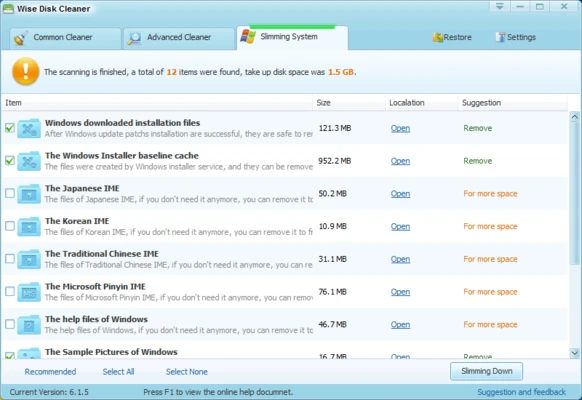
Removes selected Windows components and files that are not needed, helping free up additional disk space.
Disk Defrag
Includes a disk defragmentation tool for analyzing and reorganizing fragmented data on traditional hard drives.
Scheduled Cleaning
Set daily, weekly, or monthly cleaning schedules to automatically remove unwanted files.
One-Click Cleaning
Create a desktop shortcut for quickly starting a cleanup without opening the main interface.
Low Resource Usage
The application is lightweight and designed to use relatively few system resources while running.
User Interface
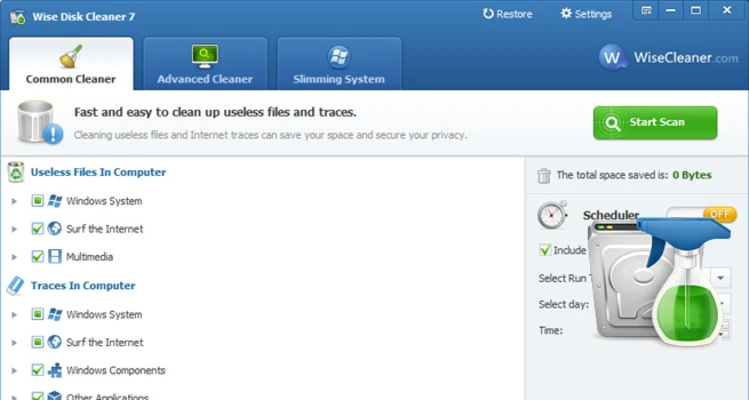
Wise Disk Cleaner uses a simple interface with separate sections for common cleaning, advanced cleaning, system slimming, and disk defragmentation. The layout is easy to understand and provides scan results before files are removed.
Installation and Setup
- Download and install Wise Disk Cleaner on your Windows PC.
- Launch the application.
- Select the cleaning options you want to use.
- Run a scan and review the results.
- Select the files you want to remove and start the cleanup.
How to Use
- Open Wise Disk Cleaner.
- Select Common Cleaner and scan your system.
- Review the detected files.
- Select the items you want to remove.
- Click the clean option to delete the selected files.
- Use Advanced Cleaner when a deeper scan is required.
- Configure Schedule for automatic cleanup if needed.
- Use Disk Defrag to analyze and defragment traditional hard drives.
FAQ
Is Wise Disk Cleaner free?
Yes. Wise Disk Cleaner is available as a free Windows utility.
Can Wise Disk Cleaner delete browser history?
Yes. It can clean browser cache, cookies, history, and other temporary browser data from supported browsers.
Does Wise Disk Cleaner improve PC performance?
Removing unnecessary files can free disk space and reduce clutter. The actual performance improvement depends on the condition and hardware of the PC.
Does it include disk defragmentation?
Yes. It includes a disk defragmentation tool for supported drives.
Can I schedule automatic cleaning?
Yes. You can configure daily, weekly, or monthly cleaning schedules.
Alternatives
CCleaner – Popular Windows system cleaning and maintenance utility.
Glary Utilities – Provides a broader collection of system maintenance and optimization tools.
Advanced SystemCare Free – PC cleanup and optimization software with additional maintenance features.
Wise Care 365 – An all-in-one Windows maintenance suite from the same developer.
Ashampoo WinOptimizer – Provides system cleaning, optimization, and privacy tools.
System Requirements
- Operating System: Windows 7, 8, 10, or 11
- Architecture: 32-bit or 64-bit
- Processor: 500 MHz or faster
- RAM: 256 MB or more
- Free Disk Space: At least 20 MB
- Display: 800 × 600 resolution or higher
PROS
- Free to use
- Lightweight and fast
- Simple interface
- Scheduled cleaning
- Includes disk defragmentation
- Supports advanced cleaning options
CONS
- Limited optimization features compared with larger system suites
- No real-time junk monitoring
- Disk defragmentation is mainly relevant to traditional hard drives
Conclusion
Wise Disk Cleaner is a lightweight and easy-to-use solution for cleaning unnecessary files from Windows PCs. It combines junk file removal, browser cleanup, system slimming, scheduled cleaning, and disk defragmentation in a single application.
For users who mainly need a simple and free tool to reclaim disk space and maintain their Windows system, Wise Disk Cleaner is a practical choice.