


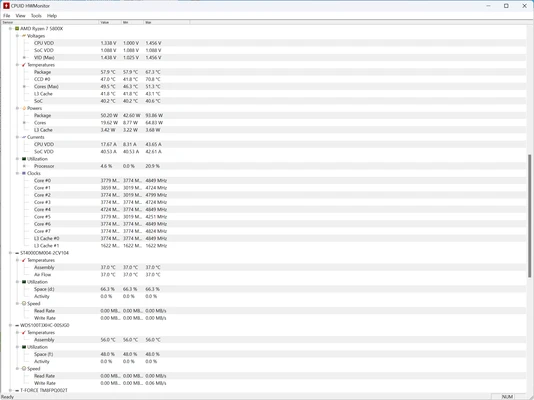
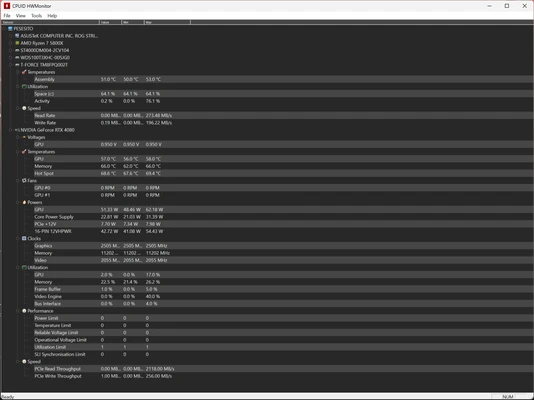
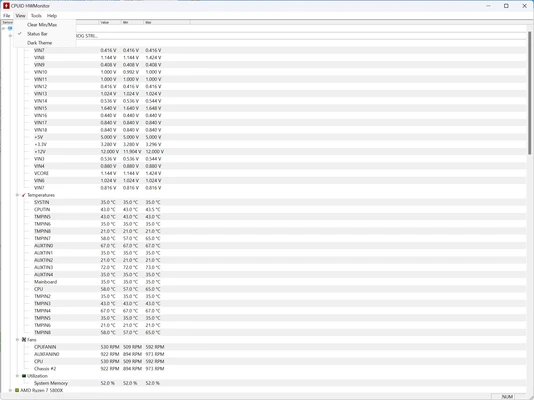
HWMonitor is a free hardware monitoring tool that allows users to monitor PC health information, including CPU temperature, GPU temperature, fan speed, voltages, and other hardware sensor data.
Developed by CPUID, HWMonitor supports a wide range of sensor chips and hardware components. It can monitor modern processors, graphics cards, hard drives, and motherboard sensors, making it useful for checking system stability and detecting overheating issues.
Features
CPU Temperature Monitoring
Displays real-time CPU temperatures, including individual core thermal readings.
GPU Monitoring
Shows graphics card temperature and other GPU-related sensor information.
Fan Speed Monitoring
Tracks system fan speeds to help maintain proper cooling performance.
Voltage Monitoring
Monitors motherboard and CPU voltage values for hardware diagnostics.
SMART Hard Drive Monitoring
Reads storage device temperature information through S.M.A.R.T technology.
Wide Hardware Support
Compatible with many sensor chips, including ITE, Winbond, and other popular hardware monitoring controllers.
Portable Version Available
Run HWMonitor without installation for quick hardware checks.
How to Use
- Download and install HWMonitor or use the portable version.
- Launch the program to start hardware monitoring.
- Check CPU, GPU, motherboard, and storage temperatures.
- Compare current, minimum, and maximum values.
- Use the information to identify overheating or hardware problems.
Installation and Setup
Installation
- Run the HWMonitor installer.
- Follow the setup wizard to complete installation.
- Launch the program from the Start menu.
Removal
- Open Windows Settings or Control Panel.
- Go to Apps or Programs and Features.
- Select HWMonitor and uninstall the software.
FAQ
What does HWMonitor monitor?
It monitors hardware sensors including temperatures, voltages, fan speeds, CPU cores, GPUs, and storage devices.
Is HWMonitor free?
Yes. HWMonitor is available as a free version with essential hardware monitoring features.
Does HWMonitor support Windows 11?
Yes. It supports modern Windows operating systems, including Windows 10 and Windows 11.
Can HWMonitor check GPU temperature?
Yes. It can display temperature information for supported graphics cards.
Does HWMonitor work without installation?
Yes. A portable version is available for users who prefer running it directly.
Alternatives
HWiNFO64 – A professional hardware monitoring and system information tool with advanced sensor analysis.
AIDA64 Extreme – A comprehensive system diagnostic and benchmarking application.
System Requirements
- OS: Windows 11 / Windows 10 (32-bit and 64-bit)
- CPU: Intel or AMD processor
- RAM: 1GB or more
- Storage: About 10MB free space
PROS
- Free and lightweight
- Real-time hardware monitoring
- Supports CPU, GPU, and motherboard sensors
- Portable version available
- Easy to use
- Useful for temperature diagnostics
CONS
- Basic user interface
- No advanced alert system
- Limited logging features
- No graph customization
- Monitoring only, without optimization tools
Conclusion
HWMonitor is a simple and reliable hardware monitoring tool for Windows users who need to check system temperatures, voltages, and fan speeds.
With wide hardware compatibility and low resource usage, it is a useful utility for gamers, PC enthusiasts, and anyone who wants to monitor hardware health and prevent overheating problems.