

Microsoft PC Manager is a free Windows optimization utility developed by Microsoft to help users improve system performance, manage storage, and monitor PC health. Instead of introducing third-party maintenance tools, it provides quick access to several built-in Windows management features through a clean and easy-to-use interface.
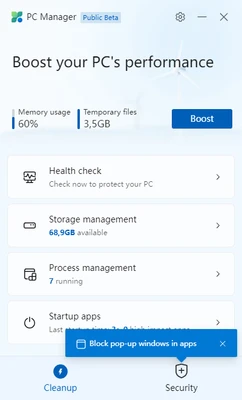
Designed for Windows 10 and Windows 11, the application combines storage cleanup, memory optimization, startup management, process monitoring, and security checks into a single dashboard. It allows users to remove temporary files, free up system resources, manage startup programs, and monitor Windows Security without navigating through multiple system settings.
The lightweight application is suitable for everyday users who want a simple way to keep their computers running smoothly without installing complex system optimization software.
Key Features
PC Health Check
Analyze system status and identify temporary files, memory usage, startup items, and other factors affecting performance.
One-Click Boost
Free system memory and terminate unnecessary background processes to improve overall responsiveness.
Storage Management
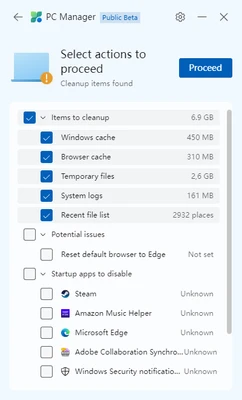
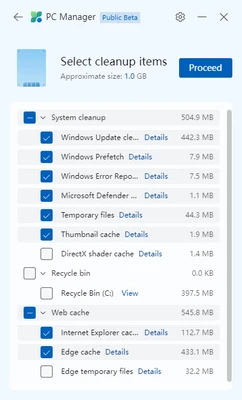
Remove temporary files, Windows Update cache, browser cache, Recycle Bin contents, and other unnecessary files to recover disk space.
Startup Management
Review and disable applications that automatically launch with Windows to reduce boot time.
Process Manager
View currently running applications and quickly close resource-intensive background processes.
Windows Security Integration
Monitor Windows Security status, antivirus protection, and security updates directly from the application.
Windows Update Cleanup
Delete obsolete Windows Update files that are no longer required after system updates.
Lightweight Design
Small installation package with minimal system resource usage.
How to Use
- Download and install Microsoft PC Manager.
- Launch the application.
- View your PC health status from the main dashboard.
- Click Boost to release memory and optimize system performance.
- Open Storage Management to remove temporary files.
- Manage startup programs to improve boot speed.
- Monitor Windows Security and install recommended updates when available.
System Requirements
- Windows 11
- Windows 10 Version 1809 or later
- 64-bit operating system recommended
- Internet connection required for updates
Pros
- Official Microsoft utility
- Clean and beginner-friendly interface
- One-click system optimization
- Integrated with Windows Security
- Lightweight and free to use
- No bundled software or advertisements
Cons
- Limited advanced optimization features
- Only available for Windows
- Some tools duplicate existing Windows utilities
- Fewer customization options than third-party system cleaners
Conclusion
Microsoft PC Manager offers a simple and reliable way to maintain Windows performance using Microsoft's own built-in management tools. Its clean interface, one-click optimization, storage cleanup, and startup management make it a good choice for users who want basic system maintenance without installing feature-heavy optimization suites.
Although it does not provide the advanced tuning options found in professional PC optimization software, it delivers an efficient, lightweight, and trustworthy solution for keeping Windows 10 and Windows 11 systems clean and responsive.