Go to Windows platform Display platforms icon
Go to Windows platform Go to Mac platform Go to Android platform
Microsoft Safety Scanner 1.455.462.0 (64-bit) icon

Microsoft Safety Scanner 1.455.462.0 (64-bit)

1.455.462.0
Microsoft Corporation
5.0
216 MB size

Free downloadable security tool for malware and virus removal!

Microsoft Safety Scanner is a free portable malware removal tool developed by Microsoft. It helps detect and remove viruses, spyware, worms, trojans, and other malicious software from Windows computers.

Unlike traditional antivirus software, it does not require installation and works as an on-demand scanner. Users can download the latest version, run a scan, and remove detected threats manually.

Microsoft Safety Scanner is designed as a secondary security tool and does not replace real-time antivirus protection.

Features

Malware Detection and Removal

Microsoft Safety Scanner can detect and remove common malware threats, including:

  • Viruses
  • Spyware
  • Trojan horses
  • Worms
  • Other malicious programs

It uses Microsoft's malware detection technology to identify suspicious files, registry entries, and system changes.

Portable Security Tool

The program runs directly after downloading without installation.

Users can:

  • Carry it on a USB drive
  • Scan multiple computers
  • Remove it by deleting the executable file

Multiple Scan Options

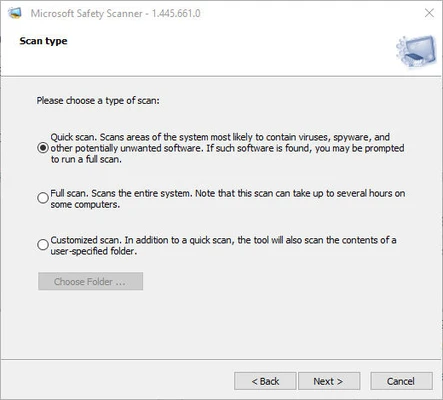
It provides different scanning modes:

  • Quick Scan
  • Full Scan
  • Custom Scan

Users can choose the appropriate scan method depending on their security needs.

Regular Malware Database Updates

Microsoft updates the tool regularly with new malware definitions and detection improvements.

For the best protection, users should download the latest version before each scan.

How to Use

  1. Download Microsoft Safety Scanner.
  2. Run the downloaded file.
  3. Accept the license agreement.
  4. Choose a scan type.
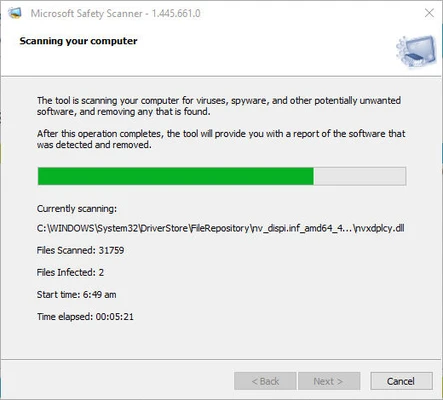
  5. Start scanning your computer.
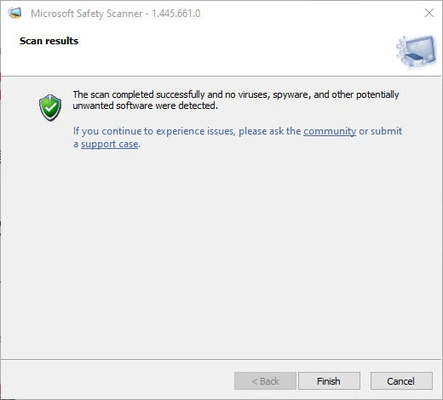
  6. Review detected threats.
  7. Follow the instructions to remove malware.

System Requirements

  • Operating System:
    • Windows 11
    • Windows 10
    • Windows 8.1
    • Windows 8
    • Windows 7
    • Windows Server editions
  • Processor:
    • 1 GHz or faster
  • RAM:
    • 1 GB or more
  • Storage:
    • 200 MB free disk space

Pros

  • Free malware removal tool
  • Developed by Microsoft
  • No installation required
  • Easy to use
  • Works alongside existing antivirus software
  • Regularly updated malware definitions

Cons

  • No real-time protection
  • Must manually download updates
  • Only available for Windows
  • Cannot replace full antivirus software

Alternatives

  • Malwarebytes
  • Microsoft Defender
  • AdwCleaner
  • HitmanPro
  • ESET Online Scanner

Conclusion

Microsoft Safety Scanner is a useful emergency malware removal tool for Windows users. It is lightweight, portable, and easy to run when you suspect your computer may be infected.

Although it does not provide continuous protection like a full antivirus program, it works well as an additional security scanner for detecting and removing malware threats.

Information about Microsoft Safety Scanner 1.455.462.0 (64-bit)

License Freeware
Op. System Windows
Category Security Software
Language English + more
Author Microsoft Corporation
permission icon Permissions Not applicable
Date 2026-08-03
Size 216 MB
File type Official Website

Apps recommended for you

360 Total Security 12.0.0.1191 icon
More than Security, Lightening your PC For Free, For Ever!
RogueKiller 16.8.3.0 icon
RogueKiller is a small software that serves to eliminate rogue processes
Kaspersky Rescue Disk 18.0.11.3d icon
Protection from viruses loading at Windows startup!
Password Safe 3.72.1 icon
Safely create a secured and encrypted user name/password list
ClamAV icon
ClamAV is a free open-source antivirus engine designed to detect malware, viruses, and threats across Windows, Linux, and server environments.
Microsoft Safety Scanner icon
A standalone on-demand computer scanner that performs quick, full, or custom analysis on your computer to detect potential threats
Infection Monkey icon
Infection Monkey is an open-source security tool used to simulate cyberattacks and test network vulnerabilities.
AdGuard Ad Blocker 8.0.5560 icon
The best way to get rid of intrusive ads and online tracking!
Trojan Remover 6.9.6.2995 icon
The best way to destroy trojans
SuperAntiSpyware 10.0.0.1290 icon
Detect and eliminate any kind of malware from your system
Microsoft Safety Scanner 1.459.242.0 (64-bit) icon
Free downloadable security tool for malware and virus removal!
Windows Firewall Control 6.33.0.0 icon
Managing Windows Firewall is now easier than ever Program Overview
360 Total Security 12.0.0.1198 icon
More than Security, Lightening your PC For Free, For Ever!
AdGuard Ad Blocker 8.0.1.5570 icon
The best way to get rid of intrusive ads and online tracking!
Trellix Stinger 26.09.37.1 (64-bit) icon
A freeware virus scanner utility to remove specific viruses and rootkits
360 Total Security 12.0.0.1196 icon
More than Security, Lightening your PC For Free, For Ever!
Kaspersky Rescue Disk icon
Download Kaspersky Rescue Disk, a free bootable antivirus ISO tool to remove malware, viruses, and rootkits from infected or non-bootable Windows systems.
Kaspersky Rescue Disk 18.0.11.3d icon
Protection from viruses loading at Windows startup!
Adlice Diag 4.0.9 icon
Diagnose your Windows PC - Detect unknown threats and eliminate them!
NxFilter 4.7.5.4 icon
Faster, Lighter and Easier Network Filtering for Windows PC
Trellix Stinger 26.6.25.2 (64-bit) icon
A freeware virus scanner utility to remove specific viruses and rootkits
Comodo Antivirus Software icon
Comodo Antivirus Software is a free antivirus that protects against viruses and malware in real time.
Emsisoft Emergency Kit icon
Emsisoft Emergency Kit is a free portable malware scanner developed by Emsisoft for quickly detecting and removing viruses and other threats.

ESET Smart Security Premium 19.2.7.0 (64-bit) icon
All-in-one protection lets you work, play and explore online with confidence