Microsoft Safety Scanner is a free, portable malware removal tool from Microsoft designed to help detect and remove malicious software from Windows computers.
Unlike a traditional antivirus program, Safety Scanner does not provide real-time protection or automatic background monitoring. Instead, it is an on-demand scanner that users can download and run manually when they want to check a Windows PC for malware.
The tool is particularly useful as a second-opinion scanner when you suspect that a computer may be infected or want to perform an additional malware check alongside your existing security software.
Key Features
On-Demand Malware Scanning: Manually scan a Windows computer for known malware and other malicious software.
Malware Removal: When supported threats are detected, the tool can attempt to remove them from the system.
Portable: Microsoft Safety Scanner does not require a traditional installation. Download the executable and run it directly.
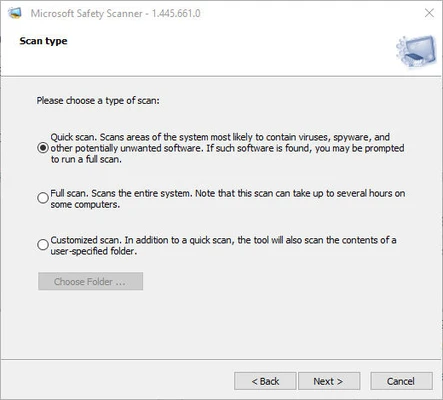
Multiple Scan Options: Choose from available scan types depending on how thoroughly you want to check the system.
Regularly Updated: New versions are released with updated malware detection capabilities. Microsoft recommends downloading the latest version before running a scan.
Temporary Tool: The downloaded executable is intended for short-term use and does not function as a permanent security application.
How It Works
Microsoft Safety Scanner is designed as a supplementary malware detection and removal tool.
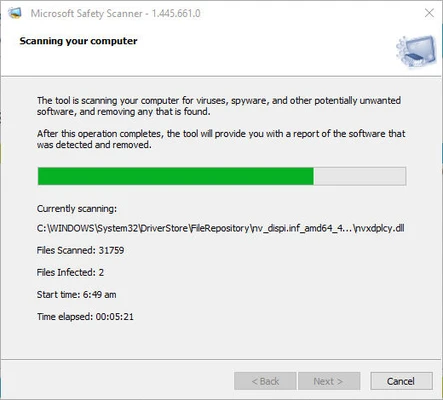
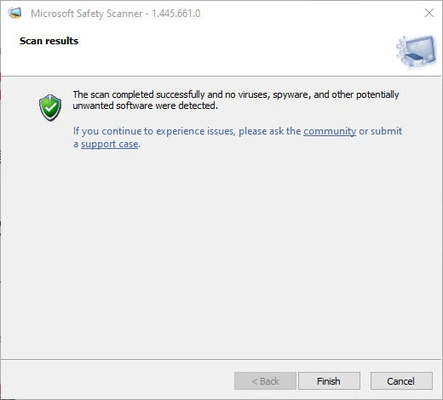
After downloading the latest version, launch the executable and select a scan type. The scanner checks the system for supported malware and displays the results after the scan is completed.
If threats are detected, the tool provides information about the findings and attempts to remove supported malicious software.
Because Safety Scanner does not provide real-time protection, it should be used together with a full-time antivirus or endpoint security solution rather than as a replacement for one.
How to Use
- Download the latest version of Microsoft Safety Scanner.
- Run the downloaded executable.
- Accept the applicable terms and follow the instructions.
- Select the desired scan type.
- Start the scan and wait for it to complete.
- Review the scan results.
- Follow the recommended actions if malware is detected.
The tool can be removed simply by deleting the downloaded executable when it is no longer needed.
Important Notes
Microsoft Safety Scanner is not a replacement for antivirus software.
It does not provide continuous real-time protection, automatic background monitoring, or the complete security features normally found in a dedicated antivirus product.
Also, each downloaded version of Safety Scanner is valid for 10 days from the time it is downloaded. For the latest malware definitions and detection improvements, download a fresh copy before performing a new scan.
FAQ
Is Microsoft Safety Scanner free?
Yes. Microsoft Safety Scanner is available as a free malware scanning and removal utility for Windows.
Does Microsoft Safety Scanner replace Microsoft Defender or antivirus software?
No. It is an on-demand scanning tool and should be used as a supplementary security utility rather than as your primary antivirus solution.
Does Microsoft Safety Scanner require installation?
No. The tool can be run directly from its downloaded executable without a traditional installation process.
How long is Microsoft Safety Scanner valid?
Each downloaded version is valid for 10 days. Microsoft recommends downloading the latest version before running a new scan.
Can I use it with another antivirus program?
Yes. It is designed as an on-demand scanner and can be useful as an additional malware-checking tool.
Does it detect every type of malware?
No. Safety Scanner is designed to detect and remove supported malware threats, but no single malware scanner can guarantee detection of every possible threat.
How do I remove Microsoft Safety Scanner?
There is normally no uninstallation process. Simply delete the downloaded executable after you finish using it.
Alternatives
Malwarebytes – Malware detection and removal software with additional security features.
AdwCleaner – A lightweight tool focused on removing adware, unwanted programs, and browser-related threats.
HitmanPro – An on-demand malware scanner designed to provide an additional layer of threat detection.
System Requirements
Microsoft Safety Scanner is designed for supported Windows operating systems. The tool is available in versions appropriate for supported 32-bit and 64-bit Windows environments.
Because Microsoft periodically updates the supported operating systems and distribution packages, check the latest Microsoft documentation before installing or running the tool on an older version of Windows.
PROS
- Free to use
- Portable and easy to run
- No traditional installation required
- Useful as a second-opinion malware scanner
- Can attempt to remove detected malware
- Regularly updated
CONS
- No real-time protection
- Not a replacement for antivirus software
- Each download is valid for only 10 days
- Does not guarantee detection of every malware threat
- Requires manual scanning
Conclusion
Microsoft Safety Scanner is a useful free utility for Windows users who want an additional way to check their computers for malware. Its portable design makes it convenient for occasional scans, troubleshooting, and second-opinion security checks.
However, it should not be treated as a replacement for a full antivirus solution. For continuous protection, users should keep Microsoft Defender or another reputable security product enabled and up to date.
Note: Download the latest version before each scan because individual Safety Scanner downloads are valid for 10 days.