

Pianoteq is a professional virtual piano and instrument software developed by MODARTT. Unlike traditional sample-based virtual instruments, it uses physical modeling technology to generate sound dynamically. This approach provides a highly responsive playing experience while keeping the software lightweight and highly customizable.
Pianoteq is designed for musicians, composers, producers, sound designers, educators, and anyone looking for a realistic virtual piano without the large sample libraries required by many traditional piano instruments.
Key Features
Physical Modeling Sound Engine: Generates sound dynamically through physical modeling instead of relying on large collections of pre-recorded samples.
Wide Instrument Selection: Includes grand pianos, upright pianos, electric pianos, harpsichords, clavinets, cimbaloms, and other instruments.
Advanced Sound Customization: Allows users to adjust tuning, hammer hardness, string characteristics, resonance, overtones, soundboard response, microphone placement, and other parameters.
Realistic Piano Response: Supports sympathetic resonance, sustain pedal resonance, duplex scale resonance, partial pedaling, unison detuning, and continuous velocity control.
MIDI and MPE Support: Works with standard MIDI keyboards and advanced expressive controllers, including MPE-compatible devices.
Built-in Effects: Includes EQ, reverb, chorus, tremolo, wah-wah, and convolution reverb for additional sound shaping.
Standalone and Plugin Support: Can be used as a standalone application or integrated into compatible DAWs as a virtual instrument plugin.
Lightweight Design: Requires significantly less storage and memory than many sample-based piano instruments.
Instrument Morphing and Layering: Allows compatible instruments to be layered or modified to create unique hybrid sounds.
Microtuning and Extended Range: Provides advanced tuning options and an extended keyboard range for specialized performances.
User Interface
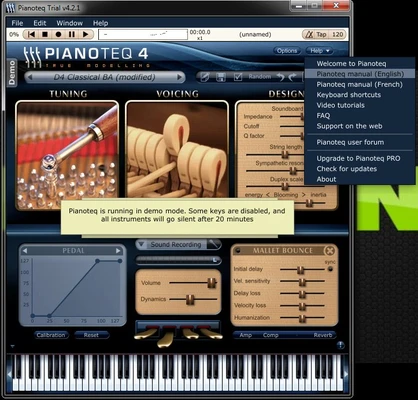
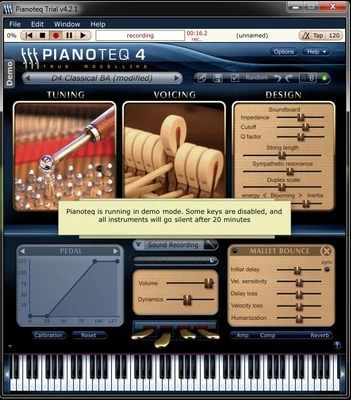
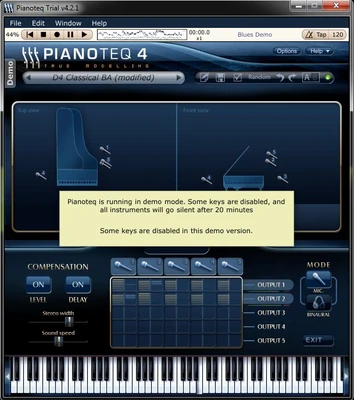
Pianoteq features a clean and organized interface with quick access to instruments, sound settings, effects, and MIDI configuration.
The main interface makes it easy to select instruments and adjust common settings, while advanced controls provide detailed options for users who want to fine-tune the sound.
The layout balances accessibility and professional-level control, making the software suitable for both beginners and experienced musicians.
Installation and Setup
Download the appropriate installer for your operating system and follow the on-screen instructions to complete the installation.
After installation, launch Pianoteq and activate the software using your license information. Configure your preferred audio driver and connect your MIDI keyboard or controller.
If you plan to use Pianoteq with a DAW, install the required plugin format and load it as a virtual instrument.
How to Use
Select an Instrument: Choose a piano or other virtual instrument from the available library.
Connect a MIDI Controller: Connect your MIDI keyboard or compatible controller and configure it through the MIDI settings.
Adjust the Sound: Modify tuning, voicing, hammer hardness, resonance, soundboard characteristics, and other parameters.
Apply Effects: Use the built-in EQ, reverb, chorus, tremolo, or other effects to shape the final sound.
Record Your Performance: Use Pianoteq in standalone mode or load it into a DAW for recording and music production.
Create Custom Sounds: Experiment with physical modeling parameters, layering, and morphing features to create personalized instruments.
FAQ
What makes Pianoteq different from sampled piano software?
Pianoteq uses physical modeling to generate sound dynamically instead of primarily playing back recorded samples. This results in a much smaller installation and provides extensive control over the characteristics of the instrument.
Does Pianoteq support MIDI keyboards?
Yes. Pianoteq supports standard MIDI controllers as well as advanced expressive and MPE-compatible controllers.
Can Pianoteq be used with a DAW?
Yes. Pianoteq can be loaded as a virtual instrument plugin in compatible digital audio workstations for recording, arranging, and music production.
Does Pianoteq work offline?
After the software has been activated, it can generally be used without a continuous internet connection.
Is Pianoteq suitable for professional music production?
Yes. Its realistic response, detailed physical modeling, extensive customization, and DAW integration make it suitable for professional musicians, composers, producers, and sound designers.
Does Pianoteq require a powerful computer?
No. One of its main advantages is its relatively low resource usage compared with large sample-based virtual instruments. However, performance requirements can increase when using complex setups or multiple instances.
Alternatives
Keyscape: A large collection of sampled keyboard and piano instruments designed for professional music production.
Native Instruments Noire: A detailed sampled grand piano designed for expressive and cinematic performances.
Pricing
Pianoteq is available in multiple editions with different levels of functionality and instrument access. Additional instrument packs can be purchased separately.
Pricing and available editions may change over time, so users should check the current official pricing before purchasing.
System Requirements
-
Operating System: Windows 7, 8, 10, or 11 (64-bit)
-
Processor: 1 GHz or faster
-
RAM: 512 MB minimum, 2 GB recommended
-
Storage: Approximately 40 MB or more
-
Audio Interface: ASIO-compatible audio hardware recommended
-
MIDI Controller: Optional but recommended for playing piano instruments
Pros
-
Highly realistic and expressive sound
-
Extremely lightweight compared with large sample libraries
-
Extensive sound customization
-
Supports MIDI and MPE controllers
-
Standalone and plugin operation
-
Suitable for professional music production
-
Low storage and memory requirements
-
Wide selection of acoustic and electronic instruments
Cons
-
Full versions can be expensive
-
Advanced controls may take time to learn
-
Some users may prefer the character of traditional sampled pianos
-
Additional instrument packs may require separate purchases
-
Physical modeling may sound different from traditional sampled instruments
Conclusion
Pianoteq is a powerful virtual piano and instrument solution that combines physical modeling technology with detailed sound customization and highly responsive performance.
Its lightweight design makes it an attractive alternative to large sample-based piano libraries, while its extensive modeling controls give experienced musicians and sound designers considerable freedom to shape the sound.
With support for MIDI controllers, expressive performance technologies, standalone operation, and DAW integration, Pianoteq is a versatile choice for musicians, composers, producers, and anyone looking for a flexible virtual piano solution.