Rapid CSS Editor is a lightweight code editor designed for creating and editing CSS-based websites. It supports HTML, CSS, LESS, SASS, JavaScript, PHP, XML, and other web development languages, with features such as code completion, syntax highlighting, CSS validation, built-in browser previews, and FTP/SFTP support.
Key Features
-
CSS and HTML Editing
-
Syntax Highlighting
-
Intelligent Code Completion
-
Code Inspector
-
Code Snippets and Templates
-
CSS Validation
-
HTML Validation
-
LESS and SASS Support
-
JavaScript and PHP Support
-
Built-in Browser Preview
-
Responsive Web Design Tools
-
Advanced Search and Replace
-
Regular Expression Search
-
FTP, SFTP, and FTPS Support
-
CSS Prefixer and Compatibility Tools
-
Color Picker
-
AI Coding Assistant
User Interface
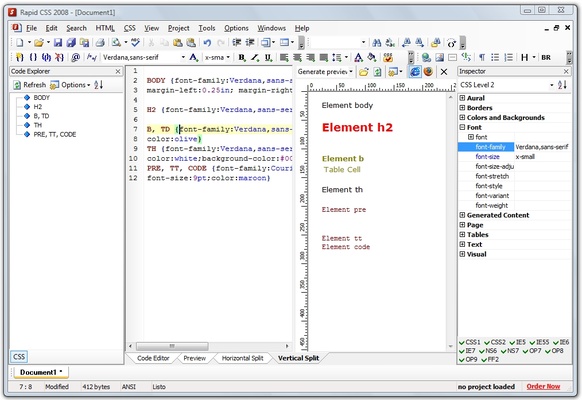
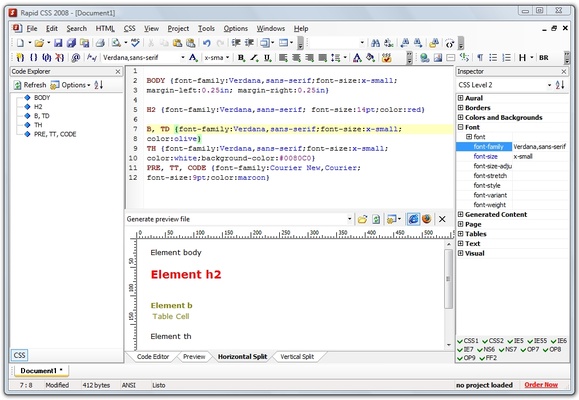
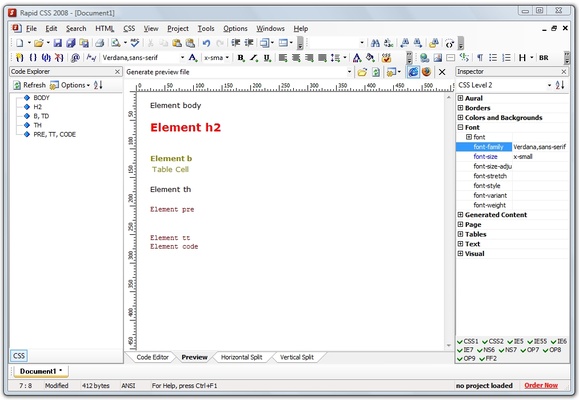
Rapid CSS Editor provides a compact development interface with a code editor, navigation panels, toolbars, and preview tools. Syntax highlighting and code completion make it easier to work with web development files, while the built-in preview allows users to check how their pages appear at different screen sizes.
Installation and Setup
Install Rapid CSS Editor using the standard Windows installer and follow the on-screen instructions. After installation, open an existing web project or create a new file and configure the editor according to your development workflow.
How to Use
-
Launch Rapid CSS Editor and open an existing project or create a new file.
-
Write or edit HTML and CSS code using syntax highlighting and code completion.
-
Use code snippets and templates to speed up repetitive tasks.
-
Run the built-in CSS or HTML validation tools to check your code.
-
Preview the website using the built-in browser tools and test different screen sizes.
-
Use FTP, SFTP, or FTPS to upload or edit files on a remote server.
-
Use the search and replace tools to quickly modify project files.
Pros
-
Lightweight and responsive
-
Strong CSS and HTML editing features
-
Built-in code completion and validation
-
Integrated browser preview
-
FTP/SFTP/FTPS support
-
Includes web development utilities and AI assistance
Cons
-
Focused primarily on web development rather than general-purpose programming
-
Smaller extension ecosystem than larger code editors
-
Requires a paid license after the trial period
Conclusion
Rapid CSS Editor combines a lightweight code editor with specialized tools for HTML and CSS development. Its code completion, validation, responsive preview, CSS utilities, and remote file support make it suitable for developers who want a focused environment for creating and maintaining websites.