

Stencyl is a 2D game development tool that allows users to create games for desktop, mobile, and web platforms without requiring traditional programming skills. Its visual drag-and-drop workflow makes it accessible to beginners, while its behavior editor and Haxe support provide additional flexibility for more experienced developers.
Stencyl is primarily designed for 2D games and can be used to create scenes, characters, animations, game logic, physics, and interactive elements for different target platforms.
What's New
The latest version includes improvements to the toolset, iOS build support, and extension development.
-
Fixed issues when viewing logged images with missing data.
-
Improved iOS build target detection.
-
Filters iOS devices that do not meet the required minimum SDK version.
-
Added support for automatically compiling simple toolset extensions when dependencies are not required.
-
Various bug fixes and stability improvements.
Key Features
Visual Game Development – Create game scenes, objects, characters, and gameplay logic using a visual drag-and-drop workflow.
Block-Based Behavior Editor – Build game behaviors with visual programming blocks without having to write traditional code.
Haxe Support – Experienced developers can use Haxe to create custom functionality and extend their projects.
2D Game Creation – Provides tools for designing levels, characters, objects, animations, and interactive game elements.
Physics Engine – Supports collision detection, movement, and physics-based interactions for creating more realistic gameplay.
Scene Designer – Design game levels using tools such as selection, grid snapping, zooming, and visual editing.
Asset Management – Import and organize custom graphics, sounds, characters, and other game assets.
Cross-Platform Publishing – Supports development and publishing for platforms such as Windows, macOS, Linux, iOS, Android, and web-based targets, depending on the current version and license.
Testing Tools – Test games during development and identify problems before publishing.
Game Monetization – Supports features that can be used for commercial games, including advertising and in-app purchases where supported by the target platform.
User Interface
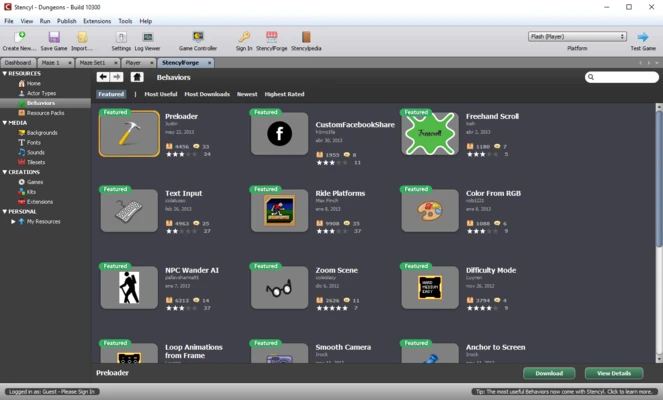
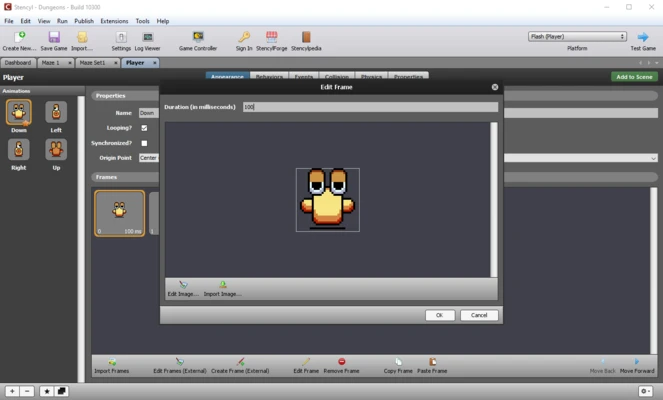
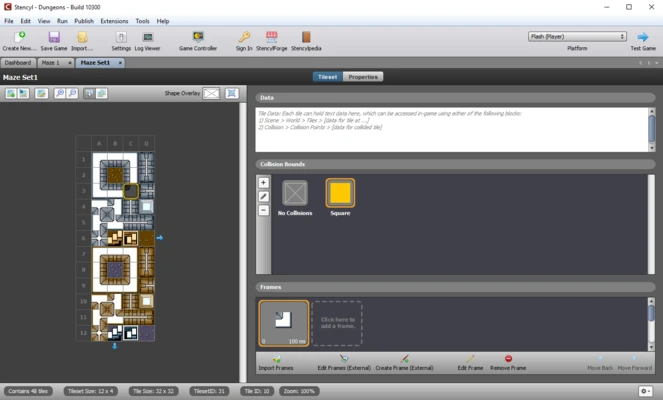
Stencyl uses a visual development interface divided into areas for scene design, behavior editing, assets, and project management.
The Scene Designer provides a visual workspace for building levels, while the Behavior Editor uses block-based programming to create game logic. This approach allows beginners to build functional games without immediately learning a traditional programming language.
Advanced users can work with Haxe when visual scripting is not sufficient for a particular project.
Installation and Setup
Download and install the appropriate version of Stencyl for your operating system, then follow the installation instructions.
After installation:
-
Launch Stencyl.
-
Create or open a game project.
-
Select the desired target platform.
-
Import your game assets.
-
Configure project settings.
-
Set up the required development components for your target platform.
-
Test the project before publishing.
Some platforms, particularly mobile targets, may require additional SDKs, certificates, development tools, or platform-specific configuration.
How to Use
Create a Project
Start a new project and select the appropriate game template and target platform.
Design the Game
Use the Scene Designer to create levels and add actors, tiles, backgrounds, and other game elements.
Create Game Logic
Add behaviors using the visual block-based editor. More experienced developers can use Haxe for custom functionality.
Add Assets
Import graphics, sounds, animations, and other resources required by your game.
Test the Game
Run the project using Stencyl's testing tools and check gameplay, controls, physics, and performance.
Publish the Game
When development is complete, choose the appropriate publishing option for your target platform and configure the required platform-specific settings.
FAQ
Is Stencyl free?
Stencyl has offered different licensing options, including a free option and paid plans. Available features and publishing capabilities depend on the current license.
Do I need programming experience to use Stencyl?
No. The visual block-based Behavior Editor allows beginners to create game logic without traditional programming. Haxe support is available for developers who need more advanced control.
Can Stencyl create 3D games?
Stencyl is primarily designed for 2D game development and is not intended for complex 3D games.
What platforms does Stencyl support?
Depending on the current version and license, Stencyl supports platforms including Windows, macOS, Linux, iOS, Android, and web-based targets.
Can I publish Stencyl games commercially?
Yes, Stencyl can be used for commercial game development, although publishing and commercial features may depend on the selected license and target platform.
Can I use Haxe with Stencyl?
Yes. Stencyl uses Haxe for generated game code and provides options for experienced developers who need to work beyond the visual programming system.
Is Stencyl suitable for beginners?
Yes. Its visual editor, drag-and-drop workflow, and block-based scripting make it particularly suitable for beginners and indie developers.
Alternatives
Unity – A full-featured game engine supporting both 2D and 3D game development with extensive development and publishing tools.
Godot Engine – A free and open-source game engine supporting both 2D and 3D projects.
Construct – A visual game development platform focused primarily on creating 2D games with minimal coding.
GameMaker – A game development environment widely used for 2D games, offering both visual tools and traditional scripting.
Cocos Creator – A cross-platform game development engine with strong support for 2D and mobile game development.
Pricing
Stencyl offers different licensing options depending on the required features and publishing platforms. A free option is available, while paid plans provide additional publishing capabilities and features.
Pricing and licensing terms may change, so users should check the current plans before purchasing.
System Requirements
Operating System: Windows, macOS, or Linux
Processor: Modern x64 processor
Memory: 4 GB RAM or more recommended
Storage: Sufficient free disk space for the application, project files, and imported assets
Additional development software or SDKs may be required for specific target platforms such as iOS and Android.
Pros
-
Easy visual game development workflow
-
No traditional programming required for basic projects
-
Powerful block-based behavior editor
-
Haxe support for advanced development
-
Strong focus on 2D game development
-
Supports multiple target platforms
-
Suitable for beginners and indie developers
-
Integrated scene and asset editing tools
Cons
-
Primarily focused on 2D games
-
Advanced publishing features may require a paid license
-
Mobile publishing can require additional development setup
-
Less suitable for large and technically complex projects
-
Platform support and publishing options vary by license
Conclusion
Stencyl is a user-friendly game development platform focused on creating 2D games with minimal traditional coding. Its drag-and-drop workflow, visual behavior editor, scene designer, physics tools, and Haxe support make it suitable for beginners, hobbyists, and indie developers.
It is a good choice for users who want to build 2D games without dealing with the complexity of a large traditional game engine. However, developers working on advanced 3D projects or highly complex commercial games may need a more comprehensive development platform.