Trellix Stinger (formerly McAfee Stinger) is a standalone malware removal utility designed to detect and remove specific viruses, Trojans, and other malware threats. It is intended as a supplementary scanning tool rather than a replacement for full antivirus software.
Key Features
-
Malware Detection and Removal – Scans for and removes supported malware threats.
-
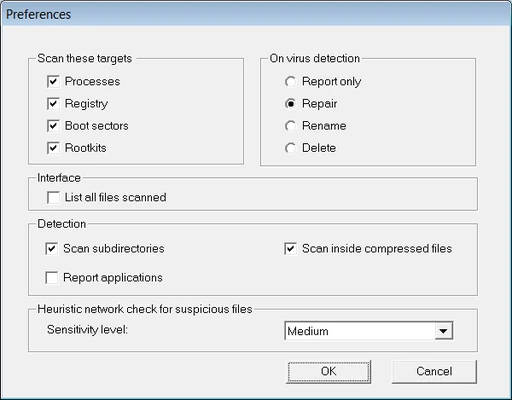
Real Protect – Uses behavioral analysis and machine learning to help identify suspicious activity.
-
Rootkit Scanning – Provides additional scanning for rootkit-related threats.
-
Custom Scans – Select specific drives, folders, or locations to scan.
-
Quarantine – Isolates detected threats to prevent them from affecting the system.
-
Command-Line Support – Allows administrators to run scans using command-line options.
-
Scan Logs – Records scan results for later review.
-
Threat Reputation – Uses cloud-based file reputation and network heuristics to improve threat detection.
User Interface
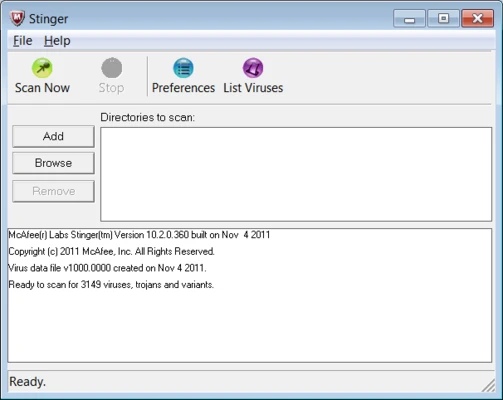
Trellix Stinger uses a simple interface focused on malware scanning. Users can start a scan, customize the locations to be checked, review detected threats, and access scan logs without navigating through a complex configuration system.
Installation and Setup
Stinger is a portable utility and does not require a traditional installation. Download the executable, save it to a convenient location, and run it.
Because it is a standalone scanner, it can also be useful when troubleshooting an infected computer where installing or running a full security suite is difficult.
How to Use
-
Run the Stinger executable.
-
Review the default scan locations.
-
Select Customize my scan if you want to scan additional drives or folders.
-
Enable rootkit scanning when required.
-
Click Scan to begin.
-
Review detected threats after the scan finishes.
-
Allow Stinger to repair or quarantine detected files as appropriate.
-
Check the scan log for additional details.
Stinger is designed to target specific threats, so it should be used alongside a complete antivirus solution rather than as the computer's only security software.
System Requirements
-
Windows PC
-
Internet connection recommended for reputation and threat intelligence features
-
No traditional installation required
Pros
-
Portable and easy to run
-
Designed for targeted malware removal
-
Supports custom scans
-
Includes rootkit scanning
-
Provides quarantine and scan logs
-
Useful for troubleshooting infected systems
Cons
-
Not a replacement for full antivirus software
-
Focused on specific supported threats rather than comprehensive protection
-
No full antivirus management or scheduled scanning
-
Advanced detection features may require an Internet connection
Conclusion
Trellix Stinger is a lightweight malware removal tool that can be useful when checking a Windows PC for specific threats. Its portable design, custom scanning, rootkit detection, quarantine, and behavioral analysis make it a practical second-opinion scanner for malware troubleshooting.
It should not replace a full antivirus solution, but it can be a useful addition when investigating or cleaning an infected system.