


WebSite Auditor is a desktop SEO tool designed to analyze websites for technical and on-page optimization issues. It crawls websites, identifies problems that can affect search engine visibility, and provides recommendations for improving page structure, content, and technical SEO.
It is part of the SEO PowerSuite toolkit and is available for Windows, macOS, and Linux.
What's New
-
Improved technical website auditing and crawling.
-
Enhanced on-page SEO analysis and optimization recommendations.
-
Improved content optimization workflows.
-
Updated XML sitemap and robots.txt management tools.
-
Enhanced reporting and customization options.
-
Improved support for modern websites and web technologies.
-
Performance and stability improvements.
Key Features
-
Technical SEO Audit: Detect broken links, duplicate content, missing metadata, redirect problems, indexing issues, and other technical SEO errors.
-
Website Crawler: Crawl internal and external website resources, including HTML, CSS, JavaScript, images, and other supported content.
-
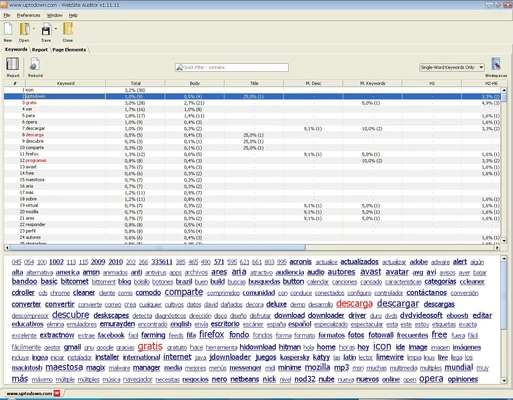
On-Page SEO Analysis: Evaluate individual pages and keywords based on SEO factors and competitor data.
-
Content Optimization: Analyze page content and receive recommendations for improving keyword usage, titles, descriptions, and other elements.
-
Competitor Analysis: Compare pages with top-ranking competitors to identify optimization opportunities.
-
XML Sitemap Generator: Create and manage XML sitemaps for website pages.
-
Robots.txt Editor: Generate, edit, and review robots.txt instructions.
-
Page Optimization: Optimize content through a visual editor or HTML interface.
-
Title and Meta Description Management: Create and edit page titles and meta descriptions while previewing search snippets.
-
Custom Reports: Generate customizable SEO reports for websites and clients.
-
Scheduled Audits: Automate website audits and reporting tasks.
-
Multi-Language Support: Available in multiple interface languages.
-
Search Engine Bot Simulation: Crawl websites using settings that emulate supported search engine bots.
User Interface
The software uses a project-based interface that organizes website audits, pages, SEO data, and reports into separate sections.
The main dashboard provides access to website structure analysis and optimization tools. Detailed reports show detected problems, affected URLs, and recommended actions, making it easier to prioritize technical and on-page SEO work.
Installation and Setup
-
Download and install the appropriate version for Windows, macOS, or Linux.
-
Launch the application after installation.
-
Create a new SEO project.
-
Enter the website URL you want to analyze.
-
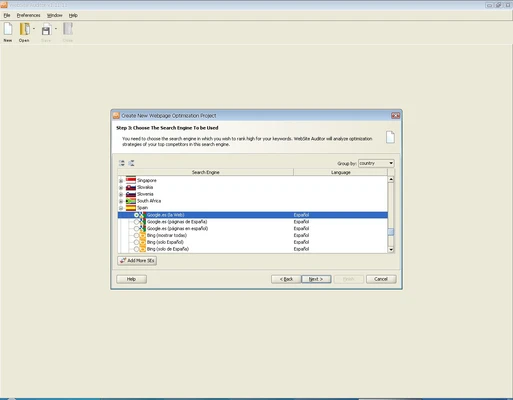
Configure crawler and search engine settings if required.
-
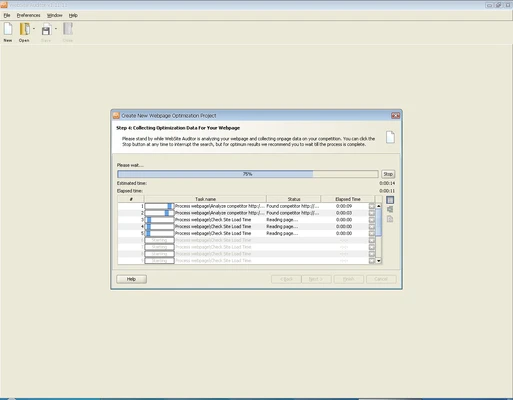
Start the website audit.
-
Review the generated SEO reports and recommendations.
The application may require Java Runtime Environment depending on the version and operating system.
How to Use
Create a Project
-
Launch WebSite Auditor.
-
Create a new project and enter your website address.
-
Configure the required crawling settings.
-
Start the website analysis.
Run a Technical Audit
-
Allow the crawler to scan the website.
-
Review detected technical issues.
-
Check broken links, duplicate pages, missing metadata, redirects, and other problems.
-
Open individual issues to view the affected URLs and recommended solutions.
Optimize Page Content
-
Select a page and target keyword.
-
Review its on-page optimization score.
-
Compare the page with competing results.
-
Follow the recommendations to improve content, headings, titles, descriptions, and keyword usage.
Manage Sitemaps
-
Open the sitemap tools.
-
Generate or update an XML sitemap.
-
Review the included URLs.
-
Save the sitemap for uploading to your website.
Create Reports
-
Select the required audit and SEO data.
-
Customize the report sections.
-
Export or share the completed report.
-
Schedule recurring reports when necessary.
FAQ
What is WebSite Auditor used for?
WebSite Auditor is used to find technical and on-page SEO problems that may affect a website's search engine visibility and usability.
Can WebSite Auditor crawl an entire website?
Yes. It can crawl website pages and supported resources to analyze technical and structural SEO issues.
Can it find broken links?
Yes. The crawler can identify broken internal and external links and show the affected pages.
Can WebSite Auditor optimize website content?
Yes. Its page optimization tools analyze content against target keywords and provide recommendations for improving on-page SEO.
Can it generate XML sitemaps?
Yes. The software includes tools for creating and managing XML sitemaps.
Can it edit robots.txt files?
Yes. WebSite Auditor includes tools for creating, reviewing, and editing robots.txt instructions.
Does WebSite Auditor work on macOS and Linux?
Yes. The software supports Windows, macOS, and Linux.
Does WebSite Auditor require an internet connection?
An internet connection is required for many functions, including website crawling, search engine data collection, license activation, and software updates.
Is WebSite Auditor free?
A free version is available with limitations. Some features, including project management and advanced reporting capabilities, require a paid license.
Alternatives
-
Screaming Frog SEO Spider – A desktop website crawler focused on technical SEO audits and website analysis.
-
Semrush – A comprehensive online SEO platform covering site auditing, keyword research, competitor analysis, and other SEO functions.
-
Ahrefs – An SEO platform with strong site auditing, backlink analysis, keyword research, and competitor research tools.
-
SE Ranking – An SEO platform offering website auditing, rank tracking, keyword research, and competitor analysis.
Pricing
Free Edition – Provides basic website auditing and optimization features with limitations.
Professional – Provides expanded project capabilities, advanced analysis, and additional SEO functions for individual users and businesses.
Enterprise – Adds advanced reporting, automation, and client-oriented features for agencies and larger organizations.
Pricing and available features may vary depending on the current license plans.
System Requirements
-
Operating System: Windows 7, 8, 10, or 11; macOS; Linux
-
Processor: Intel/AMD processor, 1.5 GHz or faster recommended
-
RAM: 2 GB minimum, 4 GB or more recommended
-
Storage: At least 500 MB of available disk space
-
Display: 1024×768 resolution or higher
-
Internet connection required for license activation, updates, and online SEO data
-
Java Runtime Environment may be required
Pros
-
Comprehensive technical SEO auditing
-
Detailed on-page optimization analysis
-
Website crawling capabilities
-
Built-in sitemap and robots.txt tools
-
Competitor-based content optimization
-
Customizable SEO reports
-
Supports Windows, macOS, and Linux
Cons
-
Free version has feature limitations
-
Large websites can require considerable processing time
-
Some advanced features require a paid license
-
Requires an internet connection for many functions
-
May have a learning curve for beginners
Conclusion
WebSite Auditor is a comprehensive desktop SEO tool for identifying and resolving technical and on-page website optimization problems. Its combination of website crawling, content analysis, competitor comparison, sitemap management, and reporting makes it useful for website owners, SEO professionals, and agencies.
It is particularly suitable for users who want detailed website audits and page-level optimization tools in a desktop application.