

GeoGebra is a free and versatile mathematics software for Windows that combines geometry, algebra, graphing, calculus, statistics, probability, spreadsheets, and 3D visualization in a single application.
Designed for students, teachers, researchers, and other users working with mathematics, GeoGebra makes complex concepts easier to understand through interactive visualizations and dynamic mathematical models.
The software supports both numerical and symbolic calculations and allows users to create interactive constructions, explore equations, analyze data, and visualize mathematical relationships. It is also available across multiple platforms, making it easy to continue working on different devices.
Key Features
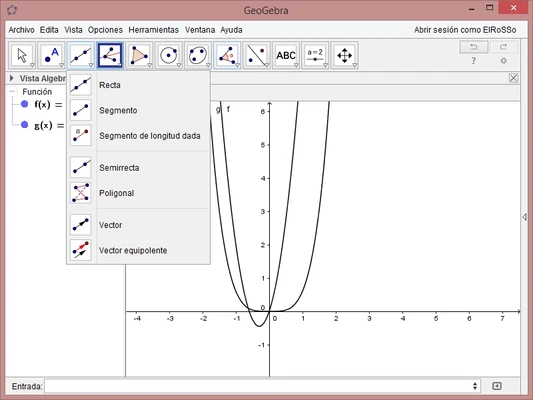
Dynamic Geometry: Create and manipulate points, lines, circles, polygons, and other geometric objects while observing relationships change in real time.
Graphing: Plot functions, equations, inequalities, and other mathematical objects with interactive controls.
Algebra and CAS: Enter algebraic expressions, solve equations, simplify formulas, and perform symbolic calculations with the Computer Algebra System.
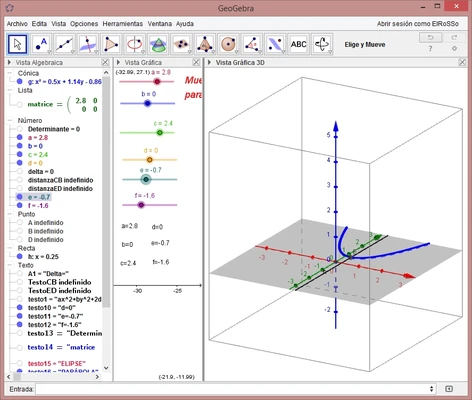
3D Graphics: Create and explore three-dimensional objects, surfaces, equations, and geometric constructions.
Statistics and Probability: Analyze datasets, create statistical graphs, and explore probability concepts using dedicated tools.
Spreadsheet: Enter and analyze numerical data in a spreadsheet while connecting it with graphs and mathematical objects.
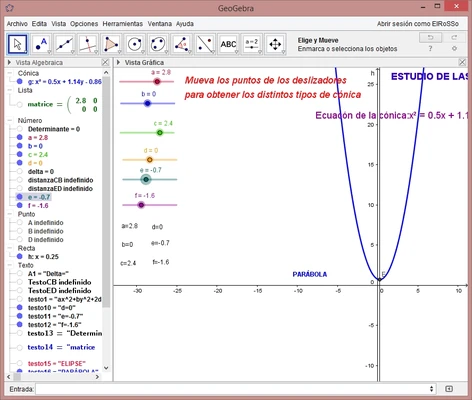
Interactive Sliders: Adjust variables and parameters dynamically to see how mathematical models change.
Cross-Platform Support: GeoGebra is available for Windows, macOS, Linux, Android, and iOS.
Scripting and Customization: Use GeoGebra commands and scripting capabilities to create customized mathematical activities and automate tasks.
Online Resources: Access and share interactive worksheets, lessons, exercises, and other educational materials.
Calculator Options
GeoGebra provides several calculator interfaces for different types of mathematical work.
Calculator Suite: Provides the broadest range of GeoGebra tools, including graphing, geometry, CAS, spreadsheets, statistics, and probability.
Graphing Calculator: Focuses on graphing functions, equations, and mathematical expressions.
Geometry: Designed primarily for dynamic geometric constructions.
3D Calculator: Provides tools for three-dimensional mathematical visualization.
CAS Calculator: Focuses on symbolic algebra and exact calculations.
Scientific Calculator: Provides basic numerical calculations and table-based functions.
User Interface
GeoGebra uses a flexible interface that can display different mathematical views depending on the task.
The Algebra View shows equations, expressions, variables, and calculated values, while the Graphics View displays graphs and geometric constructions.
Additional views include the Spreadsheet, CAS, and 3D Graphics panels. Users can switch between views and customize the workspace according to their needs.
The interface is relatively easy to learn for basic graphing and geometry, while the more advanced CAS and 3D tools provide additional functionality for experienced users.
Installation and Setup
GeoGebra can be installed on supported Windows computers using the desktop application.
-
Download the Windows version.
-
Run the installer and follow the on-screen instructions.
-
Complete the installation.
-
Launch GeoGebra from the Start menu or desktop shortcut.
-
Select the calculator or workspace that matches your task.
An internet connection is not required for basic offline use, although online resources, synchronization, and other connected features require internet access.
How to Use
Create Geometry: Open the Geometry or Graphics view and use tools such as Point, Line, Circle, and Polygon to create constructions.
Graph Equations: Enter an equation such as y = x² in the input field. GeoGebra automatically displays the corresponding graph.
Explore Parameters: Create sliders for variables and adjust them to observe how graphs and geometric constructions change.
Analyze Data: Enter numerical values into the Spreadsheet view and use statistical tools to analyze the dataset.
Use CAS: Open the CAS view to simplify expressions, solve equations, and perform symbolic calculations.
Explore 3D Models: Open the 3D Graphics view to create and manipulate three-dimensional objects, surfaces, and equations.
Share Work: Save or export mathematical constructions and activities for use in lessons, assignments, or presentations.
FAQ
Is GeoGebra free?
GeoGebra provides free access to its core mathematics tools and applications. Some services or features may have separate terms depending on how they are provided.
Can GeoGebra work offline?
Yes. The desktop application can be used offline for many mathematical tasks. Internet access is required for online resources and connected services.
Is GeoGebra suitable for advanced mathematics?
Yes. In addition to basic geometry and graphing, GeoGebra supports calculus, symbolic algebra, statistics, probability, and 3D mathematics.
Can GeoGebra solve equations?
Yes. Its CAS tools can solve many algebraic and symbolic equations and perform operations such as simplification and differentiation.
Can I create 3D graphs with GeoGebra?
Yes. The 3D Calculator and 3D Graphics tools support three-dimensional graphs, surfaces, geometric objects, and equations.
Can I export GeoGebra projects?
Yes. Depending on the content and application, projects and mathematical results can be exported or shared in formats suitable for documents, images, and interactive activities.
Does GeoGebra support scripting?
Yes. GeoGebra provides its own commands and scripting functionality, with additional JavaScript support for more advanced customization.
Alternatives
Desmos – A simple and accessible graphing calculator focused on interactive function plotting and algebra.
Gnuplot – A powerful plotting tool suited to users who need command-line-based mathematical and scientific visualization.
Wolfram Alpha – A computational knowledge engine capable of solving a wide range of advanced mathematical problems.
Microsoft Math Solver – A mathematics tool focused on solving equations and providing step-by-step assistance.
Pricing
Free – GeoGebra's core mathematics applications are available without a traditional software license fee. Online and classroom services may have separate features and terms.
System Requirements
-
Operating System: Windows 7 or later
-
Processor: 1 GHz or faster
-
Memory: 512 MB RAM minimum; 2 GB or more recommended
-
Storage: Approximately 200 MB or more of available disk space
-
Graphics: A compatible graphics processor is recommended for demanding 3D work
-
Internet: Required for online resources, synchronization, and connected services
Pros
-
Free and versatile mathematics software
-
Combines geometry, algebra, graphing, statistics, and calculus
-
Supports 2D and 3D visualization
-
Includes symbolic calculation tools
-
Interactive and suitable for education
-
Available across multiple platforms
-
Large collection of educational resources
Cons
-
Advanced features can take time to learn
-
3D graphics may require more powerful hardware
-
The large number of tools can feel overwhelming for beginners
-
Some advanced workflows may require specialized software
Conclusion
GeoGebra is a comprehensive mathematics application that brings geometry, algebra, graphing, statistics, calculus, and 3D visualization together in one platform.
Its interactive approach makes it particularly useful for students and teachers, while its CAS, scripting, and data-analysis capabilities also make it suitable for more advanced mathematical work.
For users looking for a free mathematics tool that can handle everything from basic geometry and graphing to symbolic calculations and 3D visualization, GeoGebra is one of the most versatile options available for Windows.