

Zotero is a free and open-source reference management tool designed for students, researchers, academics, and anyone who works with large collections of research materials. Developed by the Corporation for Digital Scholarship, it helps users collect, organize, manage, cite, and share references from a single library.
Zotero can automatically capture references from websites and academic databases, organize research materials into collections, and work with word processors to insert citations and create bibliographies. It also supports PDF management and annotation, making it a useful tool for academic research and writing.
What's New
-
Improved reference management and library organization.
-
Enhanced PDF reading and annotation features.
-
Improved browser integration for capturing references.
-
Better synchronization across devices.
-
Updated citation and bibliography tools.
-
Improved compatibility with word processors.
-
Various performance, stability, and usability improvements.
Key Features
Reference Management: Store and organize references from books, journals, websites, databases, and other research sources in one library.
Automatic Citation Capture: Save bibliographic information directly from supported websites and academic databases using the Zotero Connector.
Citation and Bibliography Tools: Insert citations and automatically generate bibliographies in supported word processors.
PDF Management: Store PDF files alongside references and use built-in tools to read, highlight, annotate, and add notes.
Cloud Syncing: Synchronize your library, settings, and research data across multiple devices.
Tagging and Searching: Use collections, tags, saved searches, and filters to quickly find references in large libraries.
Collaboration: Zotero Groups allows users to share libraries and collaborate on research projects.
Citation Styles: Supports thousands of citation styles, including APA, MLA, Chicago, and many specialized academic formats.
Plugin Support: Third-party plugins can extend Zotero with additional features, integrations, and customization options.
User Interface
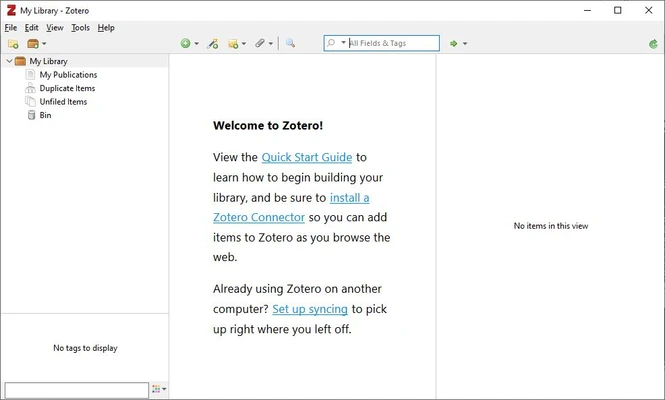
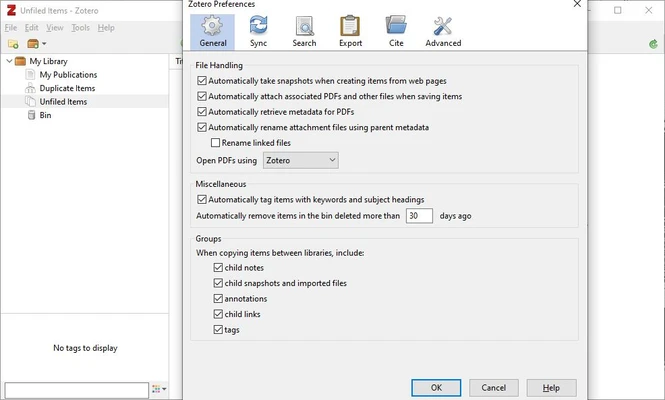
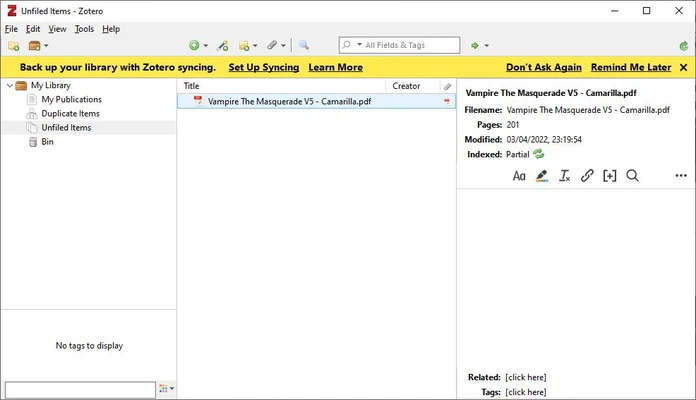
Zotero uses a clean three-panel layout that makes it easy to manage a research library. The left panel contains collections and tags, the center panel displays references, and the right panel shows detailed metadata, notes, and attachments.
The interface is designed around library organization, allowing users to quickly browse collections, search references, edit metadata, and manage attached files.
Installation and Setup
Download and install Zotero for your operating system. After installation, users can optionally install the Zotero Connector browser extension for supported browsers to capture references directly from websites.
A free Zotero account can be used to synchronize library data across devices. Users can also configure integrations with Microsoft Word, LibreOffice, and Google Docs for citation and bibliography management.
How to Use
-
Download and install Zotero.
-
Install the Zotero Connector for your browser if needed.
-
Create collections to organize your research.
-
Add references manually or capture them from websites.
-
Attach and annotate PDF documents.
-
Use tags and search tools to manage your library.
-
Insert citations into supported word processors.
-
Generate a bibliography automatically.
-
Enable syncing to access your library across devices.
FAQ
Is Zotero free?
Yes. Zotero is free and open-source software. Additional paid storage plans are available for users who need more cloud storage.
Does Zotero work offline?
Yes. You can add and manage references, read PDFs, and work with your local library without an internet connection. Changes can be synchronized when you reconnect.
Can I import references from other citation managers?
Yes. Zotero supports importing data from other reference managers using common formats such as RIS, BibTeX, and other supported bibliographic formats.
Does Zotero support different citation styles?
Yes. Zotero supports thousands of citation styles, including popular formats such as APA, MLA, and Chicago.
Can Zotero manage PDF files?
Yes. You can attach PDFs to references, read them within Zotero, highlight text, add annotations, and organize research documents alongside their bibliographic information.
Can I use Zotero with Microsoft Word?
Yes. Zotero provides word processor integration that allows users to insert citations and automatically generate bibliographies in Microsoft Word and other supported applications.
How much cloud storage does Zotero provide?
Zotero provides a limited amount of free cloud storage, with paid plans available for users who need additional storage capacity.
Alternatives
EndNote – A professional reference management solution with advanced citation, research organization, and collaboration features.
Mendeley – A reference manager focused on research organization, PDF management, annotation, and collaboration.
JabRef – An open-source reference manager particularly suited to users working with BibTeX and LaTeX.
Pricing
Zotero is free to download and use. The software itself does not require a subscription, while optional paid cloud storage plans are available for users who need additional online storage.
System Requirements
-
Operating System: Windows 10 and later
-
Processor: Compatible 64-bit processor
-
Memory: 2 GB RAM or more recommended
-
Storage: Available disk space for the application and research library
-
Internet: Required for syncing and some online features
Pros
-
Free and open-source
-
Easy reference and citation management
-
Excellent browser integration
-
Supports PDF reading and annotation
-
Works with popular word processors
-
Supports thousands of citation styles
-
Offline access with optional synchronization
-
Useful collaboration features
-
Extensive plugin ecosystem
Cons
-
Limited free cloud storage
-
Additional storage requires a paid plan
-
Large libraries may require careful organization
-
Some advanced features may require third-party plugins
Conclusion
Zotero is a powerful reference management tool for students, researchers, academics, and other users who need to organize large collections of research materials. Its browser integration makes it easy to capture references, while built-in PDF management, citation tools, synchronization, and collaboration features cover most common research workflows.
With its free and open-source model, extensive citation style support, and compatibility with popular word processors, Zotero is an excellent choice for anyone looking for a practical and flexible solution for managing academic references and research materials.