

FinePrint is a Windows printing utility that provides a universal print preview and editing workspace for documents from almost any Windows application. It helps users reduce paper and ink usage by controlling page layouts before sending print jobs to a physical printer.
The software supports duplex printing, booklet creation, multiple pages per sheet, page removal and rearrangement, watermarks, headers, footers, electronic letterheads, and saving print jobs in several file formats.
What's New
Recent versions of FinePrint focus on compatibility with newer Windows versions, printing reliability, and improvements to print preview and document management features.
Specific changes may vary depending on the installed version.
Key Features
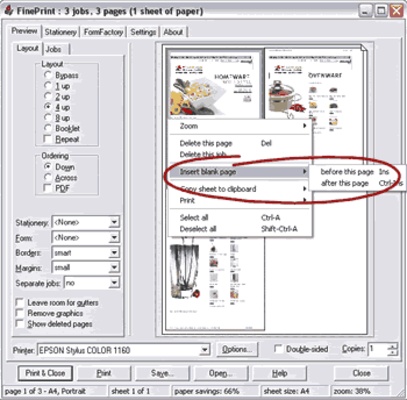
Print Preview: Preview print jobs before sending them to a printer and remove, reorder, or add pages as needed.
Ink Saver: Reduce ink usage by converting colored text to black or excluding selected graphics.
Multiple Pages per Sheet: Print 2, 4, or 8 pages on a single sheet of paper.
Duplex Printing: Print on both sides of the paper when supported by the printer.
Booklet Printing: Arrange pages automatically for booklet-style printing.
Combine Print Jobs: Combine multiple documents into a single print job.
Watermarks, Headers, and Footers: Add custom text, dates, times, and other information to printed documents.
Electronic Letterheads and Forms: Create and preview electronic letterheads and simple forms before printing.
Page Scaling: Scale large documents to fit standard paper sizes such as A4 or Letter.
Margins and Gutter: Adjust margins and add extra space for document binding.
File Export: Save print output in formats such as JPEG, TIFF, BMP, text, and FinePrint's own format.
Virtual Printers: Create multiple virtual FinePrint printers with predefined settings for different printing workflows.
Server Deployment: FinePrint can be deployed on a server and shared across a network for supported business environments.
User Interface
FinePrint uses a print-preview interface where users can inspect pages and modify the print job before sending it to a physical printer.
Page thumbnails and layout controls make it possible to remove pages, reorder documents, adjust margins, select duplex or booklet printing, and configure other output options from one workspace.
Installation and Setup
-
Download and install FinePrint on your Windows PC.
-
Complete the installation and restart Windows if required.
-
Open the document you want to print.
-
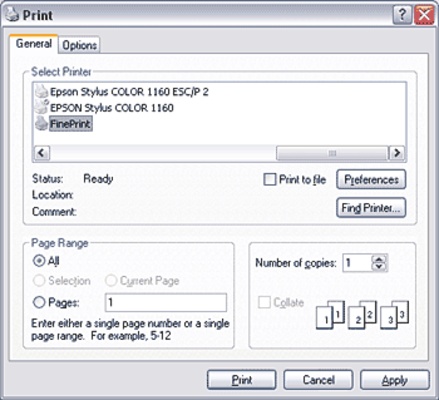
Select FinePrint from the list of available printers.
-
Configure the desired print settings.
-
Preview the document and make any necessary changes.
-
Send the completed print job to your physical printer or save the output when supported.
How to Use
Preview a Document: Open a document and select FinePrint as the printer. The print preview window will appear before the job is printed.
Save Paper: Select multiple-pages-per-sheet, duplex, or booklet printing to reduce paper consumption.
Remove Pages: Delete unwanted pages from the print preview before printing.
Reorder Pages: Rearrange pages when the original document contains pages in an unsuitable order.
Combine Documents: Add multiple print jobs and combine them into one document or print job.
Add Watermarks: Configure a watermark, header, or footer before printing.
Adjust Layout: Change margins, scaling, page orientation, or gutter space according to the document requirements.
Create a Virtual Printer: Set up a FinePrint printer with predefined settings for frequently used printing tasks.
FAQ
What is FinePrint?
FinePrint is a Windows printing utility that provides print preview, page editing, layout control, and paper-saving features.
Does FinePrint work with any printer?
FinePrint is designed to work with Windows applications and standard Windows printing workflows. Actual features such as duplex printing depend on the connected printer.
Can FinePrint print multiple pages on one sheet?
Yes. It supports layouts with 2, 4, or 8 pages per sheet.
Can FinePrint create booklets?
Yes. FinePrint includes booklet-printing options that arrange pages for booklet output.
Can FinePrint combine multiple documents?
Yes. Multiple print jobs can be combined before they are sent to the printer.
Can FinePrint remove unwanted pages?
Yes. Pages can be deleted from the print preview before printing.
Does FinePrint work on macOS?
No. FinePrint is designed for Windows.
Does FinePrint create PDFs?
FinePrint can save or export print output in supported formats, but its primary purpose is print management rather than advanced PDF editing.
Alternatives
Bullzip PDF Printer – A virtual printer for creating PDF files from Windows applications.
PDFCreator – A Windows virtual printer focused on PDF creation and document conversion.
Adobe Acrobat Pro – A comprehensive PDF solution with advanced editing, conversion, OCR, signing, and security tools.
Pricing
FinePrint is commercial software. A trial or demo version may be available for evaluation, while the full version requires a license.
Pricing and licensing options may vary depending on the edition and current offering.
System Requirements
-
Operating System: Windows 7, Windows 8/8.1, Windows 10, or Windows 11
-
Architecture: 32-bit or 64-bit, depending on version
-
Processor: 2 GHz or faster recommended
-
Memory: 2 GB RAM or more recommended
-
Storage: Approximately 100 MB of available disk space
-
Printer: Compatible Windows printer
-
Internet connection: May be required for registration, activation, or updates
Actual requirements may vary by version.
Pros
-
Effective paper-saving features
-
Universal print preview
-
Multiple pages per sheet
-
Duplex and booklet printing
-
Page removal and rearrangement
-
Supports watermarks, headers, and footers
-
Works with Windows printing applications
-
Supports virtual printer configurations
Cons
-
Windows-only
-
Primarily focused on printing rather than full PDF editing
-
Some advanced features may require a paid license
-
Interface is less modern than some newer printing utilities
-
Printer-dependent features such as automatic duplex printing require compatible hardware
Conclusion
FinePrint is a useful Windows printing utility for users who need more control over print jobs. Its preview, page management, booklet printing, duplex printing, and multiple-pages-per-sheet features make it particularly useful for reducing paper and ink consumption.
It is best suited to users who frequently print documents and want to optimize their output before printing. For users primarily looking for advanced PDF editing or document management, a dedicated PDF application may be a better choice.