PDFelement is a powerful and easy-to-use PDF editor that allows users to create, edit, convert, organize, annotate, sign, and protect PDF documents.
Developed by Wondershare, the software combines traditional PDF editing tools with AI-powered features designed to make working with documents faster and more efficient. It is suitable for individuals, students, professionals, and businesses that regularly work with PDF files.
PDFelement provides tools for editing text and images, managing pages, creating forms, converting documents, performing OCR, adding signatures, and protecting sensitive information.
What's New
The latest version adds several AI-powered tools designed to improve document reading and productivity.
- AI PDF Summarizer – Analyze multiple PDF documents and quickly extract important information.
- AI PDF Chat – Ask questions about PDF documents and receive contextual answers.
- Grammar Checker – Detect spelling and grammar errors in PDF content.
- AI Rewrite – Rewrite document content while preserving the original meaning.
- Translation Tools – Translate PDF content into different languages.
- AI Knowledge Card – Summarize important information and key points from documents.
- Improved PDF Editing – Better recognition of paragraphs, fonts, and document layouts.
- Enhanced Form Recognition – Automatically identify form fields and extract form data.
Key Features
PDF Editing – Edit text, images, links, watermarks, backgrounds, headers, footers, and other PDF elements.
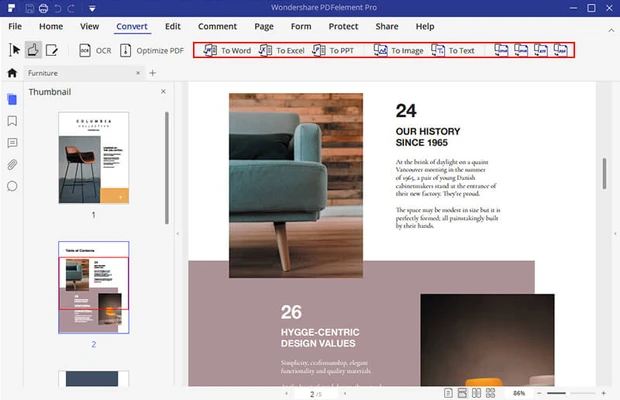
PDF Conversion – Convert PDFs to and from Word, Excel, PowerPoint, images, HTML, TXT, EPUB, and other supported formats.
OCR – Convert scanned and image-based PDFs into searchable and editable documents.
PDF Annotation – Add highlights, underlines, comments, shapes, drawings, stamps, and notes.
Page Management – Merge, split, delete, insert, replace, rotate, extract, and rearrange PDF pages.
PDF Forms – Create interactive forms, recognize existing form fields, fill forms, and extract form data.
Digital Signatures – Create electronic signatures and sign PDF documents.
Batch Processing – Process multiple documents at once for tasks such as conversion, optimization, watermarking, and data extraction.
PDF Security – Protect documents with passwords, encryption, permissions, and redaction tools.
Cloud Storage – Store documents in cloud storage and access them across supported devices.
PDF Editing and OCR
PDFelement provides extensive editing capabilities that allow users to modify text, images, fonts, and other elements while attempting to preserve the original document layout.
Its OCR technology can recognize text in scanned documents and image-based PDFs, making otherwise non-editable documents searchable and easier to work with.
OCR can also be used with scanned forms and other structured documents to extract useful information.
Creating and Combining PDFs
Users can create PDF files from different document types and combine multiple files into a single PDF.
Pages can be reorganized, extracted, rotated, replaced, inserted, or deleted without requiring a separate PDF utility.
The software also supports batch operations, which can be useful when working with large numbers of documents.
PDF Forms
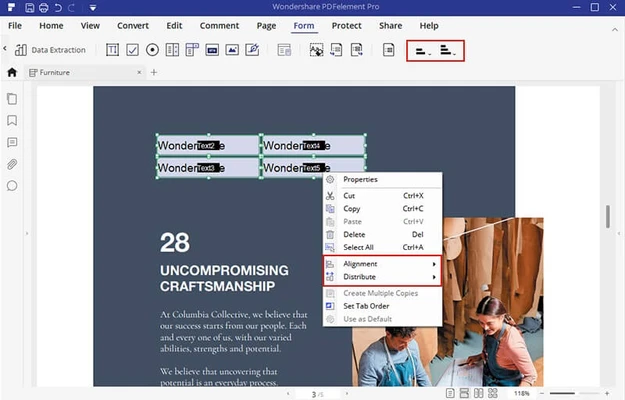
PDFelement includes tools for creating and managing interactive PDF forms.
Users can add text fields, checkboxes, radio buttons, buttons, and other form elements. Automatic form recognition can identify fields in existing documents and turn them into fillable forms.
Businesses can also extract information from completed forms and export the collected data for further processing.
AI Features
The AI tools are designed to simplify common document-related tasks.
Users can summarize lengthy PDFs, ask questions about document contents, rewrite passages, check grammar, and translate text.
The AI PDF tools can be particularly useful when working with lengthy reports, research documents, contracts, manuals, and other text-heavy files.
User Interface
PDFelement uses a modern interface with tools organized into clearly defined sections.
The main workspace provides access to editing, annotation, conversion, page management, forms, and security functions.
The interface is designed to be familiar to users who have previously worked with office productivity software, making common PDF operations relatively easy to access.
Installation and Setup
- Download the PDFelement installer.
- Run the installation file and follow the on-screen instructions.
- Launch the application after installation.
- Sign in or activate the software if required.
- Open an existing PDF or create a new document.
- Customize the available tools and preferences according to your workflow.
A trial version is available for users who want to test the software before purchasing a license.
How to Use
Edit a PDF
Open a PDF and select the editing tools to modify text, images, links, or other document elements.
Annotate a PDF
Use highlighting, underlining, comments, shapes, stamps, and drawing tools to mark up the document.
Convert a PDF
Open the conversion tools, select the desired output format, and start the conversion process.
Perform OCR
Open a scanned PDF and use the OCR function to recognize text and make the document searchable or editable.
Combine PDFs
Select multiple PDF files and combine them into a single document.
Manage Pages
Rearrange, rotate, extract, delete, replace, or insert pages as needed.
Sign a Document
Create an electronic signature and apply it to supported PDF documents.
Protect a PDF
Add password protection and configure permissions for opening, editing, copying, or printing the document.
FAQ
What is PDFelement?
PDFelement is a PDF editing and document management application that allows users to edit, convert, annotate, sign, organize, and protect PDF files.
Can PDFelement edit PDF text?
Yes. It can modify text, fonts, formatting, and other supported PDF elements.
Can it convert PDF files to Word and Excel?
Yes. PDFelement supports conversion between PDF and several common document formats, including Word, Excel, and PowerPoint.
Does PDFelement support OCR?
Yes. Its OCR tools can recognize text in scanned and image-based PDFs.
Can I create PDF forms?
Yes. Users can create interactive forms and add fields such as text boxes, checkboxes, and radio buttons.
Can PDFelement merge multiple PDF files?
Yes. Multiple PDF documents can be combined into a single file.
Can I protect PDFs with passwords?
Yes. PDFelement provides password protection, encryption, permissions, and other document security options.
Is PDFelement free?
No. The full version is commercial software, although a limited free trial is available.
Pricing
PDFelement provides several licensing options.
Free Trial – The trial version provides access to selected features but has limitations such as watermarks and restricted conversion functionality.
Individuals Yearly Plan – US$79.99
- 1 year of updates
- Full access to supported features
- Cloud storage
- No watermark
- Technical support
Perpetual Plan – US$129.99
- Permanent license
- Access to supported features
- Cloud storage
- No watermark
- Technical support
Teams – US$139
- Business-oriented features
- Multi-user controls
- Deployment options
- Technical support
- Volume discounts
Student Plan – US$47.99
- Annual license for one user
Pricing and available plans may vary depending on the platform, region, and current promotions.
Alternatives
Adobe Acrobat Pro – A professional PDF solution with extensive editing, conversion, signing, and document management capabilities.
iTop PDF – A simpler PDF editor focused on common editing, conversion, and document management tasks.
PDF Candy – Provides a broad collection of PDF editing and conversion utilities.
pdfFiller – Focuses on PDF editing, form management, document signing, and collaboration.
System Requirements
- Operating System: Windows 7, 8, 10, or 11
- Processor: 1 GHz or faster
- RAM: 512 MB or more
- Storage: At least 500 MB of available disk space
- Display: 1024 × 768 resolution or higher
PROS
- Powerful PDF editing tools
- User-friendly interface
- OCR support
- AI-powered document tools
- Extensive annotation features
- PDF form creation and recognition
- Digital signatures
- Strong document security
- Batch processing capabilities
CONS
- Full functionality requires a paid license
- Trial version has significant restrictions
- Large documents may occasionally affect performance
- Some advanced features may require additional resources
Conclusion
PDFelement is a versatile PDF editor that combines traditional document management tools with modern AI-powered features.
It can handle everyday PDF editing as well as more advanced tasks such as OCR, form creation, batch processing, document conversion, digital signatures, and PDF security.
For users who regularly work with PDF documents and want an alternative to more expensive professional PDF software, PDFelement is a capable and feature-rich choice.
Note: 14-day trial version with limited functionality.