


SEO PowerSuite is an all-in-one SEO software suite developed by Link-Assistant.Com. It combines four tools—Rank Tracker, WebSite Auditor, SEO SpyGlass, and LinkAssistant—to help users with keyword research, rank tracking, technical SEO, backlink analysis, competitor research, and link building.
Designed for both beginners and experienced SEO professionals, the suite provides desktop-based tools for managing and analyzing multiple SEO campaigns from one application.
What's New
-
Improved keyword research and rank tracking capabilities.
-
Enhanced website auditing and technical SEO analysis.
-
Updated backlink analysis and competitor research tools.
-
Improved content optimization features.
-
Enhanced reporting and project management options.
-
Better support for local and international search engines.
-
Performance and interface improvements.
Key Features
-
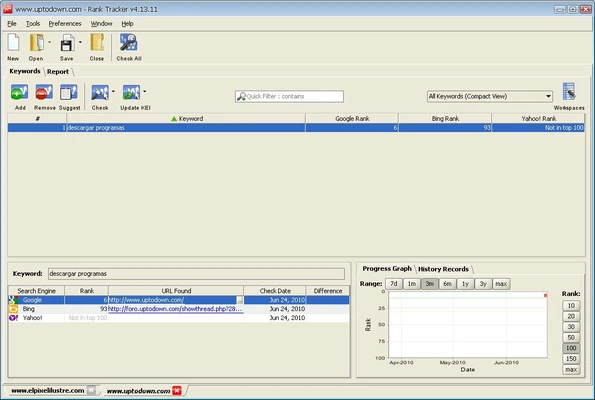
Rank Tracker: Research keywords, monitor search engine rankings, analyze competitors, and track ranking changes over time.
-
WebSite Auditor: Crawl websites to identify technical SEO issues, broken links, missing metadata, and on-page optimization problems.
-
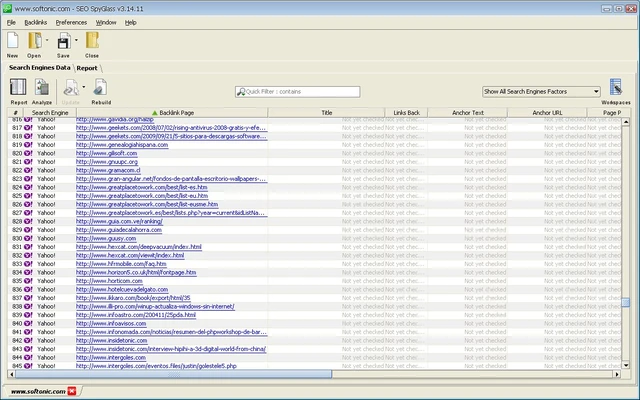
SEO SpyGlass: Analyze backlink profiles, evaluate link quality, compare competitor backlinks, and identify potentially harmful links.
-
LinkAssistant: Find link-building opportunities, organize prospects, and manage outreach campaigns.
-
Keyword Research: Discover relevant keywords and evaluate search volume and competition.
-
Competitor Analysis: Examine competing websites to identify ranking, keyword, and backlink opportunities.
-
Content Optimization: Analyze pages and improve content based on SEO recommendations.
-
SEO Reporting: Generate customizable reports containing rankings, site audits, backlinks, and other SEO data.
-
Local and International SEO: Track rankings across different search engines, locations, and markets.
-
Project Management: Manage multiple websites and SEO campaigns from a centralized desktop application.
User Interface
The software uses a modular interface that separates its four main tools while maintaining a consistent layout. Dashboards provide access to projects, reports, SEO data, and configuration settings.
The interface is suitable for beginners, while advanced users can access detailed data and customization options for more complex SEO campaigns.
Installation and Setup
-
Download and run the SEO PowerSuite installer.
-
Follow the installation wizard to complete the setup.
-
Launch the application and create a new SEO project.
-
Enter your website address and configure the required search engines and locations.
-
Add target keywords and adjust project settings.
-
Connect supported analytics or webmaster services if required.
-
Start using the individual SEO tools to analyze and optimize your website.
How to Use
Rank Tracker
-
Create a project and add your target keywords.
-
Select the search engines and locations you want to monitor.
-
Run a ranking check to view your current positions.
-
Use keyword research tools to discover additional opportunities.
-
Compare your rankings with competitors.
WebSite Auditor
-
Enter your website and start a site crawl.
-
Review technical SEO issues and broken links.
-
Check page titles, descriptions, headings, images, and other on-page elements.
-
Analyze page content and apply optimization recommendations.
-
Run another audit after making changes.
SEO SpyGlass
-
Enter a website to analyze its backlink profile.
-
Review referring domains, anchor text, and link characteristics.
-
Compare backlinks with competing websites.
-
Identify potentially risky or low-quality links for further review.
LinkAssistant
-
Search for relevant link-building prospects.
-
Organize potential link partners.
-
Manage outreach information and communication.
-
Track link-building opportunities and campaign progress.
FAQ
Is SEO PowerSuite free?
Yes. A free edition is available with limitations on certain features, project saving, and data processing. Paid editions provide additional functionality and automation options.
What tools are included in SEO PowerSuite?
The suite includes Rank Tracker, WebSite Auditor, SEO SpyGlass, and LinkAssistant.
Can SEO PowerSuite track keyword rankings?
Yes. Rank Tracker can monitor keyword positions across supported search engines, locations, and devices.
Can SEO PowerSuite audit a website?
Yes. WebSite Auditor crawls websites and identifies technical, structural, and on-page SEO issues.
Can it analyze backlinks?
Yes. SEO SpyGlass provides backlink analysis and competitor backlink research.
Is SEO PowerSuite suitable for beginners?
Yes. The individual tools provide guided workflows and organized reports, although advanced SEO functions may require some experience.
Does SEO PowerSuite work offline?
The software is desktop-based, but many SEO functions require an internet connection to retrieve current search engine, website, ranking, and backlink data.
Alternatives
-
Semrush – A comprehensive online SEO platform for keyword research, competitor analysis, site auditing, and marketing research.
-
Ahrefs – A popular SEO platform with strong backlink analysis, keyword research, and competitor research capabilities.
-
Screaming Frog SEO Spider – A desktop crawler focused on technical SEO and website auditing.
-
SE Ranking – An SEO platform offering rank tracking, website auditing, keyword research, and competitor analysis.
Pricing
Free Edition – Provides access to the four core tools with limitations on certain features and data processing.
Professional – Paid license designed for website owners and SEO professionals who need expanded data limits, project saving, and additional SEO capabilities.
Enterprise – Designed for agencies and larger organizations that require advanced reporting, automation, and client-oriented SEO workflows.
Pricing and available features may vary depending on the license and current plans.
System Requirements
-
Operating System: Windows and macOS
-
Processor: Modern multi-core processor
-
RAM: 4 GB or more recommended
-
Storage: Sufficient free disk space for applications, projects, and SEO data
-
Internet connection required for most SEO data collection and search engine operations
-
Java Runtime Environment may be required depending on the version and operating system
Pros
-
Four SEO tools in one package
-
Comprehensive keyword and rank tracking features
-
Detailed website auditing
-
Extensive backlink analysis
-
Competitor research capabilities
-
Desktop-based project management
-
Suitable for both beginners and advanced SEO users
Cons
-
Some advanced features require a paid license
-
Large projects can require significant system resources
-
SEO data collection can take time
-
Advanced tools may require an SEO learning curve
-
Many functions require an active internet connection
Conclusion
SEO PowerSuite provides a comprehensive collection of desktop SEO tools covering keyword research, rank tracking, technical website auditing, backlink analysis, competitor research, and link building. Its four integrated applications make it possible to manage different parts of an SEO campaign from a single software package.
It is a practical choice for website owners, SEO professionals, and agencies that want detailed SEO analysis and project management tools without relying entirely on browser-based platforms.