

Sejda PDF Desktop is a PDF management application for Windows that provides tools for editing, converting, compressing, merging, splitting, and organizing PDF documents.
The desktop version processes documents locally, while Sejda also provides an online version for users who prefer working through a web browser. The software supports common PDF tasks as well as OCR, form handling, digital signatures, and document security features.
What's New
Recent versions focus on improving compatibility, performance, and reliability across supported Windows systems.
Key Features
-
PDF Editing: Edit text and images within PDF documents.
-
PDF Conversion: Convert PDFs to and from formats such as Word, Excel, and PowerPoint.
-
Merge and Split: Combine multiple PDF files or split documents into separate files.
-
PDF Compression: Reduce document file sizes for easier storage and sharing.
-
OCR: Recognize text in scanned documents and make it searchable.
-
Forms: Fill out and work with PDF forms.
-
Digital Signatures: Add electronic signatures to supported PDF documents.
-
Security: Password-protect PDF files and restrict actions such as printing or copying.
User Interface
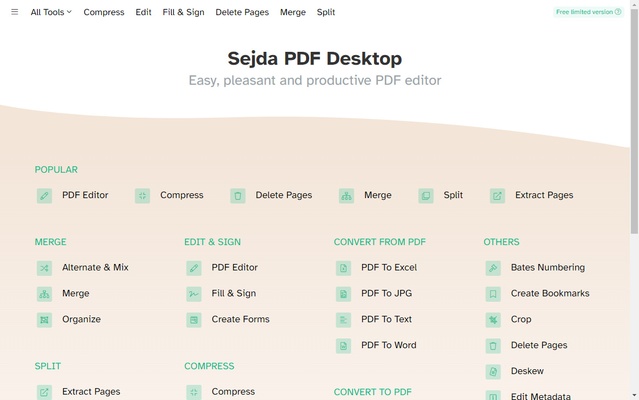
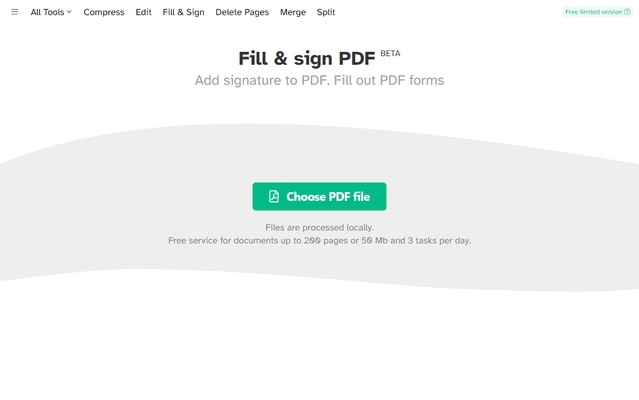
Sejda PDF Desktop features a straightforward interface with PDF tools organized by function. Users can select a task from the main screen and follow the available steps to complete it.
The desktop and online versions provide a similar selection of tools, although the desktop application processes files locally.
Installation and Setup
-
Download the Sejda PDF Desktop installer.
-
Run the installer and follow the installation instructions.
-
Launch the application after installation.
-
Select the required PDF tool from the main interface.
How to Use
-
Open Sejda PDF Desktop.
-
Select a tool such as Edit, Merge, Split, Compress, or Convert.
-
Import the PDF or other supported files.
-
Make the required changes or select the desired options.
-
Process the document and save the resulting file.
FAQ
Is Sejda PDF Desktop free?
Sejda provides a free version with daily and document-size limitations. Additional features and higher usage limits are available through paid plans.
What is the difference between the desktop and online versions?
The desktop version processes files locally on the computer, while the online version processes documents through Sejda's web service.
Does Sejda support OCR?
Yes. Sejda includes OCR tools for recognizing text in scanned PDF documents, although usage limits may apply depending on the plan.
Can Sejda merge and split PDF files?
Yes. It can combine multiple PDF files into one document and split PDFs into separate files or pages.
Are there limits in the free version?
Yes. Free usage is subject to limits on the number of tasks, document size, page count, OCR pages, and other features.
Alternatives
Adobe Acrobat Pro: A comprehensive PDF solution with advanced editing, conversion, security, and document management features.
PDFelement: A feature-rich PDF editor with tools for editing, conversion, annotation, forms, and document management.
Foxit PDF Editor: A PDF editing solution focused on document editing, conversion, annotation, and productivity features.
Pricing
Sejda offers free usage with daily limits as well as paid plans with higher or unlimited usage limits.
The free plan is generally limited to 3 tasks per day, with restrictions on document size, page count, OCR, compression, and file combinations.
Paid options include short-term Desktop access and an annual Desktop + Web plan. Pricing may change over time.
System Requirements
-
Operating System: Windows 11, 10, 8, or 7
-
RAM: 4 GB or more recommended
-
Disk Space: At least 200 MB of available storage
Pros
-
Simple and easy-to-use interface
-
Wide range of PDF tools
-
Supports editing, conversion, compression, merging, and splitting
-
Includes OCR and PDF security features
-
Available as both desktop and online versions
Cons
-
Free version has daily usage limits
-
Some advanced features require a paid plan
-
Online version requires documents to be uploaded for processing
-
Advanced PDF editing may be less flexible than some professional PDF editors
Conclusion
Sejda PDF Desktop provides a convenient collection of tools for everyday PDF management. It supports common operations such as editing, conversion, compression, merging, splitting, OCR, and document security.
The free version is suitable for occasional PDF tasks, while users who frequently work with large numbers of documents may need a paid plan to remove usage restrictions.