


CherryTree is a free and open-source hierarchical note-taking application for Windows. It lets users organize notes in a tree structure and supports rich text formatting, code syntax highlighting, images, tables, hyperlinks, and embedded files.
CherryTree is particularly useful for students, developers, researchers, and anyone who needs to organize large amounts of structured information. It also supports password protection, search and replace, import/export tools, and a portable version.
What’s New
-
Improved note organization and tree management.
-
Enhanced text editing and formatting capabilities.
-
Improved import and export support.
-
Updated syntax highlighting for programming languages.
-
Performance and stability improvements.
Key Features
-
Hierarchical tree-based note organization.
-
Rich text and plain text editing.
-
Syntax highlighting for programming languages.
-
Support for images, tables, files, and hyperlinks.
-
LaTeX support for mathematical equations.
-
Search and replace across notes and subnodes.
-
Password protection and database encryption.
-
Auto-save and backup functionality.
-
Import from various note-taking applications.
-
Export notes to HTML, PDF, and plain text.
-
Drag-and-drop node organization.
-
Portable version available.
-
Cross-platform support for Windows, Linux, and macOS.
User Interface
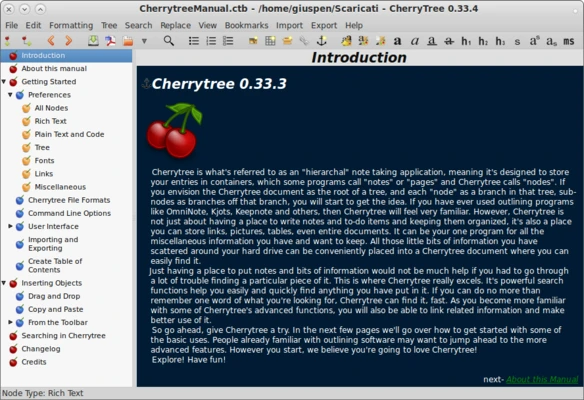
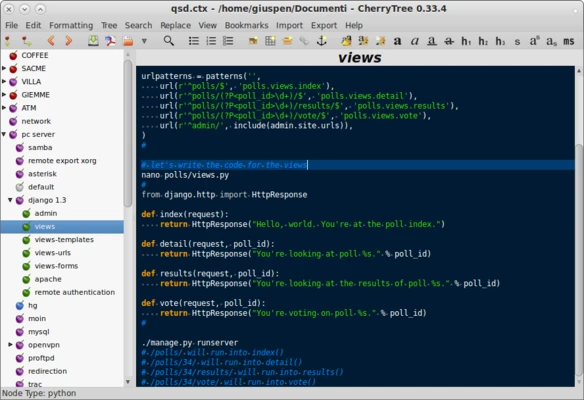
CherryTree uses a simple two-pane interface. The left panel displays the hierarchical note tree, while the right panel contains the selected note.
The interface focuses on organization and functionality rather than modern visual design. Its tree structure makes it easy to manage large collections of related notes.
Installation and Setup
-
Download the CherryTree installer for Windows.
-
Run the installer and follow the setup instructions.
-
Choose the installation location.
-
Launch CherryTree after installation.
-
Create a new database and begin adding notes.
-
Configure backup, appearance, and security settings as needed.
A portable version can also be used without a traditional installation.
How to Use
-
Create a new root node or child node for your notes.
-
Organize related information using the hierarchical tree.
-
Use the formatting toolbar to edit text.
-
Insert images, tables, files, and hyperlinks when needed.
-
Use syntax highlighting for code snippets.
-
Search the entire database to quickly find information.
-
Export selected notes or the entire tree to supported formats.
-
Enable password protection when storing sensitive information.
FAQ
Is CherryTree free?
Yes. CherryTree is free and open-source software released under the GPL license.
Does CherryTree support Windows 11?
Yes, CherryTree runs on modern Windows versions, including Windows 11.
Can CherryTree sync notes between devices?
CherryTree does not provide built-in cloud synchronization. Users can store the database in a cloud storage folder, but this should be done carefully to avoid file conflicts.
Does CherryTree have a mobile app?
No. There is currently no official mobile version.
Can I import notes from other applications?
Yes. CherryTree supports importing data from several note-taking applications and formats.
Does CherryTree support code?
Yes. It provides syntax highlighting and codeboxes for working with programming code.
Alternatives
Microsoft OneNote – A feature-rich note-taking application with cloud synchronization and collaboration tools.
Joplin – An open-source note-taking application with synchronization and encryption features.
Evernote – A popular note-taking application focused on organization, search, and web content collection.
Pricing
CherryTree is completely free and open-source. There are no premium plans or subscription fees.
System Requirements
-
Operating System: Windows 7, 8, 10, 11
-
Processor: 1 GHz or faster
-
RAM: 2 GB or more
-
Storage: At least 100 MB of free disk space
Pros
-
Free and open-source
-
Powerful hierarchical organization
-
Rich text and code support
-
Password protection and encryption
-
Extensive import and export options
-
Portable version available
Cons
-
No official mobile app
-
No built-in cloud synchronization
-
Interface looks dated compared with modern note-taking apps
-
Can take time to learn all of its features
Conclusion
CherryTree is a powerful free note-taking application for users who prefer a structured, hierarchical approach to organizing information. Its support for rich text, code, images, tables, encryption, and extensive import/export options makes it suitable for managing complex collections of notes.
Its lack of native cloud synchronization and mobile support may be a limitation for users who need cross-device access, but it remains a strong choice for Windows users who want a flexible offline knowledge management tool.