


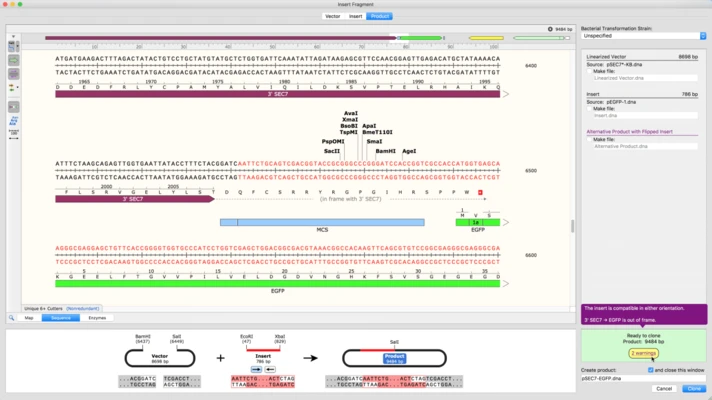
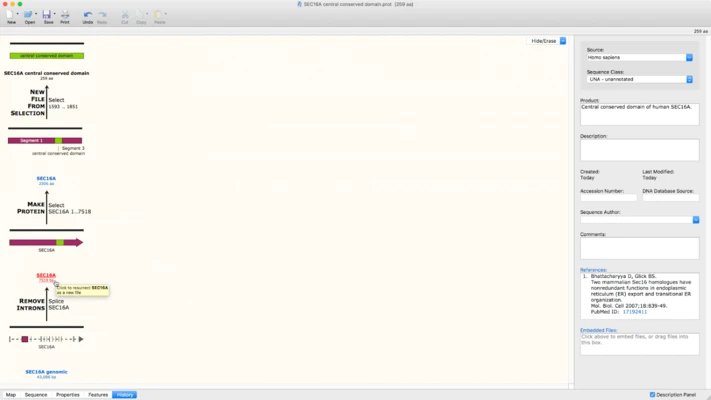
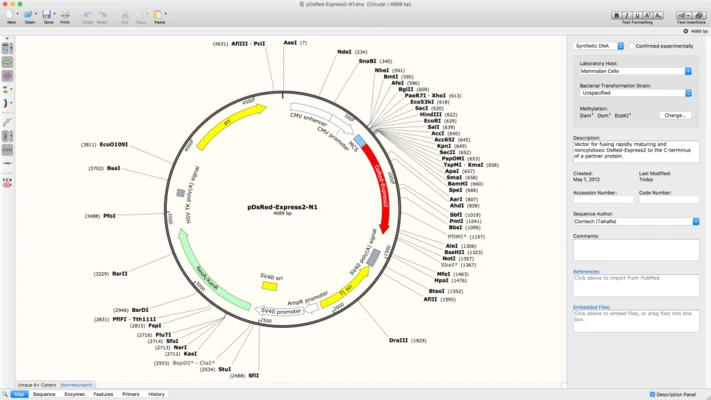
SnapGene is a professional molecular biology software designed to help researchers plan, visualize, document, and analyze DNA sequences and molecular biology workflows. It provides tools for DNA sequence editing, plasmid mapping, annotation, cloning simulation, PCR planning, primer design, and sequence alignment.
The software can display DNA in circular or linear maps and allows users to customize the appearance of enzyme sites, features, primers, ORFs, and other sequence elements. It can also handle large DNA sequences containing thousands of annotated features.
SnapGene is designed for researchers, molecular biologists, students, and laboratory professionals who need an integrated environment for DNA sequence analysis and cloning workflows.
Key Features
-
Create and edit DNA and plasmid sequences.
-
View DNA sequences in circular or linear maps.
-
Automatically annotate common DNA features.
-
Add and customize manual annotations.
-
Search for restriction enzyme sites and unique cutters.
-
Design primers manually or automatically.
-
Simulate common cloning and PCR procedures.
-
Assemble multiple DNA fragments.
-
Track sequence and cloning history.
-
Compare simulated and experimental constructs using sequence alignment.
-
Display translated features and reading frames.
-
Manage large DNA sequences with extensive annotations.
-
Import and export common sequence formats, including GenBank and FASTA.
-
Export maps and simulated gels as image files.
-
Share sequence files with collaborators.
-
Customize colors, enzyme sites, primers, features, and other map elements.
User Interface
SnapGene provides a graphical interface built around DNA maps, sequence views, and molecular biology workflows.
The main sequence window can display DNA as either a circular or linear map, while additional panels provide access to annotations, primers, restriction sites, and other sequence information.
Its visual approach makes it easy to follow cloning procedures and understand the structure of plasmids and other DNA constructs.
Installation and Setup
Download the SnapGene installer for your operating system and follow the on-screen instructions to complete the installation.
After launching the software, activate it with a valid license or start the available trial. You can then create a new DNA sequence or open an existing sequence file.
How to Use
-
Launch SnapGene and create or open a DNA sequence file.
-
Choose a circular or linear map view.
-
Add or review sequence annotations.
-
Search for restriction enzyme sites and other sequence features.
-
Design or import primers.
-
Edit DNA sequences using insertions, deletions, and replacements.
-
Simulate cloning or PCR procedures.
-
Assemble DNA fragments and review the resulting construct.
-
Use sequence alignment to compare DNA sequences.
-
Export maps, sequences, or other project data.
-
Save and share files with collaborators.
Alternatives
Geneious Prime: A comprehensive molecular biology and bioinformatics platform for sequence analysis, cloning, and research workflows.
Benchling: A web-based platform for DNA sequence management, molecular biology research, and collaboration.
ApE: A free DNA sequence editor with plasmid visualization and molecular biology tools.
UGENE: An open-source bioinformatics platform offering DNA sequence analysis and visualization features.
Pricing
SnapGene is commercial software with subscription options for academic, student, and corporate users. A trial is available for users who want to evaluate the software before purchasing.
Pricing varies depending on the type of license and number of users. Academic and student licenses are generally less expensive than commercial licenses.
System Requirements
-
OS: Windows 10 or Windows 11 64-bit
-
Processor: 2.4 GHz or faster
-
RAM: 4 GB minimum, 8 GB recommended
-
Disk Space: At least 500 MB
-
Display: 1280 × 800 or higher
-
Internet: Required for activation and updates
SnapGene is also available for macOS and Linux.
Pros
-
Comprehensive DNA sequence editing and analysis tools
-
Powerful cloning and PCR simulation
-
Clear circular and linear DNA maps
-
Extensive annotation capabilities
-
Automatic primer and feature management
-
Supports common molecular biology file formats
-
Useful sequence alignment tools
-
Suitable for both research and laboratory workflows
Cons
-
Expensive compared with free alternatives
-
Advanced features require a paid license
-
Some functions may take time to learn
-
Can require significant system resources when working with large sequences
Conclusion
SnapGene is a powerful molecular biology application that combines DNA sequence editing, annotation, visualization, cloning simulation, primer design, and sequence analysis in a single environment.
Its intuitive graphical maps and extensive molecular biology tools make it particularly useful for researchers and laboratory professionals working with plasmids, genes, PCR experiments, and cloning projects.
Although the software requires a paid license for continued use, its comprehensive feature set makes SnapGene a strong choice for users who need a professional DNA sequence analysis and molecular biology workflow.