Evernote is a powerful note-taking and organization app that helps users capture, organize, and manage information across their devices. It can be used for personal notes, to-do lists, research, project planning, meeting notes, web content, and other types of digital information.
With support for rich-text notes, notebooks, tags, attachments, web clipping, search, and synchronization, Evernote provides a centralized place to store and access important information. The application is available for Windows, macOS, Android, iOS, and the web.
What's New
Recent Evernote updates have focused on improving note organization, search, task management, synchronization, and the overall editing experience.
Updates may include improvements to the note editor, calendars, tasks, search capabilities, AI-assisted features, performance, and cross-device synchronization. Feature availability can vary depending on the version and subscription plan.
Key Features
Note Creation: Create rich-text notes containing text, checklists, images, files, links, and other content.
Notebooks and Tags: Organize notes into notebooks and use tags to make large collections easier to manage.
Web Clipper: Save articles, webpages, screenshots, images, and other online content directly to Evernote.
Powerful Search: Quickly search through notes, notebooks, attachments, and other stored information.
Cross-Platform Sync: Synchronize notes and other content across supported devices so your information is available wherever you work.
Tasks and To-Do Lists: Create tasks and checklists directly inside notes to manage projects and daily activities.
Document and File Storage: Attach PDFs, documents, images, and other files to notes for easier reference.
Handwriting and Image Recognition: Search for text contained in supported images and handwritten content.
Calendar Integration: Connect notes and tasks with calendar events to organize meetings, appointments, and other activities.
Collaboration: Share notes and workspaces with other users for collaboration and information sharing.
Templates: Use ready-made templates for meetings, project planning, task management, research, and other common workflows.
User Interface
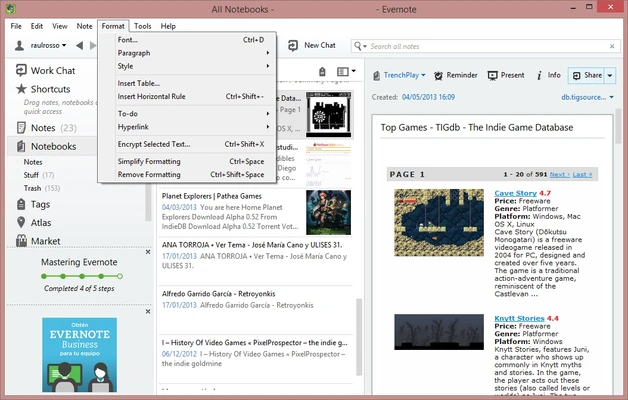
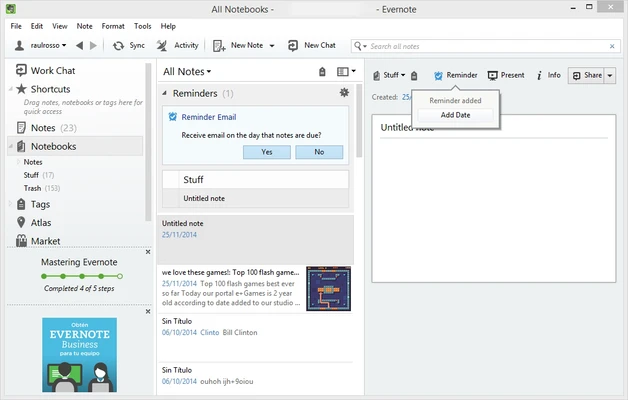
Evernote features a clean interface designed around notes, notebooks, shortcuts, search, and tasks.
The main workspace provides quick access to your notes and notebooks, while the editor offers tools for formatting text, inserting files, creating checklists, and adding other content.
The interface is relatively easy to navigate for beginners while providing enough organization and customization options for users managing large collections of notes.
Installation and Setup
-
Download Evernote for your operating system.
-
Run the installer and follow the on-screen instructions.
-
Launch Evernote after installation.
-
Sign in with an existing Evernote account or create a new account.
-
Configure your notebooks, preferences, notifications, and synchronization settings.
-
Start creating and organizing your notes.
An Evernote account is required to use the application and synchronize content across devices.
How to Use
Create a Note: Select the option to create a new note and enter your text or other content.
Add Content: Insert images, files, links, checklists, tables, or other supported elements into your notes.
Organize Notes: Move notes into notebooks and add tags to make them easier to find later.
Use Web Clipper: Install the browser extension and save useful webpages, articles, images, or screenshots directly to your account.
Create Tasks: Add tasks and checklists to notes to keep track of assignments and projects.
Search Your Notes: Use the search function to locate specific notes, keywords, files, or other stored information.
Sync Your Devices: Sign in to the same account on your supported devices to access synchronized content.
Share Notes: Share selected notes or workspaces with other users when collaboration is required.
FAQ
Is Evernote free?
Evernote offers a free plan with basic note-taking and organization capabilities. Additional features and higher usage limits are available through paid plans.
Can I use Evernote on Windows?
Yes. Evernote supports Windows and is also available on macOS, Android, iOS, and the web.
Can Evernote work offline?
Offline access depends on the current Evernote plan and application configuration. Users should check the features included with their subscription.
Can I save webpages to Evernote?
Yes. The Evernote Web Clipper browser extension allows users to save webpages, articles, screenshots, and other online content.
Can I attach files to Evernote notes?
Yes. Notes can contain supported files, documents, images, PDFs, and other attachments.
Can I search inside Evernote?
Yes. Evernote provides search tools for finding notes and other stored information. Some advanced search and recognition capabilities may depend on the plan.
Can I use Evernote on multiple devices?
Yes. Evernote supports multiple platforms, allowing users to access synchronized content across supported devices.
Can I export my Evernote notes?
Yes. Evernote provides export options that allow users to save their notes and maintain a copy of their information outside the application.
Is Evernote suitable for team collaboration?
Yes. Evernote includes sharing and collaboration features that can be used for team projects, meetings, research, and shared information.
Alternatives
Microsoft OneNote: A feature-rich note-taking application with strong integration with Microsoft 365 and Windows.
Notion: A flexible workspace combining notes, databases, project management, and collaboration tools.
Google Keep: A lightweight solution for quick notes, reminders, checklists, and simple information management.
Obsidian: A markdown-based note-taking application focused on linking information and building personal knowledge bases.
Simplenote: A lightweight and straightforward note-taking application designed for simple text notes and synchronization.
Pricing
Free
The free plan provides basic note-taking and organization features with certain limitations on devices, storage, and other capabilities.
Personal
The Personal plan adds additional features and higher usage limits, including expanded note-taking, task management, calendar, and document-related capabilities.
Professional
The Professional plan is designed for users who need more advanced productivity, search, AI, document, and task-management features.
Pricing and included features may vary by region and can change over time.
System Requirements
-
Operating System: Windows 10 or later
-
Architecture: 32-bit and 64-bit systems where supported
-
Internet Connection: Required for account services and synchronization
-
Evernote Account: Required
Additional system requirements may vary depending on the application version and operating system.
Pros
-
Powerful note-taking and organization tools
-
Cross-platform synchronization
-
Web Clipper for saving online content
-
Strong search capabilities
-
Supports files, images, checklists, and other content
-
Useful templates and productivity features
-
Task and calendar integration
-
Collaboration and sharing tools
Cons
-
Many advanced features require a paid subscription
-
Free plan has usage limitations
-
Some features may vary between platforms
-
Cloud synchronization requires an internet connection
-
Can feel more complex than lightweight note-taking apps
Conclusion
Evernote is a versatile productivity application that combines note-taking, organization, task management, web clipping, search, and document storage in one platform. Its cross-platform support makes it convenient for users who need to access their information from multiple devices.
With its powerful organization tools and extensive feature set, Evernote is a good choice for students, professionals, researchers, and anyone who needs a centralized system for managing notes and information.
Note: An Evernote account is required. Some features are available only with paid plans.