Rons Data Edit (formerly Rons CSV Editor) is a Windows data editing tool designed for working with CSV and other structured data files.
It provides an easy way to view, edit, filter, sort, clean, and organize large datasets. The software is suitable for users who regularly work with spreadsheets, CSV files, and structured data.
Key Features
- Edit and organize large datasets.
- Import and export CSV and other supported formats.
- Sort and filter rows and columns.
- Find and replace data quickly.
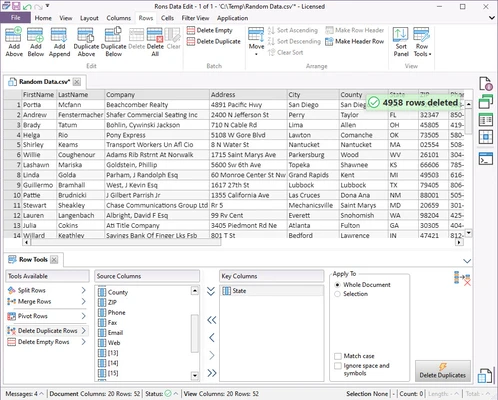
- Remove duplicate records.
- Trim whitespace and clean data.
- Validate and modify data efficiently.
- Customizable data grid and workspace.
- Support for automation and scripting.
- Handle large CSV files more efficiently than traditional text editors.
User Interface
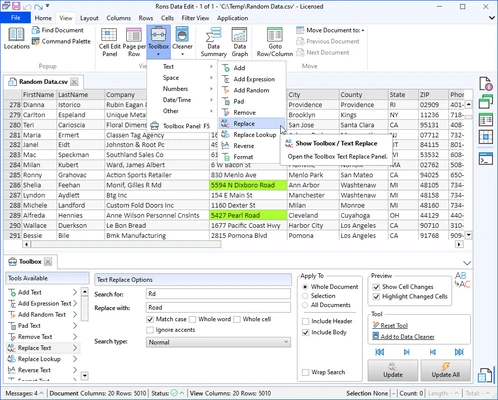
Rons Data Edit features a clean interface centered around a spreadsheet-style data grid.
The main window provides quick access to editing, filtering, sorting, search, and data-cleaning tools. Its layout is designed to make large datasets easier to browse and modify.
Installation and Setup
- Download the installer for Windows.
- Run the setup file and follow the installation wizard.
- Launch Rons Data Edit.
- Open an existing CSV or supported data file.
- Configure file and editing options as needed.
How to Use
- Open Rons Data Edit.
- Import or open a CSV file.
- Edit cells directly in the data grid.
- Use sorting and filtering to organize the data.
- Use Find and Replace to modify specific values.
- Remove duplicates or clean unwanted spaces.
- Review the changes.
- Save or export the edited data.
FAQ
What is Rons Data Edit used for?
It is mainly used to view, edit, clean, organize, and manage CSV and other structured data files.
Is Rons Data Edit free?
A free Lite version is available with limitations. The Pro version removes the row-saving limit and advertising.
Does Rons Data Edit work on Mac?
Rons Data Edit is primarily designed for Windows.
Can it handle large CSV files?
Yes. It is designed to work with large datasets and provides tools for filtering, sorting, searching, and editing data.
Can I remove duplicate data?
Yes. The software includes data-cleaning features for removing duplicate records and unwanted formatting.
Alternatives
Microsoft Excel – A full-featured spreadsheet application suitable for data editing, calculations, and analysis.
EmEditor – A fast text and CSV editor designed to handle very large files.
LibreOffice Calc – A free spreadsheet application with extensive data editing features.
CSVed – A lightweight tool focused on editing and managing CSV files.
Pricing
Data Edit Lite – Free with limitations, including a 2,500-row save limit and advertising.
Pro Version – $40 one-time license with no row-saving limit and no advertising.
System Requirements
- Operating System: Windows 7, 8, 10, or 11
- Architecture: 32-bit and 64-bit
- Processor: Intel Core i3 or equivalent
- RAM: 4 GB minimum
- Storage: 200 MB of free disk space
- Display: 1024 × 768 or higher
- Additional Software: .NET Framework 4.8
PROS
- Easy-to-use interface
- Designed for CSV and structured data
- Useful data cleaning tools
- Sorting and filtering features
- Supports large datasets
- Free version available
CONS
- Windows-focused
- Free version has limitations
- Advanced features may require some learning
- Less suitable for complex spreadsheet calculations than Excel
Conclusion
Rons Data Edit is a practical Windows tool for editing, cleaning, and managing CSV and structured data files. Its spreadsheet-style interface and data-cleaning features make it useful for users who regularly work with large datasets.
The free Lite version is suitable for basic tasks, while the Pro version provides additional functionality and removes the row-saving limitation.