

Zotero is a free and open-source reference management tool designed for students, researchers, academics, and anyone who needs to organize large collections of research materials.
It helps users collect, organize, annotate, cite, and manage books, journal articles, websites, PDFs, and other sources in a centralized library. With browser integration and support for popular word processors, Zotero makes it easy to capture references and create citations and bibliographies while writing.
Zotero is available for Windows, macOS, and Linux and can work offline, with optional synchronization for accessing research libraries across multiple devices.
Key Features
Reference Management: Store and organize books, journal articles, websites, reports, and other research sources in one library.
Automatic Reference Capture: Save bibliographic information directly from academic databases, library catalogs, websites, and online publications using the Zotero Connector.
Citation and Bibliography Tools: Insert citations and automatically generate bibliographies in Microsoft Word, Google Docs, and LibreOffice.
PDF Management: Store PDFs alongside references, read documents, highlight text, and add notes within Zotero.
Collections and Tags: Organize large libraries using collections, subcollections, tags, saved searches, and other filtering options.
Full-Text Search: Search through reference metadata and supported PDF content to quickly locate research materials.
Citation Styles: Supports thousands of citation styles, including APA, MLA, Chicago, and many specialized academic styles.
Cloud Synchronization: Synchronize library data across multiple devices using a Zotero account.
Group Libraries: Share references and collaborate with other researchers through group libraries.
Plugin Support: Extend Zotero with third-party plugins and additional tools for specialized research workflows.
User Interface
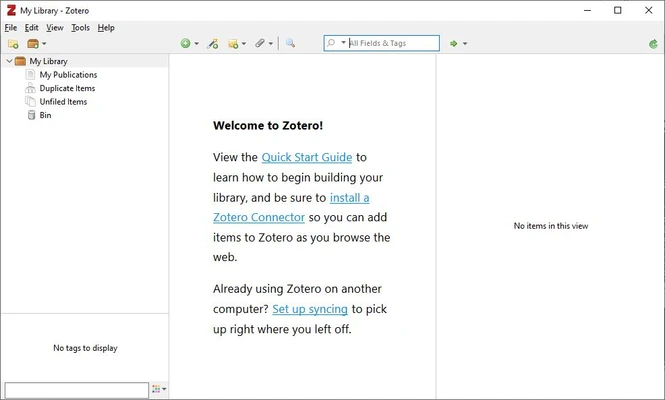
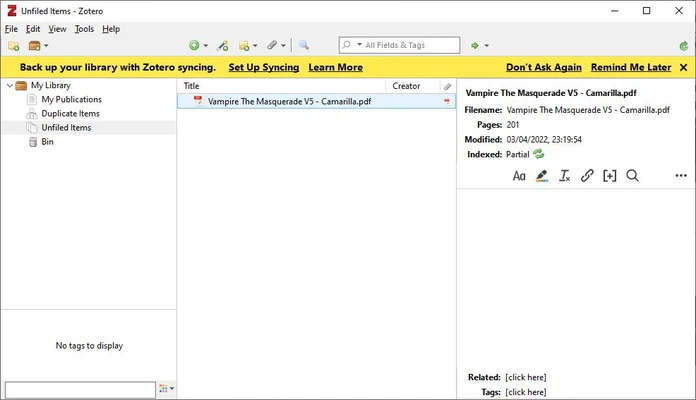
Zotero uses a straightforward three-panel interface.
The left panel contains collections, groups, and tags. The center panel displays references in the selected collection, while the right panel shows detailed metadata, notes, attachments, and other information for the selected item.
The interface is designed around library management rather than visual presentation, making it easy to organize large research collections. Users can customize collections, columns, tags, and other elements to fit their workflow.
Installation and Setup
-
Download and install Zotero for your operating system.
-
Launch Zotero and create or sign in to a Zotero account if you want synchronization.
-
Install the Zotero Connector extension in your preferred web browser.
-
Connect Zotero with your preferred word processor.
-
Create collections and begin adding references to your library.
The basic application works without an internet connection, while synchronization and web-based reference capture require an internet connection.
How to Use
Add References: Save references from websites using the Zotero Connector or add them manually.
Organize Your Library: Create collections and subcollections, then use tags and saved searches to manage larger libraries.
Manage PDFs: Attach PDFs to references and use the built-in reader to highlight passages and create notes.
Insert Citations: Open Microsoft Word, Google Docs, or LibreOffice and use the Zotero integration to insert citations while writing.
Create Bibliographies: Select the required citation style and generate a bibliography automatically from the references used in your document.
Sync Your Library: Sign in to your Zotero account and enable synchronization to keep library data available across devices.
Collaborate: Create or join a group library to share references and research materials with other users.
FAQ
Is Zotero free?
Yes. Zotero is free and open-source. The basic service includes free cloud storage, while additional storage can be purchased for larger libraries.
Does Zotero work offline?
Yes. You can add, organize, search, and manage references without an internet connection. Changes can be synchronized when you reconnect.
Can I import references from other reference managers?
Yes. Zotero supports importing data from applications such as EndNote and Mendeley through standard formats including RIS, BibTeX, and other supported formats.
Does Zotero support Microsoft Word and Google Docs?
Yes. Zotero provides integrations for Microsoft Word, Google Docs, and LibreOffice, allowing users to insert citations and generate bibliographies directly from their documents.
How many citation styles does Zotero support?
Zotero supports thousands of citation styles, including widely used academic formats such as APA, MLA, Chicago, and Vancouver.
Can Zotero manage PDF files?
Yes. PDFs can be attached to references and managed within the Zotero library. The built-in PDF reader also supports highlighting and note-taking.
Can I use Zotero on multiple computers?
Yes. Zotero can synchronize your library across supported devices when synchronization is enabled.
Alternatives
EndNote – A professional reference manager with advanced citation, research organization, and collaboration features.
Mendeley – A reference management platform with PDF organization, annotation, and collaboration tools.
JabRef – An open-source reference manager particularly suited to BibTeX and LaTeX users.
Paperpile – A cloud-focused reference manager designed around academic research and browser-based workflows.
Pricing
Free
Zotero's core reference management software is free to use and includes a limited amount of cloud storage.
Paid Storage
Additional Zotero storage is available through paid plans for users who need to synchronize larger collections of PDFs and other attachments.
Storage plans include options such as 2 GB, 6 GB, and unlimited storage, with pricing based on the selected storage capacity.
System Requirements
-
Operating System: Windows, macOS, or Linux
-
Processor: Modern Intel or AMD processor
-
RAM: 2 GB minimum, 4 GB or more recommended
-
Storage: Approximately 250 MB for the application, plus additional space for your research library
-
Internet: Required for synchronization and web-based reference capture
Actual storage requirements depend on the number of references and attachments in your library.
Pros
-
Free and open-source
-
Powerful reference and citation management
-
Excellent browser integration
-
Supports thousands of citation styles
-
Works with Word, Google Docs, and LibreOffice
-
Built-in PDF reading and annotation
-
Offline support
-
Cross-platform compatibility
-
Group libraries for collaboration
-
Extensive plugin ecosystem
Cons
-
Limited free cloud storage
-
Large PDF libraries may require additional storage
-
Some users may find the interface less modern than newer alternatives
-
Synchronization can require troubleshooting in complex workflows
Conclusion
Zotero is one of the best free reference management tools for students, researchers, academics, and writers. Its combination of automatic reference capture, citation management, PDF organization, browser integration, and word processor support makes it well suited to academic and research-heavy workflows.
Its open-source nature and extensive citation-style support make it particularly attractive for users who need a reliable alternative to commercial reference managers. For organizing research materials and simplifying citations and bibliographies, Zotero is an excellent choice.