All My Books is a Windows library management tool developed by Bolide Software. It is designed for readers, collectors, and anyone who wants to organize and manage a personal book collection.
The software allows users to catalog physical books, ebooks, and audiobooks in a searchable digital library. It can retrieve book information such as titles, authors, publishers, publication dates, summaries, and cover images from online databases, making it easier to build and maintain a large collection.
Key Features
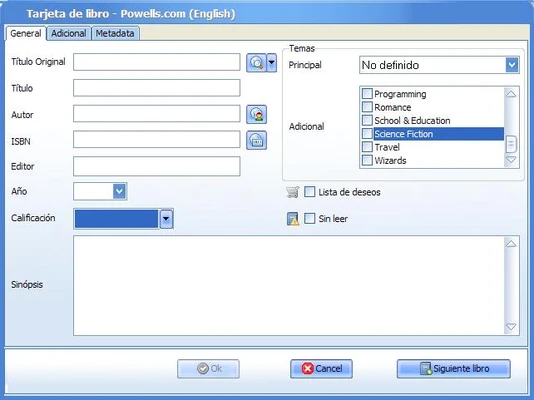
Automatic Book Information: Enter a book title, author, or ISBN to retrieve available metadata and cover artwork from online databases.
Book Collection Management: Organize books by author, genre, publication date, reading status, location, or other custom criteria.
Physical and Digital Books: Manage physical books as well as ebooks and audiobooks within the same library.
Custom Fields: Add personal notes, book condition, reading status, loan information, and other custom details to individual records.
Lending Management: Keep track of books that have been loaned to other people and record relevant lending information.
ISBN Search: Search for books using their ISBN to quickly add information to the library.
Visual Shelf View: Browse your collection using a shelf-style layout that displays book covers.
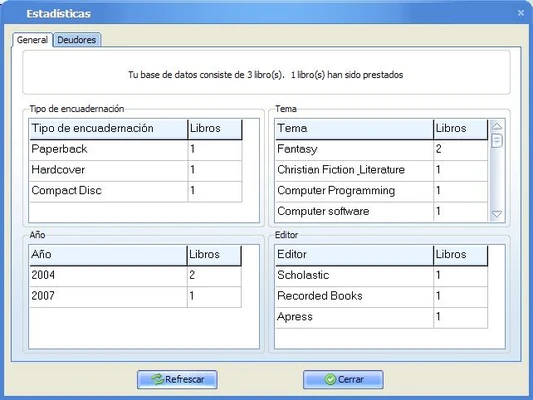
Multiple Databases: Create separate databases for different collections, such as personal books, work-related materials, or digital libraries.
Import and Export: Import existing book lists and export collection data to formats such as Excel, HTML, PDF, and text.
Book File Management: Associate digital book and audiobook files with individual book records for easier access.
User Interface
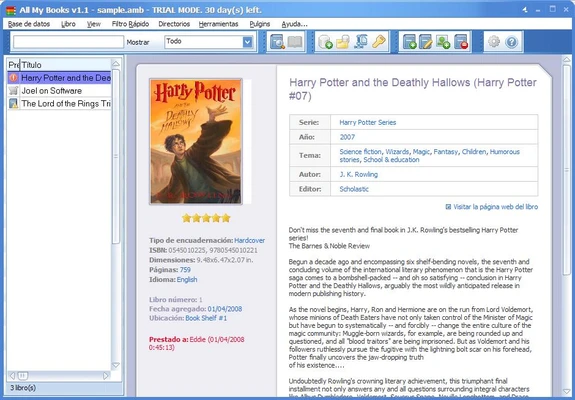
All My Books uses a traditional Windows interface focused on library management. The main window provides access to your collection, search tools, filtering options, and detailed book information.
Books can be displayed in different layouts, including list and shelf-style views. The toolbar provides quick access to common functions such as adding books, searching the collection, editing information, and exporting data.
The interface is relatively straightforward, although users with very large collections may need some time to configure categories, fields, and database organization to match their workflow.
Installation and Setup
- Download the All My Books installer.
- Run the setup file and follow the installation wizard.
- Launch the program and create a library database.
- Add books manually or search for them using their title, author, or ISBN.
- Configure categories, custom fields, and other library settings as needed.
The setup process is straightforward and does not require advanced technical knowledge.
How to Use
Adding Books: Click the Add Book option and enter the book title, author, or ISBN. Available information can be retrieved from online databases.
Organizing Books: Sort and filter your collection by author, genre, publication date, reading status, or custom fields.
Tracking Loans: Use the lending features to record books that have been loaned and keep track of borrowers.
Searching: Use the built-in search tools to quickly find books by title, author, ISBN, or other information.
Managing Digital Books: Associate ebooks and audiobook files with their corresponding book records.
Backup and Export: Export your library to supported formats for backup, printing, or sharing.
FAQ
Does All My Books support ebooks and audiobooks?
Yes. The software can manage information about ebooks and audiobooks and associate supported digital files with book records.
Can I import an existing book collection?
Yes. Existing book lists can be imported using supported text and spreadsheet formats.
Can I customize book information?
Yes. Custom fields can be used to store personal notes, reading status, book condition, loan information, and other details.
Can I export my book collection?
Yes. Library information can be exported to several formats, including Excel, HTML, PDF, and text.
Is All My Books available for macOS?
No. All My Books is designed for Windows. It may be possible to run Windows software on macOS using compatibility or virtualization solutions, but macOS is not an officially supported platform.
Can I use All My Books to manage a large collection?
Yes. The software is designed to organize collections ranging from a small personal library to thousands of books, with search, sorting, filtering, and database features.
Alternatives
Epubor eBook Manager – An ebook management tool for organizing, converting, and transferring digital books.
Calibre – A free and open-source ebook management application with extensive support for digital book collections.
Pricing
All My Books is commercial software and provides a 30-day free trial for users who want to evaluate the application before purchasing.
The trial version has some limitations, while the full version is available through a one-time license purchase. Licensing options may vary, so users should check the developer's website for the latest pricing and activation terms.
System Requirements
- Operating System: Windows 7, 8, 10, or 11
- Processor: 1 GHz or faster
- RAM: 512 MB or more
- Storage: Approximately 20 MB of free disk space
- Internet: Required for retrieving book information from online databases
PROS
- Easy-to-use library management interface
- Supports physical and digital books
- Automatic book metadata retrieval
- ISBN-based book searching
- Custom fields and categories
- Lending management
- Multiple export formats
- Shelf-style visual catalog
- Suitable for large book collections
CONS
- Windows-only
- No official macOS version
- No built-in cloud synchronization
- Some metadata features require an internet connection
- Commercial software
Conclusion
All My Books is a practical Windows application for organizing and managing personal book collections. Its automatic metadata retrieval, ISBN search, custom fields, lending management, and flexible organization tools make it suitable for both casual readers and serious book collectors.
For users who want a dedicated cataloging tool for physical books, ebooks, and audiobooks, All My Books provides a straightforward way to keep a large collection organized and searchable.
Note: A 30-day trial version is available with limited functionality.