

BullZip PDF Printer is a Windows virtual printer that allows users to create PDF files from almost any application that supports printing. Instead of opening a separate PDF conversion tool, you can select BullZip PDF Printer from the Windows print dialog and save the output as a PDF.
The software also provides additional options for PDF security, watermarking, metadata, compression, and document merging. It is suitable for users who need a simple way to create and customize PDF files from Word processors, spreadsheets, web browsers, and other Windows applications.
What’s New
Recent versions of BullZip PDF Printer have focused on compatibility, PDF/A support, installer improvements, and updates to the underlying PDF conversion components.
The exact changes depend on the installed version, so users should check the release notes for the latest update.
Key Features
-
Virtual PDF Printer – Create PDF files by printing from virtually any Windows application.
-
PDF Security – Protect generated PDF files with passwords and supported encryption options.
-
Watermarks – Add text or image watermarks to generated documents.
-
Merge and Append – Combine new output with existing PDF documents.
-
PDF/A Support – Create PDF/A documents for supported long-term document preservation workflows.
-
Metadata Editing – Set properties such as title, author, subject, and keywords.
-
Image Output – Save printed content in supported image formats such as JPEG, PNG, BMP, and TIFF.
-
Compression – Configure output options to help reduce PDF file size.
-
Command-Line Support – Automate PDF creation and integrate printing workflows with scripts or other applications.
-
Custom Output Settings – Configure file names, output folders, security options, and other PDF properties.
-
Multi-Language Interface – Available with support for multiple interface languages.
User Interface
BullZip PDF Printer integrates directly with the Windows printing system, so its main workflow does not require a traditional document-editing interface.
When you print a document using BullZip, a configuration dialog appears where you can select the output file and adjust available PDF settings. Advanced options provide access to features such as encryption, watermarks, metadata, merging, and output formats.
This approach keeps the basic PDF creation process simple while still providing additional configuration options for advanced users.
Installation and Setup
-
Download and install BullZip PDF Printer for Windows.
-
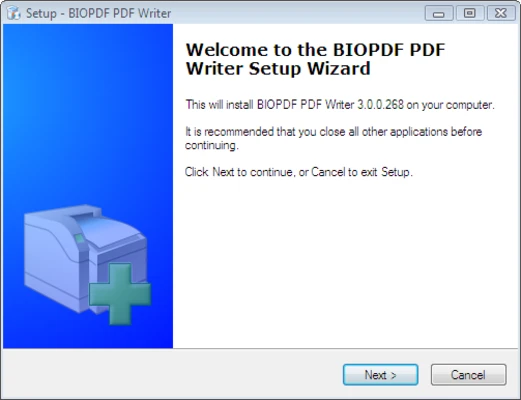
Follow the installation wizard and accept the license terms.
-
Complete the installation and allow any required components to be installed.
-
After installation, open a Windows application that supports printing.
-
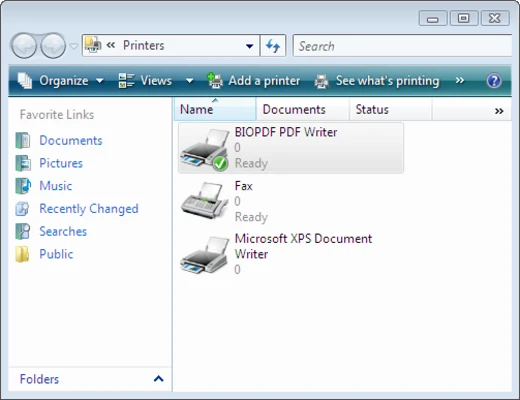
Select BullZip PDF Printer from the available printers.
-
Open the printer preferences if you want to customize default settings.
-
Configure output options according to your requirements.
The installer may include or require additional PDF conversion components depending on the version.
How to Use
Create a PDF
-
Open the document, webpage, or other content you want to convert.
-
Select Print from the application's File menu.
-
Choose BullZip PDF Printer.
-
Click Print.
-
Select the output location and file name.
-
Configure optional settings such as security, watermarking, or metadata.
-
Save the PDF.
Merge or Append a PDF
When supported by the selected configuration, use the Append or merge options in the BullZip settings dialog to add the printed document to an existing PDF.
Protect a PDF
Enable the available security options, configure a password and encryption settings, and then generate the PDF with the selected protection.
FAQ
Is BullZip PDF Printer free?
BullZip PDF Printer has a free edition with usage and licensing limitations. Commercial and additional licensing options may be available depending on the edition.
Can BullZip create PDFs from Microsoft Word?
Yes. Open the Word document, choose Print, select BullZip PDF Printer, and save the resulting PDF.
Can BullZip convert documents to images?
Yes. Supported output formats can include image formats such as JPEG, PNG, BMP, and TIFF, depending on the installed version and configuration.
Can BullZip merge PDF files?
Yes. The application provides merge and append functionality for combining PDF output with existing documents.
Does BullZip work offline?
Yes. Once installed, the basic virtual printing and PDF creation functions can be used without an Internet connection.
Alternatives
-
doPDF – A lightweight virtual PDF printer designed for straightforward PDF creation.
-
CutePDF Writer – A simple Windows PDF printer for converting printable documents to PDF.
-
PDFCreator – A more feature-rich virtual printer with additional automation and document processing options.
-
Adobe Acrobat – A comprehensive commercial PDF solution with advanced editing, conversion, and document management features.
Pricing
BullZip PDF Printer offers a free edition for supported personal and business use, with limitations depending on the license and version.
Commercial licenses or paid editions may provide additional capabilities and usage rights. Pricing and licensing terms can change, so check the current license information for the version you intend to use.
System Requirements
-
Operating System: Supported versions of Windows
-
Architecture: 32-bit and 64-bit Windows support may vary by version
-
Processor: 1 GHz or faster recommended
-
Memory: 1 GB RAM or more recommended
-
Storage: At least 100 MB of free disk space, plus additional space for generated documents
-
Additional Components: PDF conversion components may be installed with the application depending on the version
PROS
-
Simple virtual printer workflow
-
Creates PDFs from most printable Windows applications
-
Supports encryption and password protection
-
Includes watermarking options
-
Supports merging and appending PDFs
-
Provides metadata and compression controls
-
Supports command-line automation
-
Lightweight compared with full PDF editing suites
CONS
-
Not a full PDF editor
-
Some features depend on the edition and installed components
-
Advanced PDF editing requires separate software
-
Configuration options can be more complex for beginners
Conclusion
BullZip PDF Printer is a practical Windows utility for creating PDF files through the standard printing system. Its virtual printer approach makes it easy to convert documents, webpages, and other printable content without requiring a dedicated PDF editor.
Beyond basic PDF creation, it provides useful options for encryption, watermarks, metadata, merging, image output, and automation. It is a good choice for users who primarily need a reliable PDF printer rather than a complete PDF editing application.