

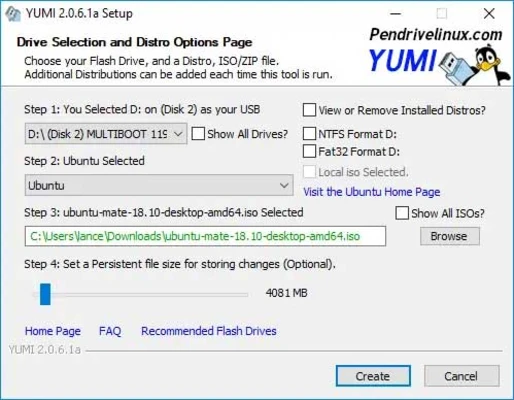
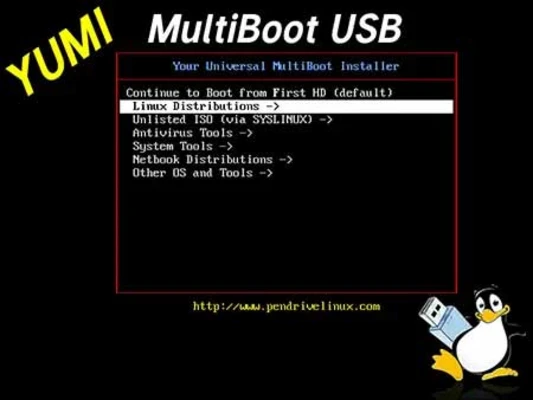
YUMI exFAT (Your Universal Multiboot Integrator) is a free multiboot USB creation tool that allows users to create a single bootable USB drive containing multiple operating systems, recovery tools, antivirus utilities, disk cloning software, and diagnostic applications.
Developed as the successor to MultibootISOs, YUMI exFAT supports both BIOS and UEFI boot modes and offers compatibility with modern large ISO files through exFAT formatting support.
Key Features
Create Multiboot USB Drives
Install multiple bootable operating systems and utilities on a single USB flash drive without needing separate devices.
exFAT Support
Supports exFAT file systems, allowing storage and booting of files larger than 4 GB while maintaining compatibility with modern systems.
BIOS and UEFI Boot Support
Compatible with both legacy BIOS and modern UEFI systems for maximum hardware compatibility.
Wide ISO Compatibility
Supports a large collection of bootable ISO images, including:
- Windows installation media
- Linux distributions
- Antivirus rescue disks
- Backup and recovery tools
- Disk cloning utilities
- System diagnostics software
Persistent Storage
Create persistent storage for supported Linux distributions, allowing settings, files, and configurations to remain available after rebooting.
ISO Boot Support
Can boot ISO files directly when required while maintaining an organized USB structure.
Portable Application
No installation required. Simply run the executable and start creating multiboot USB drives.
Main Features
- Create multiboot USB flash drives
- Supports multiple operating systems
- exFAT file system support
- BIOS and UEFI compatibility
- Persistent Linux storage
- Boot large ISO files over 4 GB
- Portable utility with no installation
- Automatic ISO download support
- Add or remove distributions anytime
- Supports antivirus and recovery tools
Supported Use Cases
Operating System Installation
Create a single USB drive containing multiple Windows and Linux installation images.
System Recovery
Carry rescue environments, recovery disks, and repair utilities on one portable drive.
IT Technician Toolkit
Store diagnostics, partition managers, password recovery tools, and cloning utilities together.
Linux Live USB
Run multiple Linux distributions directly from a USB device without installation.
Why Use YUMI exFAT
YUMI exFAT offers a flexible and efficient way to manage multiple bootable tools on a single USB drive. Unlike traditional bootable USB creators that support only one operating system at a time, YUMI allows users to build a complete multiboot toolkit while still using the remaining storage space for regular files.
Its support for exFAT and modern UEFI systems makes it one of the most versatile multiboot USB solutions available.
System Requirements
- Windows 7, 8, 10, or 11
- USB flash drive (8 GB or larger recommended)
- Administrator privileges
- BIOS or UEFI compatible system
Pros
- Supports multiple bootable operating systems
- exFAT support for files larger than 4 GB
- BIOS and UEFI compatibility
- Portable and lightweight
- Supports persistent Linux storage
- Easy to add or remove ISO images
Cons
- Some Linux distributions may have limited persistence support
- Advanced multiboot configurations can require experimentation
- Not every ISO is guaranteed to work identically
Conclusion
YUMI exFAT is one of the best multiboot USB creation tools for Windows users. With support for multiple operating systems, recovery utilities, BIOS and UEFI booting, and large ISO files through exFAT, it provides a powerful solution for technicians, enthusiasts, and anyone who needs a portable bootable toolkit.