Go to Windows platform Display platforms icon
Go to Mac platform Go to Windows platform Go to Android platform
Barrier icon

Barrier

2.4.0
debauchee
0
27.71 MB size

Control multiple computers with a single keyboard and mouse

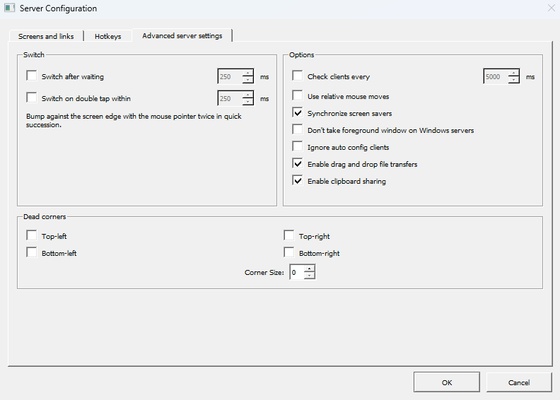
Barrier is a program for Mac that will allow you to replicate, in a virtual way, the function of a KVM switch. Through open-source development, you will easily control multiple computers with a single keyboard and mouse. Unlike traditional switches that require physical manipulation, this program will allow you to share peripherals using only intuitive software commands.

A program similar to Synergy

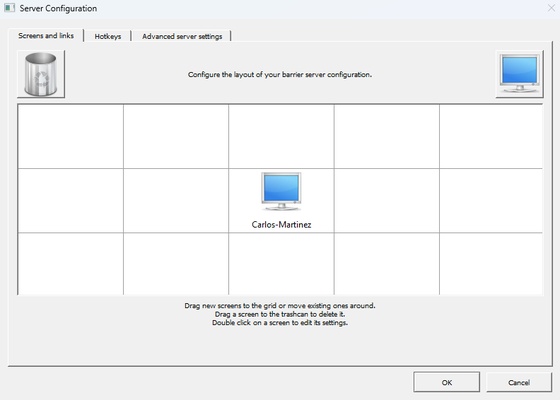
As with other similar tools, such as Synergy, the Barrier interface will allow you to complete the configuration process in the simplest way. To begin with, you will need to designate a Mac as the main server for the program. This will establish which computer will be physically connected to the keyboard and mouse. Then, you can share these peripherals virtually with other devices through the same WiFi network. It will be crucial that you use the same equipment nomenclature in the configuration to ensure proper connection.

Add multiple computers to your configuration

Once you configure the server, you can add multiple clients to share the keyboard and mouse. This will involve assigning a shared IP address for all the computers you need to connect. With Barrier for Mac, you will have no limitations when moving the cursor between different screens, even if they belong to different devices, thus simplifying your workflow.

Download Barrier for Mac and use this handy tool to facilitate sharing a keyboard and mouse between multiple computers. Thanks to a very simple interface, you will not need any technical knowledge to make up for the absence of a physical KVM switch. This will simplify the control of your actions on various devices.

Information about Barrier

License Free
Op. System Mac
Category Desktop
Language English
Author debauchee
permission icon Permissions Not applicable
Date 2026-06-03 00:58:44
Size 27.71 MB
File type DMG

Apps recommended for you

Show Desktop icon
Hide from the Dock all the open applications
Tiger Data Backup icon
Recover and backup your data to computer
Rectangle icon
Resize windows faster in macOS
Witch icon
Many Tricks
MobiKin Backup Manager for Android icon
Allows backing up Android data
EF*CK Chat Keyboard icon
Emoji filter / Unicode chat keyboard
DirEqual icon
An advanced directory compare utility for Mac
iMazing 3.6.0 icon
The Swiss Army Knife of iPhone, iPad and iPod Management
coconutBattery 4.3.3 for Mac icon
Displays info about your Mac and iOS device battery
Garmin Express 7.29.0 for Mac icon
Garmin Express is software that helps you manage your Garmin devices
MongoDB 8.3.3 for Mac icon
Building on the Best of Relational with the Innovations of NoSQL!
R-Studio for Mac icon
Disk Recovery Program and Hard Drive Recovery Software
Data Recovery Software for Mac icon
Program recovers deleted data from pen drive
Cisdem Window Manager icon
Get the best performance from your screen
coconutBattery 4.3.3 for Mac icon
Displays info about your Mac and iOS device battery
Mailvita PST to MSG Converter For Mac icon
Export multiple emails from PST files to MSG format with Mailvita.
Epic Pen icon
Draw or write on your Mac screen
Xender - Share Music Transfer icon
A cross-platform offline file transfer app with more amazing features!
WatsGo icon
One-click to Transfer WhatsApp between Android and iOS
EarthDesk icon
Set an interactive world map as wallpaper or screensaver
Mac OS Mobile Phone Recovery Software icon
Software restores lost data from mobile phone
Japplis Watch icon
Time related tools like clock, timer, stopwatch and alarm