


Epubor Ultimate is an eBook management and conversion tool for Mac that lets you convert supported eBook files between popular formats and manage book metadata.
The software supports formats such as EPUB, PDF, MOBI, AZW, AZW3, and other commonly used eBook formats. It provides a drag-and-drop interface, batch conversion, metadata editing, and compatibility with popular e-readers such as Kindle, Kobo, and Nook.
What's New
Recent updates focus on improved eBook format compatibility, conversion performance, device support, metadata handling, and overall application stability.
Key Features
-
Convert eBooks between supported formats
-
Support EPUB, PDF, MOBI, AZW, AZW3, and other formats
-
Batch conversion for multiple books
-
Edit book titles, authors, covers, and other metadata
-
Drag-and-drop eBook management
-
Detect supported connected e-readers
-
Support popular Kindle, Kobo, and Nook devices
-
Preserve book structure and formatting during conversion
-
Manage books from a centralized library
-
Support eBook processing from local files and supported devices
User Interface
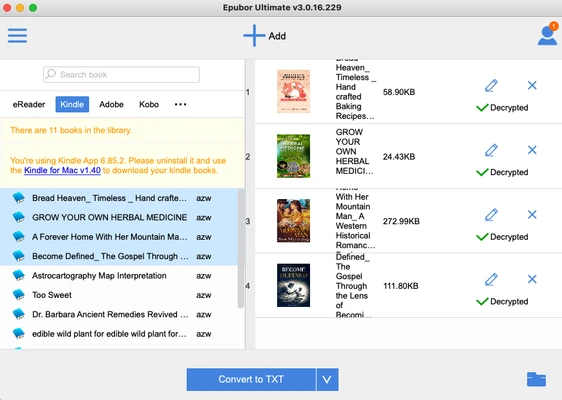
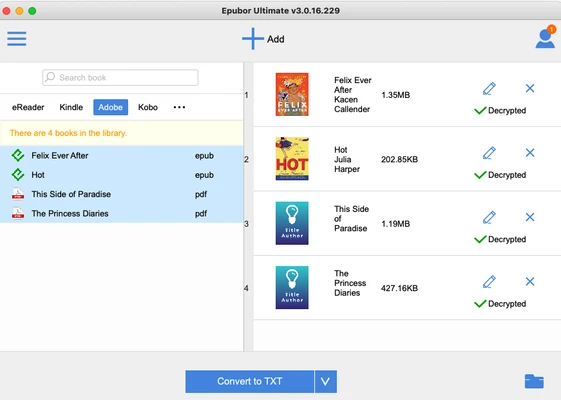
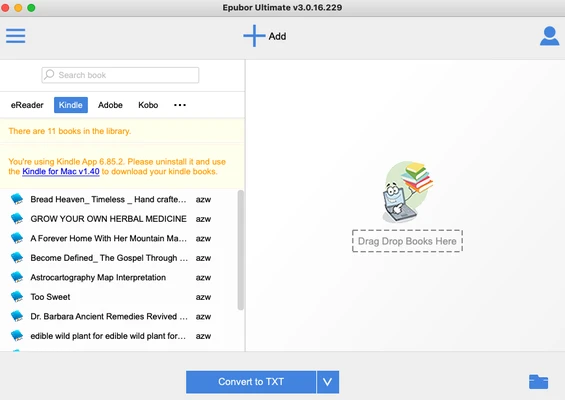
Epubor Ultimate provides a simple interface centered around the eBook library and conversion workflow. Books can be added by dragging them into the application, after which users can select an output format and start the conversion process.
Metadata editing tools are also integrated into the main interface, making it easy to update book information before organizing or converting files.
Installation and Setup
-
Download Epubor Ultimate for Mac.
-
Install the application and launch it.
-
Sign in or activate the software if required.
-
Add eBooks from your Mac or connect a supported e-reader.
-
Allow the application to scan and display available books.
-
Configure the output format and other conversion options.
How to Use
-
Add eBooks by dragging them into the main window.
-
Select a book from the library.
-
Choose the desired output format.
-
Edit metadata such as title, author, or cover if needed.
-
Click Convert to start the conversion process.
-
Check the output folder after the conversion is complete.
-
Use batch conversion when processing multiple books.
FAQ
What eBook formats does Epubor Ultimate support?
It supports a range of popular eBook formats, including EPUB, PDF, MOBI, AZW, AZW3, TXT, HTML, and other supported formats. Available input and output formats may vary by version.
Can Epubor Ultimate convert multiple eBooks at once?
Yes. The software supports batch conversion, allowing multiple supported eBooks to be processed together.
Can I edit eBook metadata?
Yes. You can edit information such as the title, author, cover, publisher, language, and other supported metadata fields.
Does Epubor Ultimate work with Kindle books?
It supports certain Kindle eBook formats and compatible books. DRM-protected content and supported sources may be subject to technical and legal restrictions.
Does Epubor Ultimate have a free trial?
Yes. A trial version is available with limitations. A paid license is required for unrestricted use.
Alternatives
Popular alternatives include Calibre, Sigil, and other eBook management and conversion tools. Calibre is a particularly popular free option for users who mainly need eBook library management and format conversion.
Pricing
Epubor Ultimate is commercial software with a free trial. A paid license is required for full functionality. Pricing and available license options may vary by version and promotion.
System Requirements
-
macOS 11 or later
-
Compatible Intel or Apple Silicon Mac
-
At least 512 MB of RAM
-
At least 100 MB of available disk space
-
Internet connection may be required for activation and updates
Pros
-
Supports many popular eBook formats
-
Simple drag-and-drop interface
-
Batch conversion
-
Built-in metadata editor
-
Supports popular e-reader devices
-
Easy to organize and process eBooks
Cons
-
Full functionality requires a paid license
-
Some eBook sources and protected content may have compatibility limitations
-
Commercial compared with free alternatives
-
Advanced conversion features may require additional configuration
Conclusion
Epubor Ultimate is a practical eBook conversion and management tool for Mac users who regularly work with different eBook formats. Its batch conversion, metadata editing, drag-and-drop workflow, and support for popular e-readers make it convenient for managing a personal digital book collection.