Go to Windows platform Display platforms icon
Go to Windows platform Go to Mac platform Go to Android platform
Camtasia 26.2.5.21144 icon

Camtasia 26.2.5.21144

26.2.5.21144
TechSmith Corporation
5.0
308.48 MB size

Video recording and editing toolkit

Camtasia is a screen recording and video editing tool designed for content creators and professionals working in education, marketing, and corporate training. It combines an accessible interface with a range of audiovisual production tools, making it suitable for creating tutorials, software demonstrations, narrated presentations, and other instructional videos.

High-definition recordings

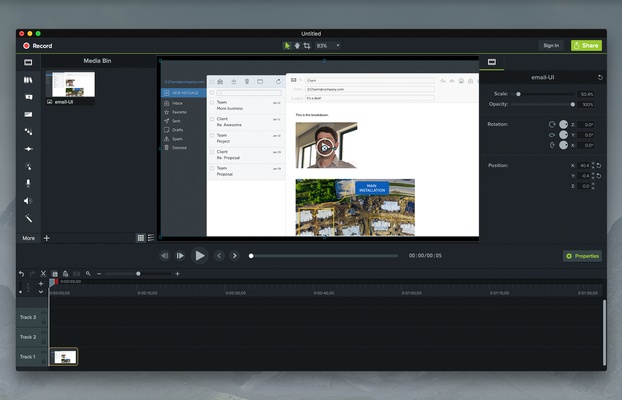
Camtasia's main feature is its screen recorder, which lets you capture your entire desktop, a specific application window, or a selected region. You can also record your webcam and microphone simultaneously, making it easier to create tutorials, gameplay videos, and online courses. Audio input can be configured to suit your recording setup, and the resulting footage can be saved in high definition for further editing.

Intuitive video editing with timeline

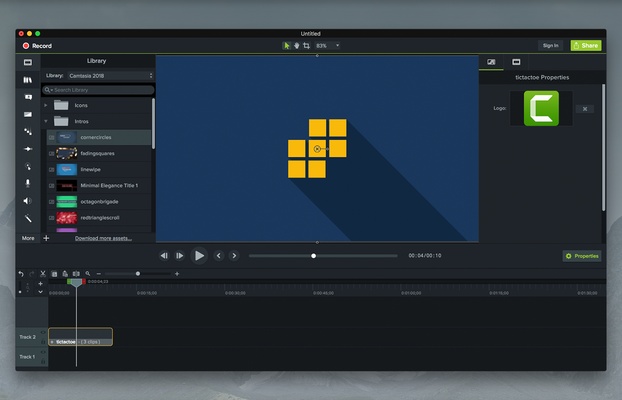
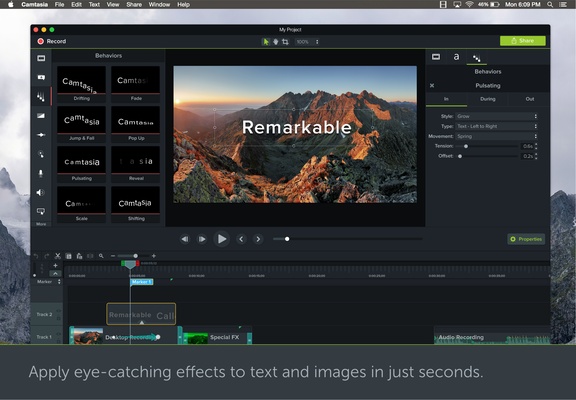
After recording, you can edit your footage using Camtasia's timeline-based video editor. Its drag-and-drop workflow makes it easy to trim and split clips, group elements, apply transitions and visual effects, and rearrange footage. The editor also supports multiple video and audio tracks, giving you more flexibility when working on complex projects.

Record and edit voiceovers with precise synchronization

Camtasia lets you record voiceovers directly within the application and synchronize narration with specific parts of your video. This is useful for explaining on-screen actions, adding instructions, or providing additional commentary without having to record the entire video again. You can edit audio independently, adjust volume, apply noise reduction and fade effects, and position audio clips anywhere on the timeline.

Camtasia is a practical tool for creating instructional videos, online training courses, software tutorials, and corporate presentations. Its combination of screen recording, video editing, and audio tools helps streamline the production process without requiring advanced video editing experience.

Information about Camtasia 26.2.5.21144

License Freeware
Op. System Windows
Category Video
Language English + more
Author TechSmith Corporation
permission icon Permissions Not applicable
Date 2026-11-04
Size 308.48 MB
File type Official Website

Apps recommended for you

Blue Iris 6.1.1.3 icon
Video Management Software (VMS) for your Windows PC
YT Video Downloader icon
YT Video Downloader for Windows lets users download videos from YouTube and other sites in various formats and resolutions.
VideoScribe 1.20.1 icon
Easy drag and drop animated video maker for beginners to professionals!
Streamlabs OBS 1.21.9 icon
Fast Feature-Packed Broadcast Software Designed by Pro Streamers!
TinyMediaManager icon
Create your own movie database
DCP-o-matic icon
A useful tool for film projectionists
Movavi Video Editor Plus 2026 26.17.0 icon
Powerful yet easy-to-use video processing program for Windows
Iriun Webcam 2.9.7 icon
Use your mobile phone camera as a wireless webcam in PC
Movies & TV 2019.26091.10016.0 icon
Buy or rent movies and series without ads
KinoFlux Editor 0.1.2 icon
Convert, compress, edit, etc - videos, audio, images, pdf's - Offline.
Kinoflux Player 1.2.0 icon
The sleek, fast, minimal, free video player for your movies.
Unifab All-In-One 4.2.6.3 icon
Enhance your videos with dozens of tools
MakeMKV 2.0.0 icon
Convert your DVDs and Blu-rays into digital files without a drop in quality
K-Lite Codec Pack Full 20.0.0 icon
Free package of media player codecs that can improve audio/video playback
VideoScribe 1.20.1 icon
Easy drag and drop animated video maker for beginners to professionals!
All My Movies 10.1 icon
Your Personal Movie Collection Cataloger and Organizer With IMDb Lookup!
HEVC Video Extensions from Device Manufacturer icon
Play HEVC (H.265) encoded videos on Windows
TinyMediaManager icon
Create your own movie database
Kinoflux Player 1.2.0 icon
The sleek, fast, minimal, free video player for your movies.
Media Player Codec Pack icon
Media Player Codec Pack for Windows 10 and 11
CapCut Desktop 9.1.0 icon
A free AI all-in-one video editing app that helps you create incredible videos!
EaseUS Video Downloader icon
EaseUS Video Downloader for Windows allows users to download videos, playlists, and channels from popular websites like YouTube in high quality.
UniFab All-In-One 4.2.2.1 icon
AI-powered 8-in-1 comprehensive video processing PC tool