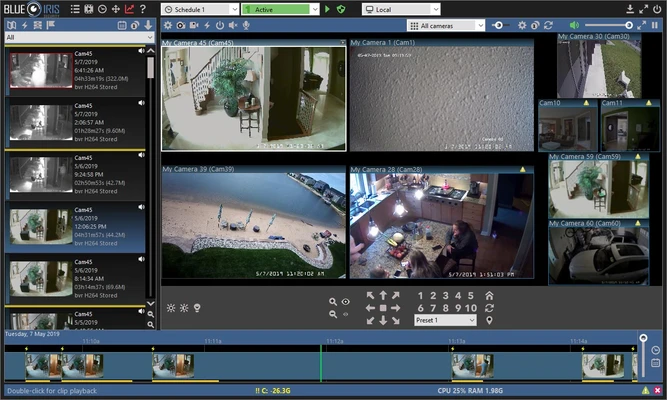
Blue Iris is a Windows-based video management and surveillance application designed for recording and monitoring security cameras. It supports up to 64 cameras, including IP cameras, webcams, analog camera devices, and desktop capture sources.
The software can record live video and audio, detect motion, generate alerts, store recordings in multiple formats, and provide remote access through a web browser or supported mobile applications. It is suitable for home security, small businesses, offices, and other surveillance environments.
What's New
Blue Iris 5 introduced a redesigned user interface and updated the overall surveillance management experience. The software continues to receive updates focused on camera compatibility, recording, remote access, performance, and security features.
Key Features
-
Supports up to 64 cameras on a Windows PC.
-
Works with IP cameras, webcams, analog camera devices, and desktop capture sources.
-
Records video and optional audio.
-
Supports JPEG snapshots and multiple video recording formats.
-
Provides motion detection and configurable camera triggers.
-
Allows date, time, logos, and other information to be overlaid on recordings.
-
Provides flexible recording schedules and arming timers.
-
Sends alerts through sound, email, messaging, phone calls, and external programs or scripts.
-
Can run as a Windows service for unattended operation.
-
Includes a built-in web server for remote camera access.
-
Supports remote viewing of live cameras, recorded clips, and alerts.
-
Provides desktop and mobile web access.
-
Includes user authentication and permission-based access.
-
Supports remote digital zoom and pan.
-
Provides detailed activity and system logs.
-
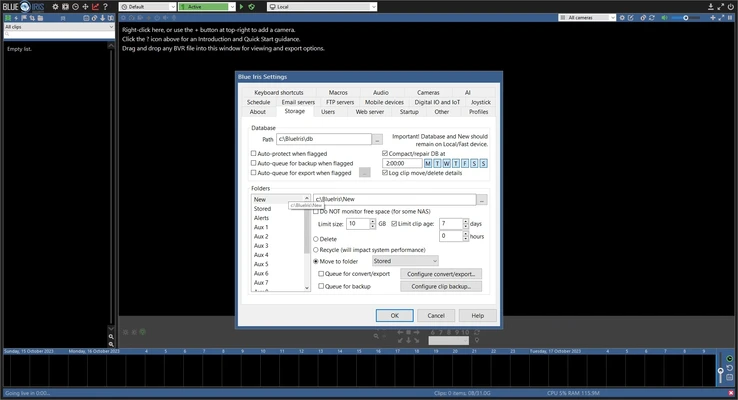
Allows users to configure video storage and retention settings.
-
Supports automatic operation according to schedules and configured events.
-
Provides centralized management of multiple cameras from a single Windows PC.
User Interface
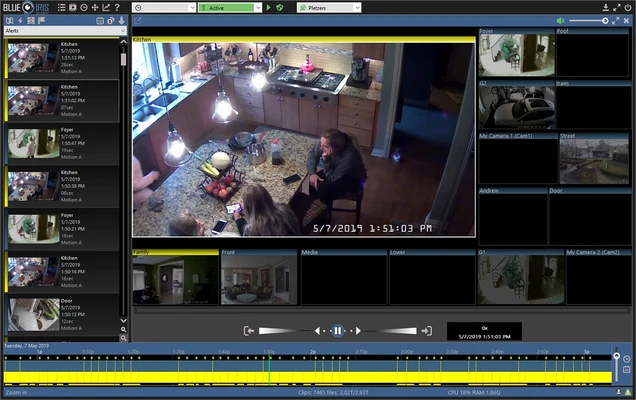
Blue Iris provides a centralized interface for managing cameras, recordings, alerts, and system settings. The version 5 interface was redesigned with updated controls and layouts for monitoring multiple cameras.
The interface includes camera views, recording controls, timelines, alerts, logs, and configuration options. Remote users can access cameras and recorded footage through the built-in web interface.
Installation and Setup
-
Install Blue Iris on a supported Windows PC.
-
Launch the application and activate the software with a license key or trial.
-
Add cameras manually or use the camera discovery tools.
-
Configure camera connections and video settings.
-
Set recording schedules and motion-detection rules.
-
Configure storage locations and retention periods.
-
Set up email, push, or other alert methods if required.
-
Create user accounts and permissions for remote access.
-
Enable the web server for browser-based remote viewing.
-
Test live viewing, recording, alerts, and remote connections.
How to Use
-
Open Blue Iris and verify that all connected cameras are online.
-
Select a camera to view its live feed.
-
Configure continuous, scheduled, or event-based recording.
-
Enable motion detection or other camera triggers.
-
Set up alerts for important events.
-
Review recordings through the timeline or alerts interface.
-
Adjust storage and automatic deletion policies to manage disk usage.
-
Create separate user permissions when multiple people need access.
-
Use the web interface to monitor cameras remotely.
-
Review system logs when troubleshooting recording or connection problems.
FAQ
How many cameras can Blue Iris support?
A single installation can support up to 64 cameras, depending on the system hardware and camera configuration.
What types of cameras does Blue Iris support?
It can work with IP cameras, webcams, analog camera hardware, and other supported video sources.
Can Blue Iris record audio?
Yes. Audio recording can be enabled when supported by the camera or capture device.
Can Blue Iris be accessed remotely?
Yes. Its built-in web server allows users to view live cameras, recorded clips, and alerts remotely through supported web-enabled devices.
Does Blue Iris support motion detection?
Yes. Motion detection and configurable camera triggers can be used to start recordings or generate alerts.
Can Blue Iris run without someone logged into Windows?
Yes. It can operate as a Windows service, allowing surveillance tasks to continue without requiring an active desktop session.
Does Blue Iris provide cloud storage?
Blue Iris primarily uses local storage and configured network storage rather than providing its own general-purpose cloud storage service.
Alternatives
SecuritySpy is a video surveillance solution designed for managing cameras and recording security footage.
Agent DVR provides browser-based camera management, recording, motion detection, and remote monitoring.
ZoneMinder is an open-source video surveillance platform suitable for users who want a highly configurable solution.
iSpy provides camera monitoring, recording, motion detection, and remote surveillance features.
Pricing
Blue Iris is commercial software and provides a 15-day trial period. A paid license is required after the trial period.
System Requirements
-
OS: Windows 10 64-bit or Windows 11
-
Processor: Intel Core i7 or equivalent recommended
-
CPU features: Intel Quick Sync recommended for hardware video decoding
-
RAM: 8 GB or more recommended
-
Graphics: NVIDIA graphics adapter recommended for efficient display performance
-
Storage: SSD and/or 7200 RPM hard drives recommended
-
Additional: Storage requirements depend heavily on the number of cameras, resolution, frame rate, recording mode, and retention period
Pros
-
Supports up to 64 cameras
-
Wide range of camera and video-source compatibility
-
Highly configurable recording options
-
Powerful motion detection and alert capabilities
-
Remote access through browser and supported applications
-
Can run as a Windows service
-
Detailed recording and storage controls
-
Regular software updates
Cons
-
Can consume significant CPU, RAM, and storage resources
-
Requires a paid license after the trial
-
Large multi-camera installations need powerful hardware
-
Interface can take time to learn
-
Does not provide built-in general-purpose cloud storage
Conclusion
Blue Iris is a powerful Windows video management solution for users who need centralized control over multiple security cameras. Its support for up to 64 cameras, flexible recording modes, motion detection, alerts, remote access, and Windows service operation makes it suitable for both home and professional surveillance environments.
The main limitation is hardware demand, particularly when managing many high-resolution cameras or retaining large amounts of recorded footage. A 15-day trial is available for evaluating the software before purchasing a license.