Rons Data Edit is a Windows-based data editing tool designed for working with CSV and other structured data files. Formerly known as Rons CSV Editor, it provides a practical interface for viewing, editing, sorting, filtering, and cleaning tabular data.
It is suitable for users who regularly work with large CSV files and need more control over data editing than a standard text editor can provide.
What's New
Rons Data Edit was previously known as Rons CSV Editor. Recent versions continue to improve data editing, file handling, usability, and support for modern Windows systems.
Key Features
-
Edit and manage large CSV and tabular data files.
-
Sort and filter data quickly.
-
Find and replace values across datasets.
-
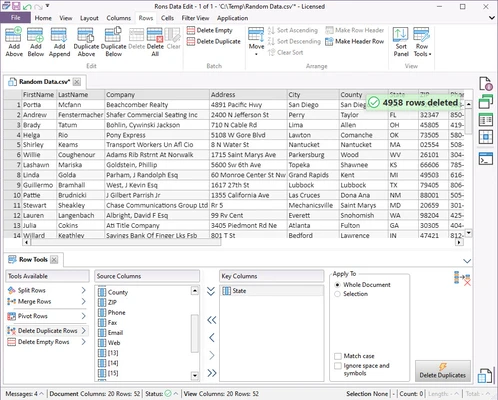
Remove duplicate records and clean unwanted spaces.
-
Import and export data in supported formats.
-
Validate and modify data efficiently.
-
Customize the workspace and toolbar.
-
Handle large datasets with a dedicated data grid.
-
Automate repetitive tasks with supported scripting features.
-
Save up to 2,500 rows in the free Lite version.
User Interface
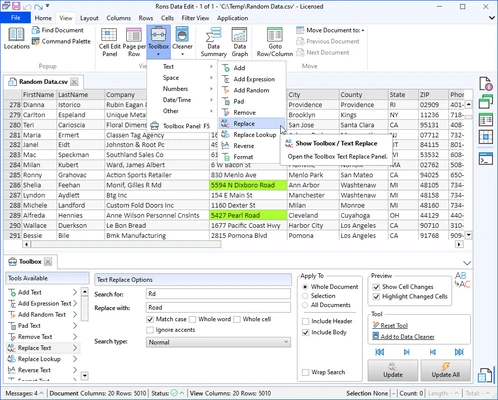
Rons Data Edit uses a clean data-grid interface that makes large tables easier to view and edit. The main workspace provides quick access to common operations such as sorting, filtering, searching, and data modification.
Its layout is designed for users who work with structured data regularly, while advanced functions are available through menus and toolbars.
Installation and Setup
Download the installer and run the setup file on your Windows PC. Follow the on-screen instructions to complete the installation.
The software requires Microsoft .NET Framework 4.8. After installation, launch Rons Data Edit and open an existing data file or import a new dataset.
The Lite version can be used without purchasing a license, while Pro features require activation.
How to Use
-
Open Rons Data Edit and load a CSV or supported data file.
-
Use the data grid to view and edit individual values.
-
Apply sorting and filtering to organize the dataset.
-
Use Find and Replace to make bulk changes.
-
Clean the data by removing duplicates or unwanted spaces.
-
Review the modified data and save the file.
-
Export the finished dataset when necessary.
FAQ
Is Rons Data Edit free?
Yes. A free Lite version is available, although it has limitations such as a 2,500-row save limit and advertising. A 15-day Pro trial is also available.
What is Rons Data Edit used for?
It is primarily used for editing, organizing, and cleaning structured data, particularly CSV files.
Does Rons Data Edit work on Mac?
Rons Data Edit is designed for Windows. It does not have a native macOS version.
Is there a row limit in the free version?
Yes. The Lite version allows up to 2,500 rows to be saved. The Pro version removes this limitation.
Does it support large datasets?
Yes. The software is designed to work with large data files and provides tools for filtering, sorting, searching, and editing data efficiently.
Alternatives
Microsoft Excel – A comprehensive spreadsheet application for data editing, calculations, analysis, and visualization.
EmEditor – A fast text and data editor that is particularly suitable for handling very large files.
Tableau Desktop – A business intelligence and data visualization platform for analyzing and presenting complex datasets.
Pricing
Data Edit Lite: Free, with a 2,500-row save limit and advertising.
Pro Version: $40 for a single-user license. Removes the row limit and advertising and provides full Pro functionality.
A 15-day Pro trial is available for evaluation.
System Requirements
-
Operating System: Windows 11, 10, 8, or 7
-
Processor: Intel Core i3 or equivalent
-
RAM: 4 GB minimum
-
Storage: 200 MB of free disk space
-
Display: 1024x768 resolution or higher
-
Additional Software: Microsoft .NET Framework 4.8
Pros
-
Easy-to-use data editing interface
-
Useful CSV editing and cleaning tools
-
Sorting and filtering capabilities
-
Supports large datasets
-
Free Lite version available
-
Pro version removes the row limitation
Cons
-
Free version has a 2,500-row save limit
-
Advertising is included in the Lite version
-
Windows-only
-
Some advanced features require the Pro version
Conclusion
Rons Data Edit is a practical Windows data editor for users who frequently work with CSV and structured data files. Its sorting, filtering, search, editing, and data-cleaning tools make it useful for managing datasets without the complexity of a full database application.
The free Lite version is suitable for smaller datasets, while the Pro version removes the row limit and advertising for users who need to work with larger files.