
Go to Windows platform Display platforms icon
Go to Windows platform Go to Mac platform Go to Android platform
MakeMKV icon

MakeMKV

1.18.1 Beta
GuinpinSoft
5
14.74 MB size

Create MKV files from your DVDs and Blu-rays

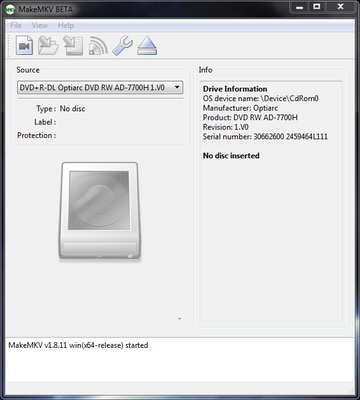
MakeMKV is a useful application that can create MKV files from any DVD or Blu-ray.

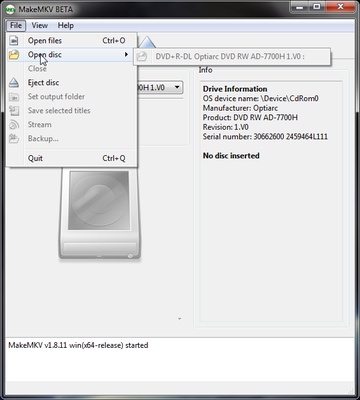
The program reads the discs that you insert in your machine, showing all the tracks on the DVD or Blu-ray organized into individual clips so you can choose which ones you want to rip to create a file with the images, audio, and subtitles included.

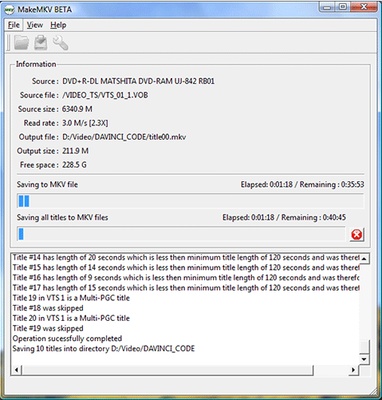
The details of each element are shown, too, including the extension, size, length, codec, and language. Once you mark all the files you want from the DVD, you just have to press the 'Make MKV' button.

MakeMKV gets around practically any anti-copy protection system, so the only thing you have to worry about is choosing the parts of the DVD you want, no matter the format.

This application works pretty quickly, but the extraction time depends on the speed of your disc reader and the quality of the clips being converted to the output MKV.

Another feature that stands out in this program is that it can stream selected videos using a link generated on the local network.

Information about MakeMKV

License Trial
Op. System Windows
Category Video
Language English 5 more
Author GuinpinSoft
permission icon Permissions Not applicable
Date 2026-06-02
Size 14.74 MB
File type EXE

Apps recommended for you

Free Video Cutter Joiner icon
The easiest way to cut and join videos
Zerene Stacker icon
Zerene Stacker for Windows is a focus stacking software that combines multiple images to create sharp, high-depth-of-field photographs.
DVD-Cloner icon
Clone DVDs with DVD9 support
AVS Video Editor icon
Powerful multitask application to edit video
FFmpeg icon
One of the best open codecs for video playback
WavePad Sound Editor 24.33 icon
Free software to edit music, voice, wav, mp3 or other audio files
Movavi Video Converter icon
Good choice to convert videos to iPod or PSP format
Vidigger icon
Vidigger for Windows is a video downloader that allows users to extract and download videos from popular streaming sites with ease.
K-Lite Codec Pack Full 20.0.0 icon
Free package of media player codecs that can improve audio/video playback
VideoScribe 1.20.1 icon
Easy drag and drop animated video maker for beginners to professionals!
All My Movies 10.1 icon
Your Personal Movie Collection Cataloger and Organizer With IMDb Lookup!
Media Player Classic Home Cinema 2.8.2 (64-bit) icon
An extremely light-weight, open source media player for Windows
MP4 Player 6.4.21 icon
Play MP4, FLV, and WebM video files that downloaded from video sites!
MKVToolNix 102.0.0 (64-bit) icon
Create, modify and inspect Matroska (MKV) files for Windows PC
Subtitle Workshop 6.3.6 icon
Free software for creating, editing and converting text-based subtitle files
Blue Iris 6.1.1.3 icon
Video Management Software (VMS) for your Windows PC
Media Player Codec Pack icon
Media Player Codec Pack for Windows 10 and 11
Resolume Avenue icon
Resolume Avenue for Windows is a VJ software that allows users to mix and manipulate live video, create visuals, and control media for performances.
iVCam icon
Turn your smartphone into a high-quality webcam with iVCam for Windows, the easy-to-use app for video conferencing, live streaming, and remote communication.
Iriun Webcam 2.9.7 icon
Use your mobile phone camera as a wireless webcam in PC
K-Lite Codec Pack Full 19.9.5 icon
Free package of media player codecs that can improve audio/video playback
Mp3tag 3.36.1 icon
The universal Tag editor for various audio formats
Iriun Webcam icon
Turn your smartphone into a high-quality webcam with Iriun Webcam for Windows, the easy-to-use app for video calls, streaming, and online meetings.
HEVC Video Extensions from Device Manufacturer icon
Play HEVC (H.265) encoded videos on Windows